
220-1202 · Question #2
A technician is attempting to join a workstation to a domain but is receiving an error message stating the domain cannot be found. However, the technician is able to ping the server and access the…
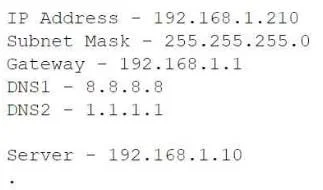
The correct answer is A. Change the DNS settings. Domain join failures with successful IP connectivity almost always point to name-resolution issues. The workstation is using public DNS servers (8.8.8.8 and 1.1.1.1), which have no records for the internal AD domain or its controllers. Pointing DNS at the internal DNS server…
Question
A technician is attempting to join a workstation to a domain but is receiving an error message stating the domain cannot be found. However, the technician is able to ping the server and access the internet. Given the following information:
Which of the following should the technician do to fix the issue?
Exhibit
Options
- AChange the DNS settings.
- BAssign a static IP address.
- CConfigure a subnet mask.
- DUpdate the default gateway.
How the community answered
(38 responses)- A55% (21)
- B13% (5)
- C8% (3)
- D24% (9)
Explanation
Domain join failures with successful IP connectivity almost always point to name-resolution issues. The workstation is using public DNS servers (8.8.8.8 and 1.1.1.1), which have no records for the internal AD domain or its controllers. Pointing DNS at the internal DNS server (192.168.1.10) ensures the domain name and SRV records can be resolved, allowing the join to
Topics
Community Discussion
No community discussion yet for this question.