
220-1101 · Question #590
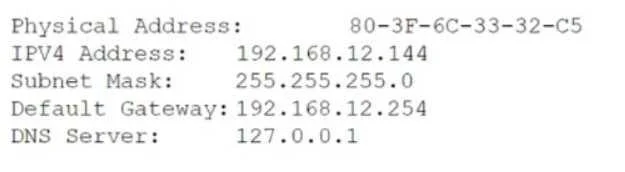
A technician attempts to join a Windows client to a domain but receives the following error: An attempt to resolve the hostname has failed. The technician generates the display shown below utilizing…
The correct answer is A. DNS. The technician should check the DNS server settings and make sure they are correct. DNS, or into IP addresses, such as 192.168.1.1, that computers use to communicate with each other. DNS is essential for joining a Windows client to a domain, which is a logical group of…
Question
A technician attempts to join a Windows client to a domain but receives the following error:
An attempt to resolve the hostname has failed. The technician generates the display shown below utilizing ipconfig /all. Which of the following is the most likely reason for the error?
Exhibit
Options
- ADNS
- BPhysical address
- CSubnet mask
- DIPv4 address
- EDefault gateway
How the community answered
(59 responses)- A93% (55)
- C2% (1)
- D2% (1)
- E3% (2)
Explanation
The technician should check the DNS server settings and make sure they are correct. DNS, or into IP addresses, such as 192.168.1.1, that computers use to communicate with each other. DNS is essential for joining a Windows client to a domain, which is a logical group of computers that share a common directory and security policy. A domain name, such as example.com, identifies the domain and its members on the network. To join a Windows client to a domain, the client needs to resolve the hostname of the domain controller, which is the server that manages the domain and its resources. The client sends a DNS query to the DNS server, asking for the IP address of the domain controller. The DNS server responds with the IP address, and the client uses it to establish a connection with the domain controller and complete the domain join
Topics
Community Discussion
No community discussion yet for this question.