
210-065 · Question #7
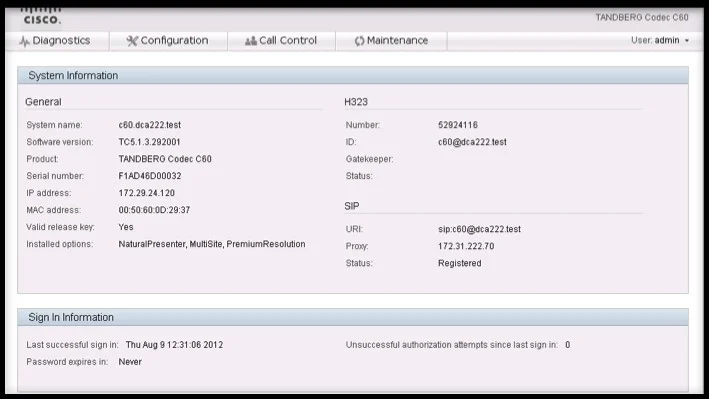
Refer to the exhibit. You have just finished installing a 65-inch dual profile system in a multipurpose room. After powering up the entire system, only one display is used. Using the information in…
The correct answer is D. The codec has the appropriate option keys installed, so either the display is not cabled. When the exhibit confirms the codec has the correct dual-display option keys installed, a missing option key is ruled out, leaving a physical cabling issue as the reason the second display shows nothing. Option key verification is the first diagnostic step for this symptom.
Question
Refer to the exhibit. You have just finished installing a 65-inch dual profile system in a multipurpose room. After powering up the entire system, only one display is used. Using the information in the exhibit, why is the second display not displaying anything from the system?
Exhibit
Options
- AThe Cisco TelePresence profile systems do not support dual display.
- BThe display is not powered on.
- CThe dual display option key has not been input into the codec.
- DThe codec has the appropriate option keys installed, so either the display is not cabled
How the community answered
(47 responses)- A15% (7)
- B4% (2)
- C6% (3)
- D74% (35)
Why each option
When the exhibit confirms the codec has the correct dual-display option keys installed, a missing option key is ruled out, leaving a physical cabling issue as the reason the second display shows nothing. Option key verification is the first diagnostic step for this symptom.
The Cisco TelePresence 65-inch Profile series is specifically designed to support dual displays, so platform hardware limitation is not a valid cause.
While a powered-off display is theoretically possible, the exhibit evidence pointing to a cabling issue makes this a lower-priority explanation than an incorrect or missing cable connection.
The exhibit directly contradicts this choice by showing the codec already has the appropriate dual-display option keys installed.
The exhibit data confirms the codec already has the required dual-display option keys activated, which eliminates software licensing as a root cause. With option keys verified, the next diagnostic layer is physical - the second display is most likely not correctly cabled to the codec output. This follows Cisco TelePresence troubleshooting methodology: confirm software configuration first, then verify physical connections.
Concept tested: Cisco TelePresence dual display option key and cabling troubleshooting
Source: https://www.cisco.com/c/en/us/support/conferencing/telepresence-profile-series/tsd-products-support-series-home.html
Topics
Community Discussion
No community discussion yet for this question.