
210-065 · Question #88
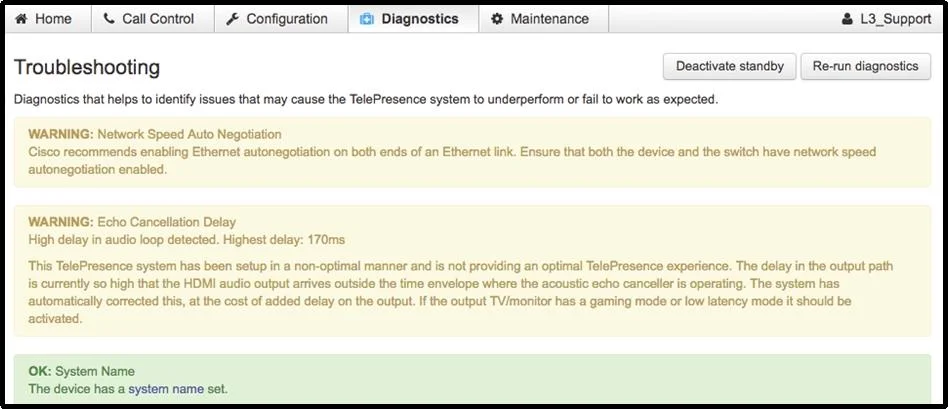
Refer to the exhibit. The customer recently connected a new TV monitor to the Cisco TelePresence endpoint. This device is now showing a warning concerning the echo cancellation delay. Which action…
The correct answer is A. Turn off any postprocessing settings. Video postprocessing features on a connected TV introduce additional audio-video delay that disrupts the endpoint's echo cancellation algorithm, and disabling postprocessing removes the delay source.
Question
Refer to the exhibit. The customer recently connected a new TV monitor to the Cisco TelePresence endpoint. This device is now showing a warning concerning the echo cancellation delay. Which action could help mitigate this issue?
Exhibit
Options
- ATurn off any postprocessing settings.
- BTurn off 3D mode on the new TV.
- CTurn on Frequency Scan Acceleration for the new TV.
- DTurn off surround sound on the new TV.
How the community answered
(49 responses)- A71% (35)
- B4% (2)
- C14% (7)
- D10% (5)
Why each option
Video postprocessing features on a connected TV introduce additional audio-video delay that disrupts the endpoint's echo cancellation algorithm, and disabling postprocessing removes the delay source.
Cisco TelePresence echo cancellation relies on a precise and stable delay model between the loudspeaker output and the microphone input. TV postprocessing features such as noise reduction, motion enhancement, or dynamic contrast adjustment introduce variable processing latency in the video path that shifts the audio-video synchronization. Disabling all postprocessing settings on the TV removes this added latency, allowing the echo canceller to correctly model and suppress acoustic echo.
3D mode affects stereoscopic rendering and does not introduce the type of audio processing delay that causes echo cancellation warnings.
Frequency Scan Acceleration is not a standard TV display feature relevant to echo cancellation delay mitigation.
Disabling surround sound may reduce some audio path processing but postprocessing is the broader and more directly relevant setting for the video-induced latency causing echo cancellation issues.
Concept tested: Echo cancellation delay caused by TV postprocessing on TelePresence
Source: https://www.cisco.com/c/en/us/support/collaboration-endpoints/telepresence-system-ex-series/products-maintenance-guides-list.html
Topics
Community Discussion
No community discussion yet for this question.