
210-065 · Question #264
Refer to the exhibit. Which option performs a factory reset of a Cisco TelePresence System endpoint?
The correct answer is E. Troubleshooting > Configuration Issues. On a Cisco TelePresence System endpoint, a factory reset is performed through the Troubleshooting > Configuration Issues menu path in the web interface.
Question
Refer to the exhibit. Which option performs a factory reset of a Cisco TelePresence System endpoint?
Exhibit
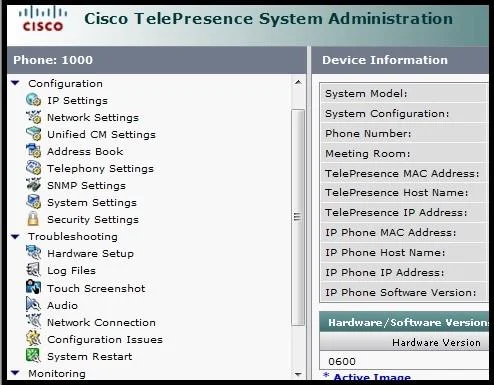
Options
- AConfiguration > System Settings
- BConfiguration > Security Settings
- CTroubleshooting > Hardware setup
- DMonitoring
- ETroubleshooting > Configuration Issues
- FTroubleshooting > System Restart
- GA Cisco TelePresence System endpoint can be reset only via CLI.
How the community answered
(38 responses)- C5% (2)
- D3% (1)
- E87% (33)
- F5% (2)
Why each option
On a Cisco TelePresence System endpoint, a factory reset is performed through the Troubleshooting > Configuration Issues menu path in the web interface.
Configuration > System Settings is used to manage general system parameters such as network settings, not to initiate a factory reset.
Configuration > Security Settings manages security-related configurations such as passwords and TLS settings, and does not include a factory reset function.
Troubleshooting > Hardware setup is used to run hardware diagnostics and self-tests, not to perform a factory reset.
Monitoring provides operational status, call statistics, and log data about the endpoint and contains no factory reset capability.
The Troubleshooting > Configuration Issues section of the Cisco TelePresence System web interface provides the factory reset option, which clears all user-applied settings and restores the endpoint to its factory default configuration.
Troubleshooting > System Restart reboots the endpoint while preserving its existing configuration, which is distinct from a factory reset that wipes configuration.
The factory reset can be performed via the web GUI under Troubleshooting > Configuration Issues, so the CLI is not the only available method.
Concept tested: Cisco TelePresence endpoint factory reset via web interface
Source: https://www.cisco.com/c/en/us/support/collaboration-endpoints/telepresence-system-series/products-maintenance-guides-list.html
Topics
Community Discussion
No community discussion yet for this question.