
200-901 · Question #679
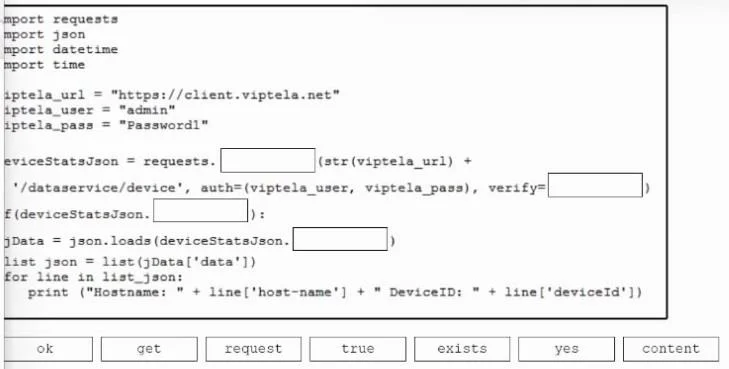
Drag and Drop Question Drag and drop the code from the bottom onto the box where the code is missing in the Python script to list all devices. Not all options are used. Answer: Exam Questions, Study…
The correct answer is get; true; exists; content. This question tests the ability to complete a Python script that interacts with a REST API using the 'requests' library to retrieve and parse JSON data.
Question
Drag and Drop Question Drag and drop the code from the bottom onto the box where the code is missing in the Python script to list all devices. Not all options are used. Answer:
Exam Questions, Study Guides, Practice Tests. Lead the way to help you pass any IT Certification exams, 100% Pass Guaranteed or Full Refund. Especially Cisco, Microsoft, CompTIA, Citrix, EMC, HP, Oracle, VMware, Juniper, Check Point, LPI, Nortel, EXIN and so on. Our Slogan: First Test, First Pass. Help you to pass any IT Certification exams at the first try. You can reach us at any of the email addresses listed below. Any problems about IT certification or our products, you could rely upon us, we will give you satisfactory answers in 24 hours.
Exhibit
Answer Area
Drag items
Correct arrangement
- get
- true
- exists
- content
Explanation
This question tests the ability to complete a Python script that interacts with a REST API using the 'requests' library to retrieve and parse JSON data.
Approach. The goal is to correctly complete the Python script to list all devices by making an HTTP GET request, handling authentication, verifying SSL, checking for success, and parsing the JSON response. Here's the correct placement for each blank:
-
Blank 1 (requests.____): The script needs to make an HTTP GET request. The 'requests' library provides the
get()method for this purpose.- Drag
gethere:deviceStatsJson = requests.get(str(viptela_url) + ...
- Drag
-
Blank 2 (verify=____): The
verifyparameter inrequestscontrols SSL certificate verification and expects a boolean value. To enable verification,True(ortruein a context where Python's boolean is expected) is used.- Drag
truehere:..., auth=(viptela_user, viptela_pass), verify=true)
- Drag
-
Blank 3 (if deviceStatsJson.____): After making a request, it's good practice to check if the request was successful. The
requests.Responseobject has anokattribute, which isTruefor successful (2xx) status codes andFalseotherwise.- Drag
okhere:if (deviceStatsJson.ok):
- Drag
-
Blank 4 (json.loads(deviceStatsJson.____)): To parse the JSON response body,
json.loads()expects a string or bytes containing the JSON data. Therequests.Responseobject has acontentattribute that returns the response body as bytes (andtextfor string). Given the available options,contentis the correct choice to retrieve the raw response body for parsing.- Drag
contenthere:jData = json.loads(deviceStatsJson.content)
- Drag
Common mistakes.
- common_mistake. Common mistakes include:
- Dragging
requestfor Blank 1: Whilerequests.requestis a generic method,requests.getis the specific and most common method for HTTP GET requests, makinggetmore appropriate here. - Dragging
contentorexistsfor Blank 2 (verify=____): Theverifyparameter expects a boolean.contentrefers to the response body, andexistsis not a valid boolean or keyword for this parameter. - Dragging
truefor Blank 3 (if deviceStatsJson.____):trueis a boolean value itself, not an attribute of theResponseobject that indicates success. The correct attribute isok(e.g.,response.ok). - Dragging
existsfor Blank 4 (json.loads(deviceStatsJson.____)):existsis not an attribute of therequests.Responseobject that provides the response body. The body is accessed via attributes liketextorcontent.
Concept tested. The core technical concepts tested are Python programming fundamentals, specifically interacting with REST APIs using the 'requests' library, handling HTTP methods (GET), basic authentication, SSL certificate verification, checking HTTP response status codes, and parsing JSON data from an API response.
Topics
Community Discussion
No community discussion yet for this question.