
200-901 · Question #678
Drag and Drop Question Drag and drop the code from the bottom onto the box where the code is missing to print the hostname, software version, and uptime for the network devices returned in the…
The correct answer is PrettyTable; content-type; response; network_devices. This question tests the ability to complete a Python script that uses the requests library to consume a REST API and the prettytable library to display the retrieved data in a formatted table.
Question
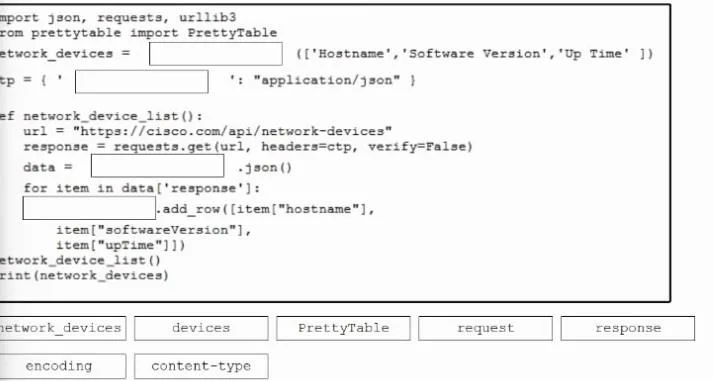
Drag and Drop Question Drag and drop the code from the bottom onto the box where the code is missing to print the hostname, software version, and uptime for the network devices returned in the response. Not options are used. Answer:
Exhibit
Answer Area
Drag items
Correct arrangement
- PrettyTable
- content-type
- response
- network_devices
Explanation
This question tests the ability to complete a Python script that uses the requests library to consume a REST API and the prettytable library to display the retrieved data in a formatted table.
Approach. To correctly complete the Python script, each blank must be filled with the appropriate drag target based on Python syntax and library usage:
- Blank 1 (
network_devices =): The variablenetwork_devicesis later used with the.add_row()method, which is a feature ofPrettyTableobjects. Therefore,network_devicesmust be initialized as an instance ofPrettyTable. The correct drag target isPrettyTable. - Blank 2 (
ctp = { : 'application/json' }): Thectpdictionary is passed as headers to therequests.get()function.'application/json'is a common value for theContent-TypeHTTP header, specifying the expected format of the response. The correct drag target iscontent-type. - Blank 3 (
data = .json()): After arequests.get()call, the returned object is arequests.Responseobject. To parse its JSON content into a Python dictionary or list, the.json()method is called on thisresponseobject. The correct drag target isresponse. - Blank 4 (
.add_row([...])): Inside theforloop, data from the API response is added as a row to the table. The table object initialized in Blank 1 isnetwork_devices. Thus,network_devices.add_row()is the correct way to add a row to the table. The correct drag target isnetwork_devices.
Common mistakes.
- common_mistake. Common mistakes include incorrectly identifying the object for method calls or using generic terms instead of specific library objects or header keys.
- Using
devices: 'devices' is not a defined object in this context and cannot be used to initialize aPrettyTableor call.add_row(). - Using
request: 'request' refers to therequestsmodule itself, not theresponseobject that contains the data to be parsed using.json(). - Using
encoding: While related to data format,encodingis not the correct HTTP header key to specify the content type for JSON;Content-Typeis used for this purpose.
Concept tested. This question tests fundamental Python programming concepts, including variable assignment, dictionary creation, function definition, for loops, and- crucially- the practical application of external libraries: the requests library for consuming REST APIs (making GET requests, handling headers, and parsing JSON responses) and the prettytable library for formatting and displaying tabular data.
Topics
Community Discussion
No community discussion yet for this question.