
200-901 · Question #588
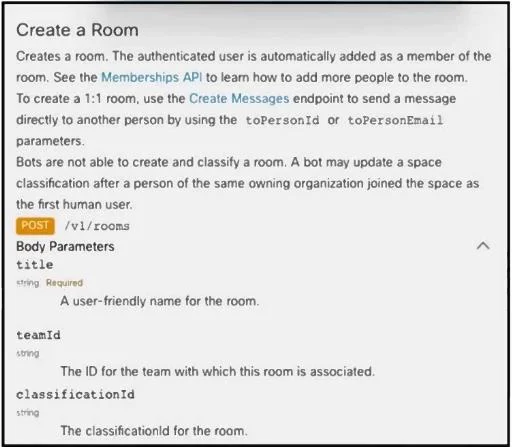
Drag and Drop Question Refer to the exhibit. Drag and drop the code from the bottom onto the box where the code is missing to create a new room within Webex Teams. Not all options are used. Answer:
The correct answer is title; POST. This question tests the ability to construct a Python Webex API request to create a new room, specifically identifying the correct HTTP method, endpoint, request body parameters, and header structure based on API documentation.
Question
Drag and Drop Question Refer to the exhibit. Drag and drop the code from the bottom onto the box where the code is missing to create a new room within Webex Teams. Not all options are used. Answer:
Exhibit
Answer Area
Drag items
Correct arrangement
- title
- POST
Explanation
This question tests the ability to construct a Python Webex API request to create a new room, specifically identifying the correct HTTP method, endpoint, request body parameters, and header structure based on API documentation.
Approach. Based on the Webex API documentation and standard Python requests library practices (and critically, matching the provided solution in the third image):- The first blank, payload = { '______': roomName }, requires the name of the parameter for the room's title. The API documentation explicitly states 'title' (string) as the user-friendly name for the room. Therefore, 'title' is dragged to this position.- The second blank, _______ = { 'Content-Type': ... }, is defining the dictionary that holds the HTTP headers for the request. 'headers' is the standard and most appropriate variable name for this dictionary in Python. Therefore, 'headers' is dragged to this position.- The third blank, requests._______( ... ), requires the HTTP method to be used. The API documentation clearly shows POST /v1/rooms for creating a room. Therefore, 'POST' is dragged to this position.- The fourth blank, requests.POST('______', url, data=payload, headers=headers), is intended to be filled with 'data' as per the provided solution image. While this specific placement and use of 'data' as a positional argument in requests.post() alongside explicit url, data=payload, and headers=headers keyword arguments is unconventional for the standard Python requests library, it is the designated correct answer according to the exhibit's solution. In the context of this exam, it is the expected fill to complete the provided template.
Common mistakes.
- common_mistake. - Dragging 'PUT' instead of 'POST': 'PUT' is typically used for updating existing resources, while the objective 'Create a Room' universally maps to a 'POST' request according to REST API principles and the provided documentation. - Using 'request' (singular) for the HTTP method: 'request' is a generic method in the
requestslibrary, but 'POST' (orrequests.post()) is the specific HTTP verb required for this operation. - Providing an incorrect key for the payload (e.g., 'request', 'data' for the room name): The API documentation clearly specifies 'title' as the required body parameter for the room's name. - Misplacing 'url' into any of the blanks: The URL is already defined as a variableurland is explicitly passed as an argument. - Incorrectly placing 'data' (other than the designated fourth blank, as per the solution): While the placement of 'data' in the fourth blank is unusual, other placements would be definitively incorrect given the context of API parameters and Python syntax.
Concept tested. REST API consumption, understanding HTTP methods (POST), request body parameters, HTTP headers, and basic Python requests library usage to interact with an API (specifically Webex APIs). This includes interpreting API documentation to correctly formulate an API request.
Topics
Community Discussion
No community discussion yet for this question.