
200-901 · Question #143
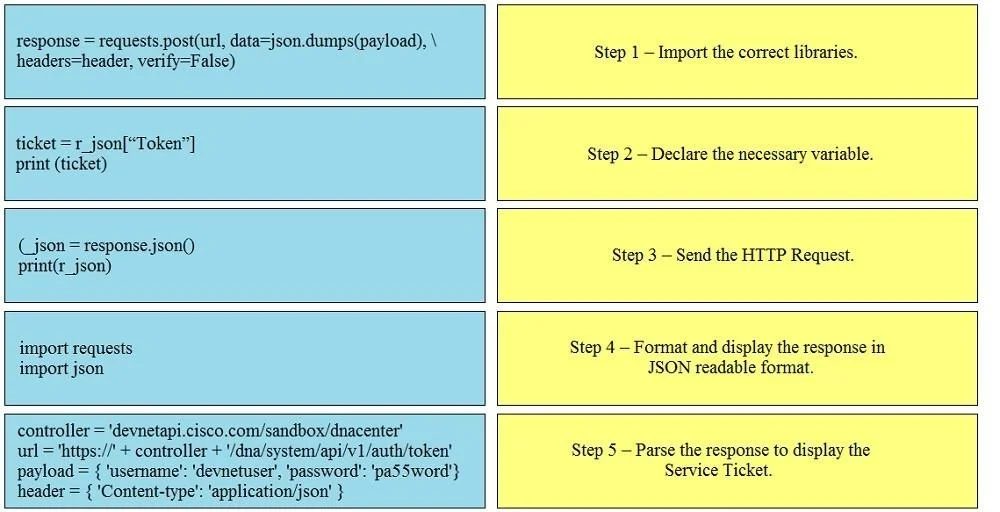
Drag and Drop Question Drag and drop the Python code from the left onto the correct step on the right to call a REST API. Answer:
The correct answer is import requests import json; controller = 'devnetapi.cisco.com/sandbox/datacenter' url = "https://" + controller + '/dna/system/api/v1/auth/token' payload = { "username": "developer", "password": "pa55word"} header = { 'Content-Type': 'application/json' }; response = requests.post(url, data=json.dumps(payload), \ headers=header, verify=False); _json = response.json() print(_json); ticket = r_json["Token"] print(ticket). The task is to correctly order Python code snippets for calling a REST API into a logical sequence of steps, from importing libraries to parsing and displaying specific response data.
Question
Drag and Drop Question Drag and drop the Python code from the left onto the correct step on the right to call a REST API. Answer:
Exhibit
Answer Area
Drag items
Correct arrangement
- import requests import json
- controller = 'devnetapi.cisco.com/sandbox/datacenter' url = "https://" + controller + '/dna/system/api/v1/auth/token' payload = { "username": "developer", "password": "pa55word"} header = { 'Content-Type': 'application/json' }
- response = requests.post(url, data=json.dumps(payload),
headers=header, verify=False) - _json = response.json() print(_json)
- ticket = r_json["Token"] print(ticket)
Explanation
The task is to correctly order Python code snippets for calling a REST API into a logical sequence of steps, from importing libraries to parsing and displaying specific response data.
Approach. The correct approach involves dragging each Python code snippet to its corresponding logical step in the API call process:
-
Step 1 - Import the correct libraries: Drag
import requestsimport jsonto this step. Python scripts typically begin by importing necessary modules. -
Step 2 - Declare the necessary variable: Drag
controller = 'devnetapi.cisco.com/sandbox/dnacenter'url = 'https://' + controller + '/dna/system/api/v1/auth/token'payload = {'username': 'devnetuser', 'password': 'pa55word'}header = {'Content-type': 'application/json'}to this step. Before making an API call, you need to define the endpoint, authentication payload, and request headers. -
Step 3 - Send the HTTP Request: Drag
response = requests.post(url, data=json.dumps(payload), \ headers=header, verify=False)to this step. This line uses therequestslibrary to send the actual POST request with the defined URL, payload, and headers. -
Step 4 - Format and display the response in JSON readable format: Drag
(_json = response.json()print(r_json)to this step. After receiving the HTTP response, it needs to be parsed into a usable format, typically JSON, and often displayed for inspection. (Note: The provided snippet has a minor typo(_jsonwhich should ber_json = response.json()to align withprint(r_json)and the subsequent step, but we must use the snippet as given by the exam.) -
Step 5 - Parse the response to display the Service Ticket: Drag
ticket = r_json["Token"]print(ticket)to this step. This is the final step where a specific piece of information ('Token') is extracted from the parsed JSON response and then displayed.
Common mistakes.
- common_mistake. Common mistakes include misordering the foundational steps, such as attempting to send an HTTP request before importing the
requestslibrary or defining theurlandpayloadvariables. Another error would be trying to parse a specific data point (ticket = r_json["Token"]) before the entire response has been parsed into a JSON object (r_json = response.json()). Incorrectly ordering the parsing and printing steps, or confusing general response display with specific data extraction, also leads to wrong answers.
Concept tested. The core concept tested is the fundamental workflow for interacting with RESTful APIs using Python, specifically covering library imports, variable declaration for API parameters (URL, payload, headers), sending HTTP requests, parsing JSON responses, and extracting specific data from the response. It also implicitly tests an understanding of the Python requests library and basic JSON manipulation.
Topics
Community Discussion
No community discussion yet for this question.