
200-901 · Question #101
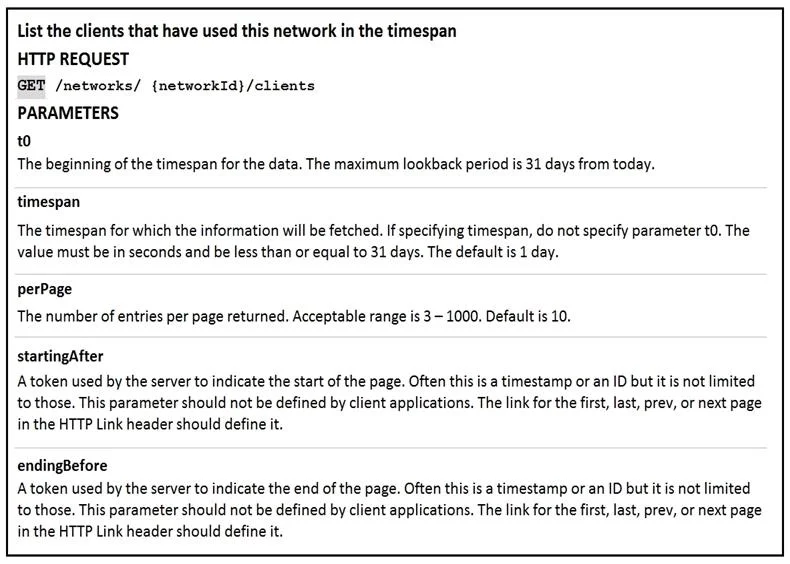
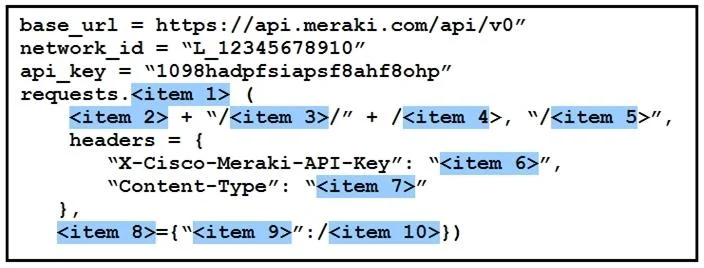
Drag and Drop Question Refer to the exhibit. Drag and drop the code from the left code from the left onto the item number on the right to complete the Meraki code to obtain a list of client which…
The correct answer is get; base_url; networks; network_id; clients; api_key; application/json; params; timespan; 432000. This question tests knowledge of constructing a Python REST API call to the Cisco Meraki Dashboard API to retrieve a list of clients that have connected to a specific network. It covers HTTP method selection, URL structure, authentication headers, and query parameters.
Question
Drag and Drop Question Refer to the exhibit. Drag and drop the code from the left code from the left onto the item number on the right to complete the Meraki code to obtain a list of client which have used this network. Answer:
Exhibits
Answer Area
Drag items
Correct arrangement
- get
- base_url
- networks
- network_id
- clients
- api_key
- application/json
- params
- timespan
- 432000
Explanation
This question tests knowledge of constructing a Python REST API call to the Cisco Meraki Dashboard API to retrieve a list of clients that have connected to a specific network. It covers HTTP method selection, URL structure, authentication headers, and query parameters.
Approach. The completed code uses requests.get() (item 1) because retrieving data from an API is a read operation requiring an HTTP GET method. The URL is built by concatenating base_url (item 2) + '/networks/' + network_id (item 4) + '/clients' (item 5) - this matches the Meraki Dashboard API endpoint structure for listing network clients. Authentication is provided in the headers using api_key (item 6) mapped to the 'X-Cisco-Meraki-API-Key' header, and 'Content-Type' is set to 'application/json' (item 7) as required by the API. Finally, a params (item 8) dictionary passes the timespan (item 9) query parameter set to 432000 (item 10), which equals exactly 5 days in seconds (5 × 86,400) - the default maximum lookback window the Meraki API supports for client history.
Concept tested. Cisco Meraki Dashboard REST API usage in Python - specifically constructing an authenticated GET request to the /networks/{networkId}/clients endpoint, including proper header-based API key authentication, JSON content type declaration, and use of the timespan query parameter to scope the client history window.
Reference. Cisco Meraki Dashboard API Reference - GET /networks/{networkId}/clients (developer.cisco.com/meraki/api-v1/get-network-clients)
Topics
Community Discussion
No community discussion yet for this question.