
200-301 · Question #914
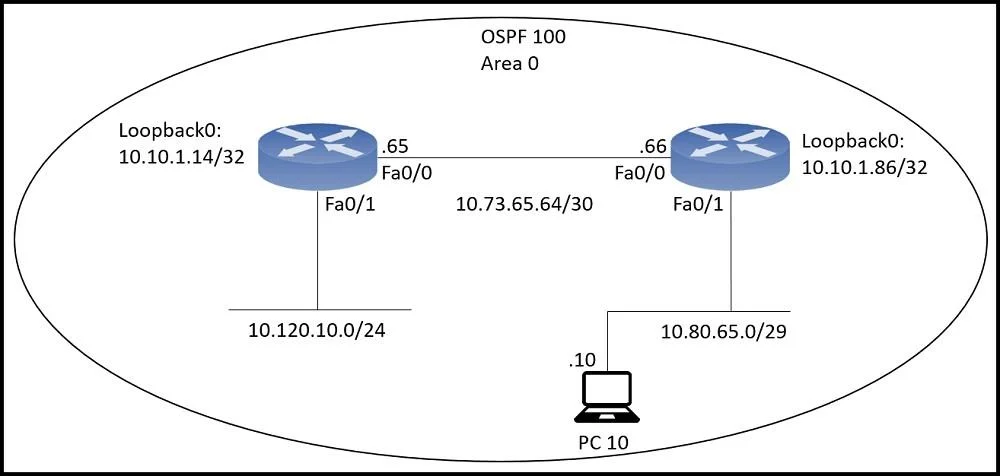
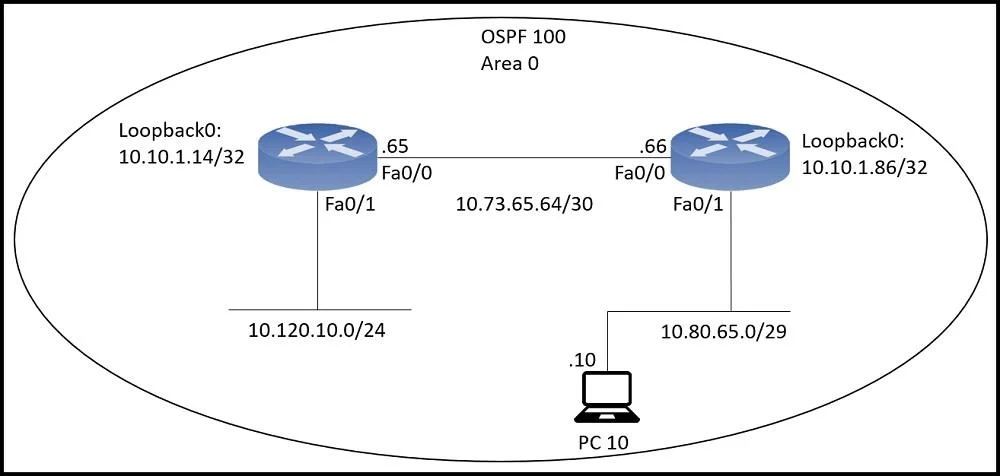
An engineer just installed network 10.120.10.0/24. Which configuration must be applied to the R14 router to add the new network to its OSPF routing table?
The correct answer is A. Router ospf 100 Network 10.120.10.0 0.0.0.255 area 0. To add a network to an OSPF routing process, the network command specifies the network address, its inverse (wildcard) mask, and the OSPF area.
Question
An engineer just installed network 10.120.10.0/24. Which configuration must be applied to the R14 router to add the new network to its OSPF routing table?
Exhibits
Options
- ARouter ospf 100 Network 10.120.10.0 0.0.0.255 area 0
- BRouter ospf 120 Network 10.120.10.0 255.255.255.0 area 0
- CRouter ospf 100 area 0 Network 10.120.10.0 0.0.0.255
- DRouter ospf 100 Network 10.120.10.0 255.255.255.0 area 0
How the community answered
(41 responses)- A85% (35)
- B10% (4)
- C2% (1)
- D2% (1)
Why each option
To add a network to an OSPF routing process, the `network` command specifies the network address, its inverse (wildcard) mask, and the OSPF area.
The command `router ospf 100` initiates the OSPF process with ID 100. The `network 10.120.10.0 0.0.0.255 area 0` command correctly advertises the 10.120.10.0 network, using the appropriate wildcard mask (0.0.0.255 for a /24 subnet) and assigns it to OSPF Area 0, enabling OSPF on relevant interfaces.
This option uses 255.255.255.0, which is a subnet mask, not the required wildcard mask for OSPF network commands.
The `area 0` keyword is misplaced; it must follow the network address and wildcard mask in the `network` command.
This option uses 255.255.255.0, which is a subnet mask, not the required wildcard mask for OSPF network commands.
Concept tested: OSPF network command configuration
Source: https://www.cisco.com/c/en/us/td/docs/ios-xml/ios/iproute_ospf/configuration/15-s/iro-15-s-cr-book/iro-cfg.html
Topics
Community Discussion
No community discussion yet for this question.