
200-301 · Question #907
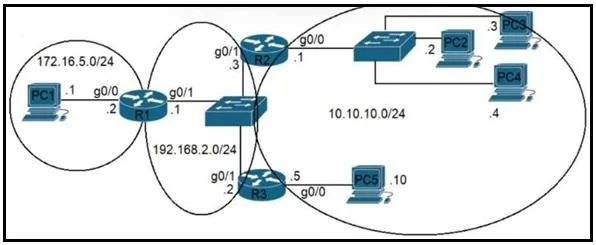
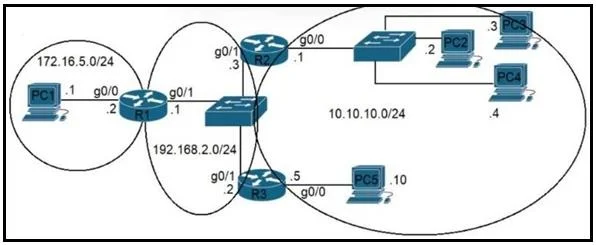
Refer to the exhibit. The router R1 is in the process of being configured. Routers R2 and R3 are configured correctly for the new environment. Which two commands must be configured on R1 for PC1 to…
The correct answer is A. ip route 10.10.10.0 255.255.255.0 192.168.2.3 B. ip route 10.10.10.10 255.255.255.255 192.168.2.2. What do we need? - R1 must know how to reach all of 10.10.10.0/24 (PC2, PC3, PC4, PC5). - R2’s G0/1 is 192.168.2.2. - R3’s G0/1 is 192.168.2.3. - Either can be used as a next hop for the entire 10.10.10.0/24 network. ip route 10.10.10.0 255.255.255.0 192.168.2.3 - Route all…
Question
Exhibits
Options
- Aip route 10.10.10.0 255.255.255.0 192.168.2.3
- Bip route 10.10.10.10 255.255.255.255 192.168.2.2
- Cip route 10.10.10.10 255.255.255.255 g0/1
- Dip route 10.10.10.8 255.255.255.248 g0/1
- Eip route 10.10.10.0 255.255.255.248 192.168.2.2
How the community answered
(38 responses)- A79% (30)
- C3% (1)
- D11% (4)
- E8% (3)
Explanation
What do we need? - R1 must know how to reach all of 10.10.10.0/24 (PC2, PC3, PC4, PC5). - R2’s G0/1 is 192.168.2.2. - R3’s G0/1 is 192.168.2.3. - Either can be used as a next hop for the entire 10.10.10.0/24 network. ip route 10.10.10.0 255.255.255.0 192.168.2.3 - Route all 10.10.10.0/24 to R3. ip route 10.10.10.10 255.255.255.255 192.168.2.2 - Host route for PC5 (not needed, but does not harm reachability). ip route 10.10.10.0 255.255.255.0 192.168.2.2 - Route all 10.10.10.0/24 to R2. ip route 10.10.2.2 255.255.255.255 10.10.10.10 - Host route for something not relevant, but Host route via g0/0 is unnecessary, and could conflict with network reachability. 10.10.10.0 255.255.255.248 only covers a small portion of the 10.10.10.0/24 network (not all
Topics
Community Discussion
No community discussion yet for this question.