
200-301 · Question #895
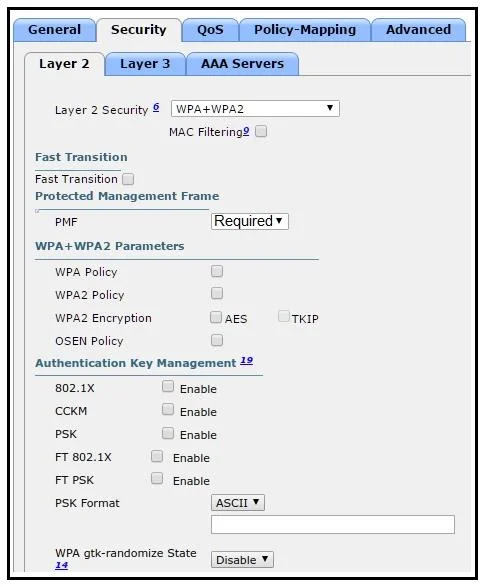
Refer to the exhibit. The network engineer is configuring a new WLAN and is told to use a setup password for authentication instead of the RADIUS servers. Which additional set of tasks must the…
The correct answer is D. Select WPA2 Policy Disable PMF Enable PSK. To configure a WLAN for authentication using a shared password instead of RADIUS, the engineer must enable WPA2 policy with Pre-Shared Key (PSK) authentication.
Question
Refer to the exhibit. The network engineer is configuring a new WLAN and is told to use a setup password for authentication instead of the RADIUS servers. Which additional set of tasks must the engineer perform to complete the configuration?
Exhibits
Options
- ADisable PMF Enable PSK Enable 802.1x
- BSelect WPA Policy Enable CCKM Enable PSK
- CSelect WPA Policy Select WPA2 Policy Enable FT PSK
- DSelect WPA2 Policy Disable PMF Enable PSK
How the community answered
(40 responses)- A5% (2)
- B10% (4)
- C3% (1)
- D83% (33)
Why each option
To configure a WLAN for authentication using a shared password instead of RADIUS, the engineer must enable WPA2 policy with Pre-Shared Key (PSK) authentication.
Enabling 802.1x is incorrect because 802.1x is used for enterprise authentication with RADIUS servers, which the question explicitly states is not being used.
While PSK is correct, selecting only `WPA Policy` (implying WPA1) is less secure than WPA2. CCKM (Cisco Centralized Key Management) is a proprietary fast roaming feature, not the primary authentication mechanism for a 'setup password'.
While PSK is correct and WPA2 Policy is appropriate, selecting `WPA Policy` (WPA1) is less secure, and `FT PSK` (Fast Transition PSK) is an advanced fast roaming feature, not the fundamental authentication method.
To use a setup password for authentication instead of RADIUS, the Pre-Shared Key (PSK) authentication method must be enabled. WPA2 Policy is the most common and secure choice for PSK authentication in modern WLANs. Protected Management Frames (PMF) is an optional 802.11w feature that enhances security by protecting management frames, and while generally recommended, disabling it is a valid configuration option depending on network requirements or compatibility.
Concept tested: WLAN WPA2-PSK security configuration
Source: https://www.cisco.com/c/en/us/td/docs/wireless/controller/8-5/config-guide/b_cg85/wlan_security.html
Topics
Community Discussion
No community discussion yet for this question.