
Cisco
200-301 · Question #1771
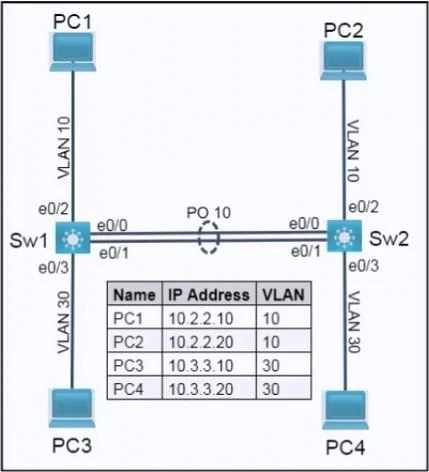
SIMULATION 69 Please use the "Tasks" and "Topology" tabs to complete this lablet. Topology Tasks Complete the tasks below: Task 1 Configure 802.1q trunks between Sw1 and Sw2 on ports E0/0 and E0/1…
The provided configuration correctly sets up 802.1Q trunks on the specified interface range for both switches and restricts the permitted VLANs to 10, 11, and 30.
Submitted by amina.ke· Mar 5, 2026Network Access
Question
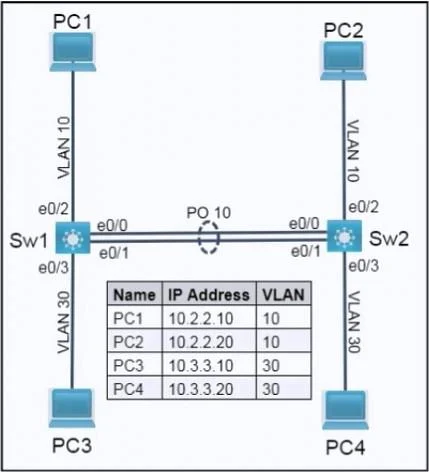
SIMULATION 69 Please use the "Tasks" and "Topology" tabs to complete this lablet. Topology Tasks Complete the tasks below: Task 1 Configure 802.1q trunks between Sw1 and Sw2 on ports E0/0 and E0/1. - Only permit VLANs 10, 11, and 30 on the trunks. Task 2 Using LACP, create a Port Channel between Sw1 and Sw2. - Combine E0/0 and E0/1 into a Port Channel while leaving the trunk configurations intact. - Assign number 10. - Only Sw1 should initiate negotiate. Answer: Task 1 - Configure 802.1Q trunks (only VLANs 10, 11, 30) On Sw1: conf t interface range e0/0 - 1 switchport trunk encapsulation dot1q switchport mode trunk switchport trunk allowed vlan 10,11,30 end On Sw2: conf t interface range e0/0 - 1 switchport trunk encapsulation dot1q switchport mode trunk switchport trunk allowed vlan 10,11,30 end Interfaces e0/0 and e0/1 on both switches are configured as 802.1Q trunks and restricted to VLANs 10, 11, and 30. Task 2 - Create LACP Port Channel 10 (Sw1 initiates) On Sw1 (LACP active - initiates negotiation): conf t interface range e0/0 - 1 channel-group 10 mode active exit interface port-channel 10 switchport mode trunk switchport trunk allowed vlan 10,11,30 end On Sw2 (LACP passive): conf t interface range e0/0 - 1 channel-group 10 mode passive exit interface port-channel 10 switchport mode trunk switchport trunk allowed vlan 10,11,30 end LACP is enabled by using mode active on Sw1 and mode passive on Sw2, creating Port-Channel 10 from e0/0 and e0/1. The port-channel is configured as an 802.1Q trunk permitting only VLANs 10, 11, and 30, maintaining the required trunk characteristics across the aggregated link.
Exhibits
Explanation
The provided configuration correctly sets up 802.1Q trunks on the specified interface range for both switches and restricts the permitted VLANs to 10, 11, and 30.
Concept tested. 802.1Q Trunking, Allowed VLANs on Trunks
Topics
#802.1Q trunking#LACP#EtherChannel#VLAN pruning
Community Discussion
No community discussion yet for this question.