200-301 · Question #1770
200-301 Question #1770: Real Exam Question with Answer & Explanation
Sign in or unlock 200-301 to reveal the answer and full explanation for question #1770. The question stem and answer options stay visible for context.
Question
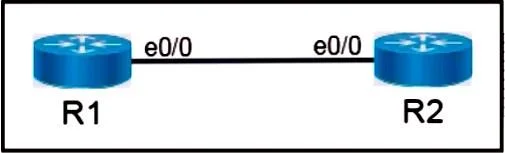
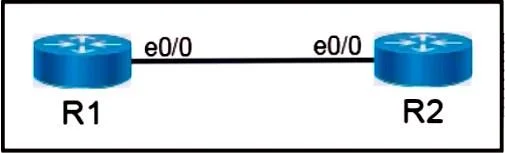
Lab Simulation 68 Please use the "Tasks" and "Topology" tabs to complete this lablet. Topology Tasks Configure IPv4 and IPv6 between the two routers by completing the following tasks. Task 1: - Configure R1 with the first usable host IP address in the 172.16.16.32/29 network. - Configure R2 with the last usable host IP address in the 172.16.16.32/29 network. - Verify connectivity using ping. Task 2: - Configure R1 with the first usable host IP address in the 2001:db8:12::34/126 network. - Configure R2 with the last usable host IP address in the 2001:db8:12::34/126 network. Answer: Task 1: IPv4 Addressing We need to address the link R1-R2 using the subnet 172.16.16.32/29.1. 1. Subnet Calculations for 172.16.16.32/29: - Network Address: 172.16.16.32 - Subnet Mask: 255.255.255.248 (A /29 mask means 32 − 29 = 3 host bits, so 23 = 8 total addresses). - Addresses in Subnet: 8 - Broadcast Address: 172.16.16.32 + 8 − 1 = 172.16.16.39 - First Usable Host IP: 172.16.16.32 + 1 = 172.16.16.33 - Last Usable Host IP: 172.16.16.39 − 1 = 172.16.16.38 2. Configuration Commands R1 Configuration configure terminal interface Ethernet0/0 ip address 172.16.16.33 255.255.255.248 no shutdown exit R2 Configuration configure terminal interface Ethernet0/0 ip address 172.16.16.38 255.255.255.248 no shutdown exit 3. Verification Once both configurations are applied, you can ping from R1 to R2: R1# ping 172.16.16.38 Task 2: IPv6 Addressing We need to address the link R1-R2 using the subnet 2001:db8:12::34/126.1. 1. Subnet Calculations for 2001:db8:12::34/126 A /126 mask is used for point-to-point links in IPv6 and is the equivalent of a /30 in IPv4. It allows for 4 total addresses (128 − 126 = 2 host bits, 22 = 4 addresses). - Network Address: 2001:db8:12::34 - Next Network Address: 2001:db8:12::38 (Incrementing the host portion by 4) - First Usable Host IP (R1): The address immediately following the network address, which is 2001:db8:12::35 (since the next network is ...:38, the broadcast/reserved address is ...:37, and the next usable is ...:36). - Last Usable Host IP (R2): The address immediately preceding the broadcast address (or the address two before the next network), which is 2001:db8:12::36. 2. Configuration Commands First, IPv6 routing must be enabled globally on both routers for them to process IPv6 packets. R1 Configuration configure terminal ipv6 unicast-routing interface Ethernet0/0 ipv6 address 2001:db8:12::35/126 no shutdown exit R2 Configuration configure terminal ipv6 unicast-routing interface Ethernet0/0 ipv6 address 2001:db8:12::36/126 no shutdown exit 3. Verification Once both configurations are applied, you can verify IPv6 connectivity: R1# ping 2001:db8:12::36
Options
- taskConfigure IPv4 and IPv6 addressing between R1 and R2. For IPv4, configure R1 with the first usable host IP (172.16.16.33) and R2 with the last usable host IP (172.16.16.38) in the 172.16.16.32/29 network, then verify connectivity using ping. For IPv6, configure R1 with the first usable host IP (2001:db8:12::35) and R2 with the last usable host IP (2001:db8:12::36) in the 2001:db8:12::34/126 network, then verify connectivity using ping.
- prerequisites
Unlock 200-301 to see the answer
You've previewed enough free 200-301 questions. Unlock 200-301 for full answers, explanations, the timed quiz mode, progress tracking, and the master PDF. Question stem and options stay visible so you can still see what's on the exam.