
Cisco
200-301 · Question #1714
Lab Simulation 60 Please use the "Tasks" and "Topology" tabs to complete this lablet. Topology Tasks Refer to the topology. All physical cabling is in place. Configure local user accounts, modify…
This lab simulation requires configuring a local user account for telnet access, modifying an existing Named ACL to allow specific traffic and log denied traffic, and enabling DHCP snooping.
Submitted by devops_kid· Mar 5, 2026Security Fundamentals
Question
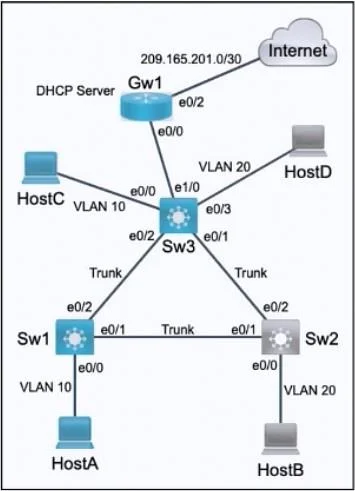
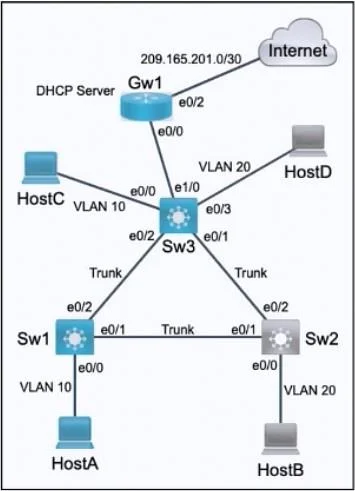
Lab Simulation 60 Please use the "Tasks" and "Topology" tabs to complete this lablet. Topology Tasks Refer to the topology. All physical cabling is in place. Configure local user accounts, modify the Named ACL (NACL), and configure DHCP Snooping. The current contents of the NACL must remain intact. 1. Configure a local account on Gw1 with telnet access only on virtual ports 0-4. Use the following information: - Username: wheel - Password: lock3path - Algorithm type: Scrypt - Privilege level: Exec mode 2. Configure and apply a NACL on Gw1 to control network traffic from VLAN 10: - Name: CORP_ACL - Allow BOOTP and HTTPS - Restrict all other traffic and log the ingress interface, source MAC address, the packet's source and destination IP addresses, and ports 3. Configure Sw1: - Enable DHCP Snooping for VLAN 10 - Disable DHCP Option-82 data insertion - Enable DHCP Snooping MAC address verification - Enable trusted interfaces Answer: See the below explanation
Exhibits
Explanation
This lab simulation requires configuring a local user account for telnet access, modifying an existing Named ACL to allow specific traffic and log denied traffic, and enabling DHCP snooping.
Concept tested. Cisco IOS local user accounts, named ACLs, DHCP snooping
Topics
#Local user accounts#Named ACL configuration#DHCP Snooping#Telnet virtual ports
Community Discussion
No community discussion yet for this question.