
200-301 · Question #1713
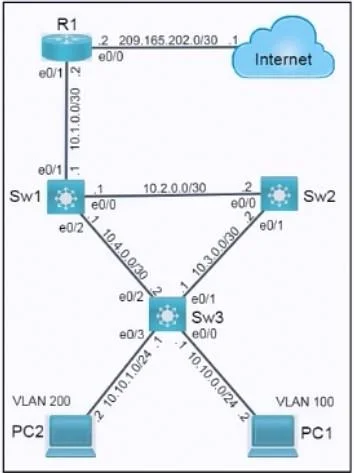
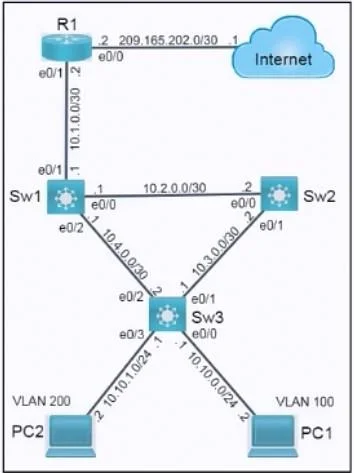
Lab Simulation 59 Please use the "Tasks" and "Topology" tabs to complete this lablet. Topology Tasks Refer to the topology. All physical cabling is in place, and a routing protocol is preconfigured…
Lab Simulation 59 - Full Explanation --- Overall Goal This lab tests three distinct network security skills: 1. ACL design - filter traffic efficiently using an extended named ACL 2. Local AAA / VTY hardening - restrict switch management access 3. DHCP snooping - protect…
Question
Exhibits
Explanation
Lab Simulation 59 - Full Explanation
Overall Goal
This lab tests three distinct network security skills:
- ACL design - filter traffic efficiently using an extended named ACL
- Local AAA / VTY hardening - restrict switch management access
- DHCP snooping - protect against rogue DHCP servers
Task 1: Extended Named ACL (WEB_ACL)
Why this approach is correct
Extended ACLs filter on both source AND destination (IP + port), so they can enforce granular rules like "only HTTP from subnet X." The golden rule: place extended ACLs closest to the source - this drops unwanted traffic before it wastes bandwidth traversing the network, which is why R1's inbound interface (e0/1, facing the user VLANs) is the correct placement.
"Minimum ACEs" means you write only the rules you need; everything else falls through to a catch-all.
Step-by-Step Breakdown
Step 1 - Enter ACL config mode
ip access-list extended WEB_ACL
Creates the named extended ACL. Named ACLs (vs. numbered) are easier to edit and read. extended means you can match on Layer 4 protocol and port, not just source IP.
Skipping this: All subsequent
permit/denystatements have nowhere to attach.
Step 2 - Block telnet from PC1 only
deny tcp host 10.10.20.2 any eq 23
host 10.10.20.2= PC1's specific IP (thehostkeyword is shorthand for a /32 mask)any= any destinationeq 23= port 23 (Telnet)
This rule is first because ACLs process top-down and stop at the first match. If the permit-all rule (step 4) came first, PC1's telnet traffic would match it and never reach this deny.
Skipping this: PC1 retains telnet access - security requirement violated.
Wrong order (placing after permit ip any any): The deny is never reached; ACL processing stops at the earlier permit.
Step 3 - Allow HTTP only from VLAN 200
permit tcp 10.10.10.0 0.0.0.255 any eq 80
10.10.10.0 0.0.0.255= VLAN 200's subnet (wildcard mask, not subnet mask)eq 80= HTTP
This permits web traffic exclusively from VLAN 200 hosts. Any other subnet trying HTTP will not match this rule and fall through to step 4.
Note on the provided answer: Step 5 in the procedure shows
deny tcp any any eq 20. Port 20 is FTP-data, not a stated requirement. This is almost certainly a typo - it should bedeny tcp any any eq 80to block HTTP from all sources other than VLAN 200. Without that deny, thepermit ip any anybelow would allow HTTP from any subnet, violating the "HTTP only from VLAN 200" requirement.
Step 4 (corrected Step 5) - Block HTTP from all other sources
deny tcp any any eq 80
Since HTTP was already permitted for VLAN 200 in step 3 (those packets matched and exited), this rule catches HTTP from all remaining sources and drops it. This is what enforces the "only from VLAN 200" constraint.
Skipping this: Other VLANs can also browse the web - the "only" qualifier is lost.
Step 5 - Allow all other traffic
permit ip any any
Without this, the implicit deny any any at the end of every ACL would drop all traffic not explicitly permitted. This catch-all preserves normal network operation (pings, routing protocols between devices, etc.).
Skipping this: All traffic not matching earlier rules is silently dropped - network outage for most services.
Step 6 - Apply the ACL inbound on R1 e0/1
interface e0/1
ip access-group WEB_ACL in
in = filter packets entering the interface (from the VLAN side toward the rest of the network). Applying inbound at the closest point to the source drops bad traffic immediately, before it travels further.
Applying outbound or on the wrong interface: Packets traverse the network before being filtered, wasting router/link resources - violates the "conserve resources" requirement.
Task 2: Local Account on Sw2 (Telnet VTY 0-4)
username GroupAdmin privilege 15 algorithm-type scrypt secret BumbL3

line vty 0 4
 login local
 transport input telnet
algorithm-type scrypt= stronger password hashing than MD5 (modern Cisco IOS)privilege 15= full exec (enable-level) access without needing to typeenabletransport input telnet= restricts VTY lines to telnet only (blocks SSH)login local= authenticate against the local user database
Omitting
transport input telnet: Both SSH and telnet are allowed - requirement violated. Omittinglogin local: The local account exists but VTY lines don't use it; anyone can log in without credentials.
Task 3: DHCP Snooping on Sw3
ip dhcp snooping
ip dhcp snooping vlan 100,200
ip dhcp snooping verify mac-address
- DHCP snooping distinguishes trusted ports (uplinks to legitimate DHCP servers) from untrusted ports (end-user ports). DHCP Offers/Acks from untrusted ports are dropped, blocking rogue DHCP servers.
vlan 100,200- scopes protection to these VLANs only.verify mac-address- checks that the source MAC in the Ethernet frame matches the client MAC field inside the DHCP packet. Prevents DHCP starvation attacks that spoof different client MACs.
Enabling snooping globally without specifying VLANs: No VLANs are actually protected. Skipping MAC verification: An attacker can exhaust the DHCP pool by sending floods of DHCP Discovers with fake client-MAC fields while using the same source MAC.
Memory Tips
| Concept | Mnemonic |
|---|---|
| Extended ACL placement | "Extended = close to the source" - stop traffic early |
| ACL order matters | Top-down, first match wins - specific rules before general |
| Implicit deny | Every ACL ends with an invisible deny any any - always add a permit ip any any if needed |
| DHCP snooping | Think of it as a bouncer - trusted ports (uplinks) get VIP access; untrusted ports (end users) are checked |
| Wildcard mask | It's the inverse of a subnet mask: /24 = 0.0.0.255 |
Topics
Community Discussion
No community discussion yet for this question.