
200-301 · Question #1685
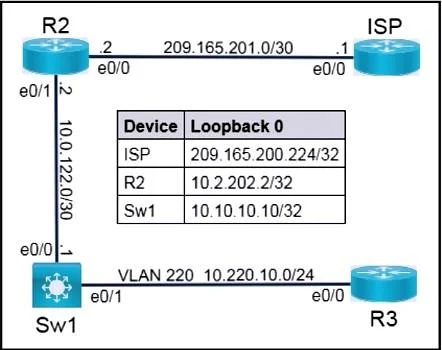
Lab Simulation 54 Please use the "Tasks" and "Topology" tabs to complete this lablet. Topology Tasks Connectivity between the devices has been established. IP services must be configured to complete…
This lab simulation requires configuring NAT PAT on Router R2, setting up Router R3 as an NTP client using R2, completing DHCP configurations across R2 (server), Sw1 (relay), and R3 (client), and removing specific SSH configurations from R2.
Question
Exhibits
Explanation
This lab simulation requires configuring NAT PAT on Router R2, setting up Router R3 as an NTP client using R2, completing DHCP configurations across R2 (server), Sw1 (relay), and R3 (client), and removing specific SSH configurations from R2.
Approach. The correct approach involves a series of CLI commands on specific devices, based on the task requirements and network topology:
Task 1: Router R2 PAT Configuration
- Interaction: Access the command-line interface (CLI) of Router R2.
- Commands:
enable configure terminal interface ethernet0/1 ip nat inside exit interface ethernet0/0 ip nat outside exit access-list 1 permit 10.0.122.1 ip nat inside source list 1 interface ethernet0/0 overload end copy running-config startup-config - Reasoning:
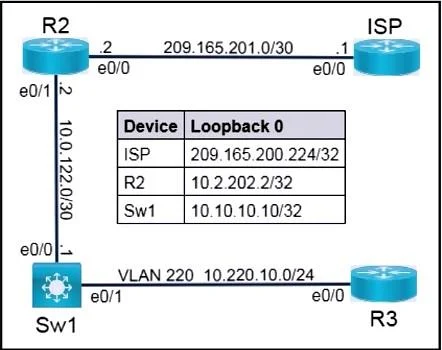
interface ethernet0/1; ip nat inside: Designates the interface connecting to the private network (where Sw1's 10.0.122.1 resides) as the NAT inside interface.interface ethernet0/0; ip nat outside: Designates the interface connecting to the public network (ISP) as the NAT outside interface.access-list 1 permit 10.0.122.1: Defines an access list to match the private IP address of Sw1's e0/0 interface (10.0.122.1).ip nat inside source list 1 interface ethernet0/0 overload: Configures Port Address Translation (PAT). It translates traffic from 10.0.122.1, using the IP address of R2's Ethernet0/0 interface (209.165.201.2) as the public source, and usesoverloadto allow multiple private connections to share this single public IP via port multiplexing. This directly fulfills the requirement to use the IP address of Ethernet0/0.
- Verification (Conceptual): From Sw1,
ping 209.165.200.224 source 10.0.122.1. On R2,show ip nat translationsto confirm the translation entry.
Task 2: Router R3 NTP Client
- Interaction: Access the CLI of Router R3.
- Commands:
enable configure terminal ntp server 10.0.122.2 end copy running-config startup-config - Reasoning:
ntp server 10.0.122.2: Configures R3 to synchronize its clock with an NTP server. R2's Ethernet0/1 interface (10.0.122.2) serves as the NTP server, which is reachable from R3 through Sw1 (assuming 'Connectivity between the devices has been established' includes basic routing). This adheres to the constraint of not using broadcast commands.
- Verification (Conceptual): On R3,
show ntp statusandshow clock detailto check synchronization status.
Task 3: Complete the DHCP configuration
- Interaction: Access the CLI of Router R2, Switch Sw1, and Router R3.
- Commands:
On R2 (DHCP Server - completing partial configuration for VLAN 220 clients):
On Sw1 (DHCP Relay - assuming Sw1 is a Layer 3 switch and acts as the gateway for VLAN 220):enable configure terminal ip dhcp pool VLAN220_POOL network 10.220.10.0 255.255.255.0 default-router 10.220.10.1 exit ip dhcp excluded-address 10.220.10.1 end copy running-config startup-config
On R3 (DHCP Client):enable configure terminal vlan 220 exit interface ethernet0/1 switchport mode access switchport access vlan 220 exit interface vlan 220 ip address 10.220.10.1 255.255.255.0 ip helper-address 10.0.122.2 exit ip routing end copy running-config startup-configenable configure terminal interface ethernet0/0 ip address dhcp no shutdown exit end copy running-config startup-config - Reasoning:
- R2: Defines a DHCP pool
VLAN220_POOLfor the 10.220.10.0/24 network, including thedefault-router(Sw1's SVI for VLAN 220) and excluding the gateway IP from assignment. This completes R2's role as a DHCP server. - Sw1: Creates VLAN 220, assigns Ethernet0/1 to it as an access port (connecting to R3). The
interface vlan 220(SVI) is configured with10.220.10.1as its IP (acting as the default gateway for clients) andip helper-address 10.0.122.2to forward DHCP broadcasts from VLAN 220 clients to R2's DHCP server.ip routingenables L3 forwarding on Sw1. - R3:
ip address dhcpconfigures R3's Ethernet0/0 interface to obtain its IP address and network configuration dynamically from the DHCP server (R2 via Sw1's relay).
- R2: Defines a DHCP pool
- Verification (Conceptual): On R3,
show ip interface briefto confirm e0/0 receives an IP from 10.220.10.0/24. On R2,show ip dhcp bindingto see leased addresses.
Task 4: Remove SSH configuration parameters from R2
- Interaction: Access the CLI of Router R2.
- Commands:
enable configure terminal no ip ssh version 2 no crypto key generate rsa line vty 0 4 no transport input ssh exit end copy running-config startup-config - Reasoning:
no ip ssh version 2: Specifically disables support for SSH version 2.no crypto key generate rsa: Deletes the RSA key pair, which is fundamental for SSH server operation. This effectively disables the SSH server functionality and removes SSH access.line vty 0 4; no transport input ssh: Removes SSH as an allowed incoming protocol on the Virtual Teletype (VTY) lines, ensuring that SSH connections cannot be established via remote access, even if some SSH components remained.
- Verification (Conceptual): Attempt to SSH to R2 from another device; the connection should fail. On R2,
show ip sshandshow crypto key mypubkey rsashould indicate SSH is not enabled and no RSA keys exist.
Common mistakes.
- common_mistake. * Task 1 (PAT): Using a static NAT pool instead of
interface ethernet0/0 overload. The question explicitly requires using the interface's IP, which is achieved with theinterfacekeyword in theip nat inside sourcecommand. Failing to properly designate inside/outside interfaces is also a common error.
- Task 2 (NTP): Using
ntp broadcast clientorntp broadcastcommands, which are explicitly forbidden. Another mistake is configuring an unreachable or incorrect IP address for the NTP server on R3. - Task 3 (DHCP): On Sw1, failing to configure the
ip helper-addresson the correct VLAN SVI for VLAN 220, or not creating/configuring the SVI itself. On R2, not defining a DHCP pool for the 10.220.10.0/24 network or providing an incorrectdefault-routeraddress. On R3, manually configuring an IP address instead of usingip address dhcp. - Task 4 (SSH): Only using
no ip ssh version 2without removing the RSA crypto keys or restricting SSH access on VTY lines. Whileno ip ssh version 2targets a specific version,no crypto key generate rsais critical for completely disabling the SSH server, andno transport input sshon VTY lines ensures no remote SSH login is possible. Leavingtransport input allortransport input sshon VTY lines would allow SSH even ifip ssh version 2is removed (if version 1 is present).
Concept tested. This simulation tests fundamental networking concepts including Network Address Translation (NAT) with Port Address Translation (PAT) and interface overload, Network Time Protocol (NTP) client configuration, Dynamic Host Configuration Protocol (DHCP) server setup, DHCP relay agent (ip helper-address) functionality, DHCP client configuration, and advanced SSH security configuration management (disabling specific SSH versions, removing RSA crypto keys, and controlling Virtual Teletype (VTY) access). It also implicitly verifies understanding of basic routing and Layer 3 switching concepts (SVIs, ip routing).
Topics
Community Discussion
No community discussion yet for this question.