
200-301 · Question #1642
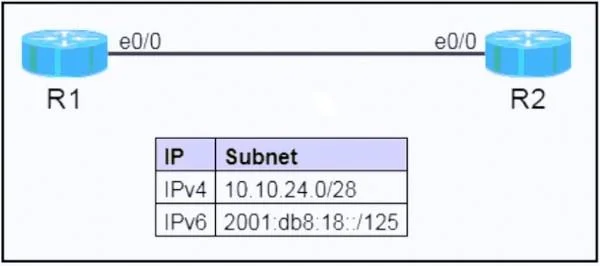
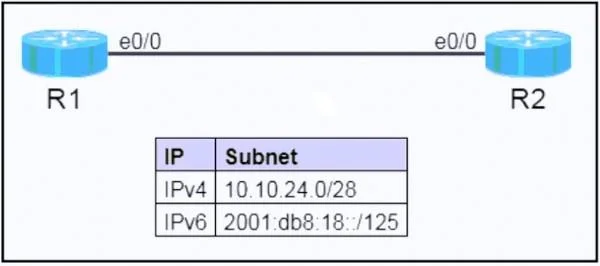
Lab Simulation 49 Guidelines This is a lab item in which tasks will be performed on virtual devices. - Refer to the Tasks tab to view the tasks for this lab item. - Refer to the Topology tab to…
Lab Simulation 49 - Full Explanation --- Overall Goal This lab tests your ability to subnet, configure, and verify both IPv4 and IPv6 on a point-to-point router link. The two tasks mirror each other: subnet the given network, assign the first usable address to R1 and the last…
Question
Exhibits
Explanation
Lab Simulation 49 - Full Explanation
Overall Goal
This lab tests your ability to subnet, configure, and verify both IPv4 and IPv6 on a point-to-point router link. The two tasks mirror each other: subnet the given network, assign the first usable address to R1 and the last usable address to R2, then confirm reachability. This is a fundamental skill for any network engineer and maps directly to real-world WAN/LAN link provisioning.
IPv4 Analysis - 10.10.24.0/28
Before touching any device, you must understand the subnet math.
| Property | Value |
|---|---|
| Network address | 10.10.24.0 |
| Subnet mask | 255.255.255.240 |
| Prefix length | /28 |
| Block size | 16 addresses (2⁴) |
| Usable hosts | 14 (16 − network − broadcast) |
| First usable | 10.10.24.1 → R1 |
| Last usable | 10.10.24.14 → R2 |
| Broadcast | 10.10.24.15 |
A /28 borrows 4 bits from the host field in the last octet. The mask is 1111 1111 1111 1111 1111 1111 1111 0000 = 255.255.255.240.
IPv6 Analysis - 2001:db8:18::/125
A /125 leaves 3 bits for hosts → 2³ = 8 addresses total, 6 usable.
| Property | Value |
|---|---|
| Network / anycast | 2001:db8:18:: (= ::0 in last group) |
| First usable | 2001:db8:18::1 → R1 |
| Last usable | 2001:db8:18::6 → R2 |
| Broadcast equivalent | 2001:db8:18::7 |
The subnet router anycast address is always the all-zeros host portion (2001:db8:18::), just like the network address in IPv4. The task explicitly forbids assigning it - doing so would create ambiguity for routers trying to reach "the subnet's router."
Step-by-Step Reasoning
Step 1 - Subnet Analysis (both IPv4 and IPv6)
Do the math before touching the CLI. Entering the wrong address wastes time and causes ping failures that are hard to diagnose under exam pressure.
Skip this → you might assign .0 (network) or .15 (broadcast) to an interface. IOS will accept some of these but the interface won't route correctly.
Step 2 & 3 - Configure R1 and R2 IPv4 addresses
R1(config)# interface e0/0
R1(config-if)# ip address 10.10.24.1 255.255.255.240
R1(config-if)# no shutdown
R2(config)# interface e0/0
R2(config-if)# ip address 10.10.24.14 255.255.255.240
R2(config-if)# no shutdown
no shutdown is mandatory - Cisco router interfaces default to administratively down. Forgetting it means the interface stays down and pings fail even with a correct address.
The mask must match on both ends. A mismatch (e.g., R1 uses /28, R2 uses /29) means they won't be in the same subnet and cannot reach each other.
Step 4 - Verify IPv4 with ping
R1# ping 10.10.24.14
R2# ping 10.10.24.1
Ping confirms Layer 3 reachability and that both interfaces are up/up. Five successful replies (!!!!! ) = success. Anything else (UUUUU, .....) signals a config error to fix before moving on.
Do this before IPv6 config so you isolate problems. If you configure both and ping fails, you don't know which protocol is broken.
Step 5 - IPv6 Subnet Analysis
Same reasoning as Step 1 but for IPv6. Confirm the anycast address (::0 suffix) and stay away from it. The last usable is ::6, not ::7 (that's the all-ones host address, equivalent to broadcast).
Step 6 & 7 - Configure R1 and R2 IPv6 addresses
R1(config)# interface e0/0
R1(config-if)# ipv6 address 2001:db8:18::1/125
R1(config-if)# no shutdown
R2(config)# interface e0/0
R2(config-if)# ipv6 address 2001:db8:18::6/125
R2(config-if)# no shutdown
Note: You do not need a separate ipv6 unicast-routing command just to assign addresses. However, if routing between networks were required, that global command would be needed.
Assigning the anycast address (::0/125) would technically be accepted by IOS but violates RFC 4291 and the lab task - instant point deduction.
Step 8 - Verify IPv6 with ping
R1# ping 2001:db8:18::6
R2# ping 2001:db8:18::1
IPv6 ping syntax is the same as IPv4 on IOS. Success confirms the link-local neighbor discovery (NDP) is also working, since NDP is required for IPv6 forwarding on the same segment.
Step 9 - Save to NVRAM
R1# write memory   (or: copy running-config startup-config)
R2# write memory
The lab instructions explicitly require saving before clicking Next. If the grader reloads the device or checks startup-config, unsaved changes are invisible. This step has no functional effect on connectivity - it only matters for persistence and scoring.
Always save last, after verifying. Saving a broken config wastes time if you need to re-enter correct values.
Step 10 - Final Verification
R1# show ip interface brief
R1# show ipv6 interface brief
These commands confirm:
- Interface is up/up (not admin down or line-protocol down)
- The correct IP addresses are assigned
- No typos crept in during configuration
show ip interface brief is the fastest single command to confirm interface state and address on IOS.
What Goes Wrong If Steps Are Out of Order
| Skipped/misordered step | Consequence |
|---|---|
| Skip subnet math | Wrong address assigned; ping fails |
Forget no shutdown | Interface stays down; ping times out |
| Assign anycast address | Task graded wrong; violates RFC |
| Skip ping verification | Can't isolate IPv4 vs IPv6 issues |
Forget write memory | Config lost on reload; grader may fail the item |
Memory Tip
"First to R1, Last to R2, Never the Zero, Always Save"
- First usable → R1 (alphabetically first)
- Last usable → R2 (alphabetically last)
- Never the Zero → avoid the network/anycast address
- Always Save →
write memorybefore Next
For subnetting speed: a /28 = 16-block, 14 hosts. A /125 = 8-block, 6 hosts. Memorize powers of 2 for the last octet bits and you can subnet any exam question in under 30 seconds.
Topics
Community Discussion
No community discussion yet for this question.