
200-301 · Question #1620
Lab Simulation 43 Guidelines This is a lab item in which tasks will be performed on virtual devices. - Refer to the Tasks tab to view the tasks for this lab item. - Refer to the Topology tab to…
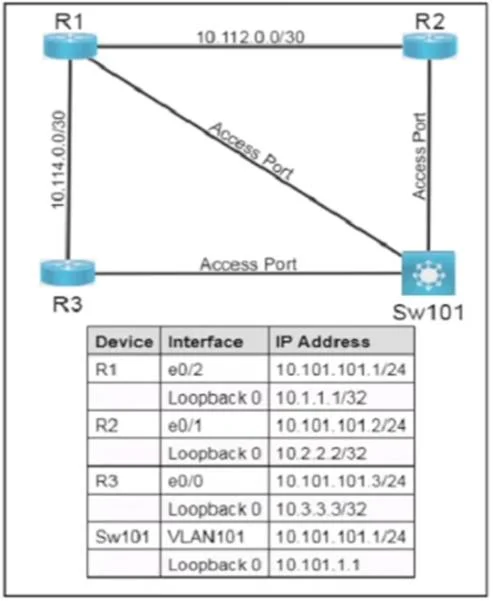
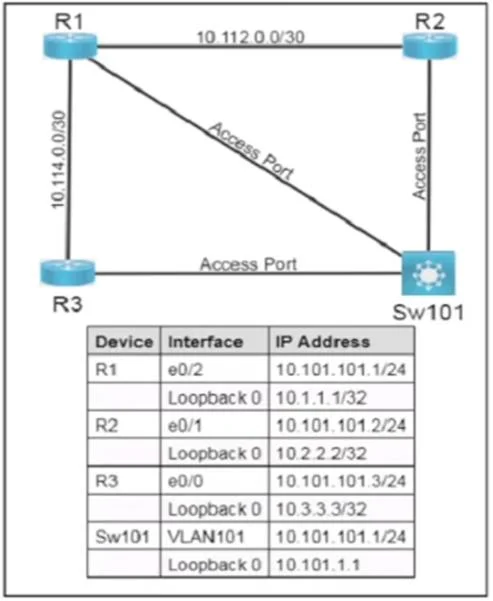
OSPF Lab 43 - Full Explanation --- Overall Goal This lab configures OSPF Area 0 on a multi-device network (R1, R2, R3, Sw101) where all devices share a common Layer 2 segment via VLAN101. The two key constraints are: 1. Use interface-level OSPF assignment instead of the network…
Question
Exhibits
Explanation
OSPF Lab 43 - Full Explanation
Overall Goal
This lab configures OSPF Area 0 on a multi-device network (R1, R2, R3, Sw101) where all devices share a common Layer 2 segment via VLAN101. The two key constraints are:
- Use interface-level OSPF assignment instead of the
networkcommand - Engineer a predetermined DR/BDR election outcome
This reflects real-world scenarios where you want deterministic OSPF role assignment rather than leaving it to the default election process.
Why Interface-Level OSPF Instead of network?
The traditional approach uses network <ip> <wildcard> area 0 under the OSPF process. The modern alternative assigns OSPF directly on the interface:
ip ospf <process-id> area <area-id>
Why it's better: It ties OSPF participation explicitly to a specific interface, leaving no ambiguity about which interfaces are in which area. It also avoids wildcard mask errors and is the preferred method in current IOS versions.
Step-by-Step Reasoning
Steps 1–3: R1 OSPF Configuration
R1(config)# router ospf 110
R1(config-if)# interface Ethernet0/2
R1(config-if)# ip ospf 110 area 0
- Step 1 creates the OSPF process with ID 110. The process ID is locally significant (doesn't need to match neighbors), but this lab requires 110 specifically.
- Step 2 navigates to the interface facing VLAN101. The specific interface name varies by topology - Ethernet0/2 here connects R1 to the shared segment.
- Step 3 is the critical substitution for
network. It tells OSPF process 110 to advertise this interface and run OSPF on it within Area 0.
If skipped: R1 won't participate in OSPF at all. No adjacency forms, no routes are exchanged.
Steps 4–6 / 7–9: R2 and R3 OSPF Configuration
Same pattern - router ospf 110, navigate to the VLAN101-facing interface, then ip ospf 110 area 0.
- R2 uses Ethernet0/1, R3 uses Ethernet0/0 - different interface names because the topology wires them differently.
Common mistake: Using the wrong interface name. Always confirm which interface faces VLAN101 before entering config.
Steps 10–12: Sw101 OSPF Configuration
Sw101(config-if)# interface Vlan101
Sw101(config-if)# ip ospf 110 area 0
Sw101 is a Layer 3 switch, so its VLAN101 participation is through a SVI (Switched Virtual Interface) - interface Vlan101 - not a physical Ethernet interface. This is why the interface name differs from the routers.
If you used a physical interface here instead of the SVI: OSPF would run on the wrong interface and fail to form adjacencies with the routers on VLAN101.
DR/BDR Election - The Concept
On a multi-access network (like Ethernet/VLAN), OSPF elects:
- DR (Designated Router): Acts as the hub for LSA flooding - all others form adjacency with DR
- BDR (Backup DR): Takes over if DR fails
- DROther: Forms adjacency only with DR and BDR, not with each other
Election rules (in order):
- Highest OSPF priority wins DR (default priority = 1)
- Tie-break: Highest Router ID
- Priority 0 = permanently excluded from election
Steps 13–14: Make R1 the DR
R1(config-if)# ip ospf priority 255
Priority 255 is the maximum value, guaranteeing R1 wins the DR election regardless of Router IDs. Any value higher than all others suffices, but 255 leaves no ambiguity.
If skipped: DR election falls back to Router ID comparison - R1 might not win.
Steps 15–16: Make Sw101 the BDR
Sw101(config-if)# ip ospf priority 200
Priority 200 is the second highest, making Sw101 the BDR. It must be lower than R1's 255 but higher than R2/R3's 0.
If you set Sw101 to 255 as well: A tie would be broken by Router ID - outcome becomes unpredictable.
Steps 17–18 / 19–20: Exclude R2 and R3 from Election
R2(config-if)# ip ospf priority 0
R3(config-if)# ip ospf priority 0
Priority 0 is special - it permanently disqualifies the interface from ever becoming DR or BDR. The device still forms OSPF adjacencies and exchanges routes, it just never competes for DR/BDR roles.
Critical caveat: DR/BDR elections are non-preemptive after the initial election. If you change priorities on a live network without resetting OSPF, the change won't take effect until the current DR/BDR fails or adjacencies are cleared. On a fresh lab this isn't an issue, but on a production network you'd need
clear ip ospf process.
What Happens if Steps Are Out of Order?
| Mistake | Consequence |
|---|---|
Set priority before ip ospf 110 area 0 | Priority is set, but interface isn't in OSPF yet - no problem, order doesn't matter here |
| Enable OSPF on wrong interface | Adjacency forms on wrong segment; VLAN101 routes missing |
Skip router ospf 110 before interface config | ip ospf 110 area 0 still creates the process implicitly on most IOS versions, but it's risky practice |
| Set R2/R3 priority to 1 instead of 0 | They can still become DR/BDR if R1 or Sw101 fails - violates the requirement |
Memory Tips
"Interface OSPF = ip ospf PID area AREA" - same syntax as the network command's area number, just moved to the interface.
Priority mnemonic - "R1 is #1, BDR is second best, zeros sit out":
- R1 = 255 (max = #1 always)
- Sw101 = 200 (high but not max = second place)
- R2, R3 = 0 (zero = out of the race)
Don't forget to save: write memory or copy run start on every device before clicking Next - the lab requires saving to NVRAM.
Topics
Community Discussion
No community discussion yet for this question.