
200-301 · Question #1621
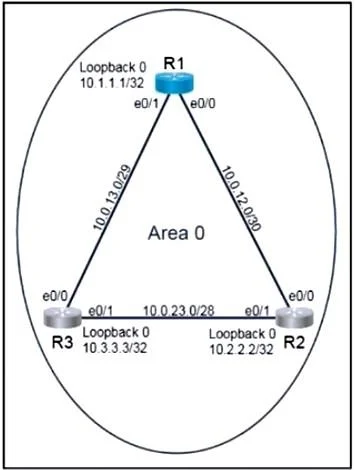
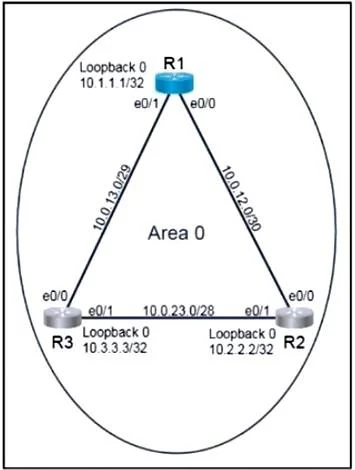
Lab Simulation 44 Guidelines This is a lab item in which tasks will be performed on virtual devices. - Refer to the Tasks tab to view the tasks for this lab item. - Refer to the Topology tab to…
OSPF Lab Simulation 44 - Explained --- Overall Goal Configure OSPF on R1 so it participates in Area 0 without using network statements, and ensure R1 always wins the Designated Router (DR) election. The key constraint is using interface-level OSPF (ip ospf <process> area…
Question
Exhibits
Explanation
OSPF Lab Simulation 44 - Explained
Overall Goal
Configure OSPF on R1 so it participates in Area 0 without using network statements, and ensure R1 always wins the Designated Router (DR) election. The key constraint is using interface-level OSPF (ip ospf <process> area <area>) instead of the traditional network statement under the OSPF process.
Step-by-Step Breakdown
Step 1: router ospf 30
Starts an OSPF process with process ID 30. The process ID is locally significant - it doesn't need to match neighboring routers. Without this, none of the subsequent OSPF commands have a process to attach to.
Skipping this means no OSPF process exists and the interface commands in later steps will reference a non-existent process.
Step 2: router-id 10.0.12.1
Manually sets the OSPF Router ID to R1's E0/0 IP address. The task explicitly requires using E0/0's IP as the router ID.
OSPF uses the Router ID to:
- Uniquely identify the router in the OSPF domain
- Break ties in DR elections (higher RID wins when priority is equal)
Without this, OSPF would auto-select a Router ID from the highest loopback or active interface IP - unpredictable and not what the task requires.
Order matters: Set the router ID before OSPF adjacencies form. If set after, you must issue
clear ip ospf processto apply it, disrupting adjacencies.
Step 3-4: interface E0/0 -> ip ospf 30 area 0
This is the core of the "no network statement" requirement. Instead of:
network 10.0.12.0 0.0.0.255 area 0
You enable OSPF directly on the interface:
ip ospf 30 area 0
This tells OSPF process 30 to include this interface in Area 0 and begin sending Hello packets out E0/0 to discover R2.
Skipping this means R1 never sends Hellos out E0/0 and never forms an adjacency with R2.
Step 5: ip ospf priority 255 (on E0/0)
Sets the OSPF interface priority to 255 (maximum possible). During the DR election, the router with the highest priority wins. Default is 1; setting 255 guarantees R1 always becomes DR on the E0/0 segment.
If priority is left at default (1) and another router has priority 1 too, the DR is decided by Router ID - not guaranteed. Setting 255 makes R1 the definitive winner regardless.
Steps 6-7: interface E0/1 -> ip ospf 30 area 0
Same as steps 3-4 but for E0/1, enabling OSPF on the link connecting to R3. Without this, R1 never forms adjacency with R3.
Step 8: ip ospf priority 255 (on E0/1)
Same rationale as step 5 - ensures R1 wins the DR election on the E0/1 segment as well.
What Happens If Steps Are Skipped
| Skipped Step | Consequence |
|---|---|
router ospf 30 | No OSPF process; interface commands fail |
router-id | Auto-selected RID; may not match task requirement |
ip ospf 30 area 0 on an interface | That interface's neighbor never forms adjacency |
ip ospf priority 255 | R1 might not win DR election; task requirement unmet |
Memory Tips
- "Interface OSPF = no network statement" -
ip ospf <pid> area <area>on the interface replaces thenetworkcommand entirely. - Priority 255 = always DR - Think of it as "255 = max = boss of the segment."
- Router ID first - Always set before adjacencies form, or you'll need to reset the process.
- Per-interface, not per-process - Priority and area are set on the interface, not under
router ospf.
Topics
Community Discussion
No community discussion yet for this question.