
200-301 · Question #1591
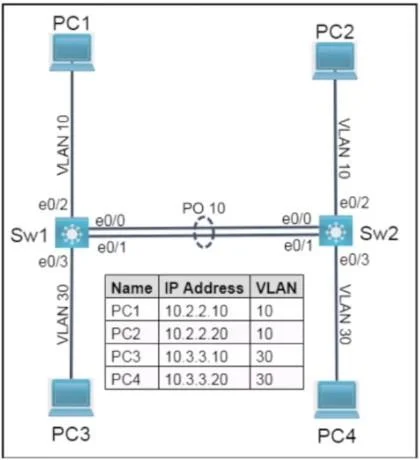
Lab Simulation 37 Guidelines This is a lab item in which tasks will be performed on virtual devices. - Refer to the Tasks tab to view the tasks for this lab item. - Refer to the Topology tab to…
Lab Simulation 37 - Full Explanation Overall Goal The lab configures redundant, high-speed trunking between Sw1 and Sw2 by combining two physical links (E0/0 and E0/1) into a single logical link (EtherChannel/LACP), then tagging that link to carry only the relevant VLANs. The…
Question
Exhibits
Explanation
Lab Simulation 37 - Full Explanation
Overall Goal
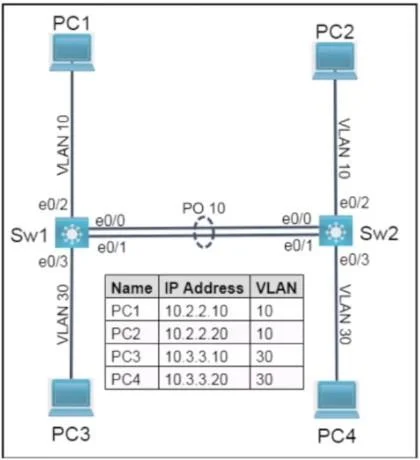
The lab configures redundant, high-speed trunking between Sw1 and Sw2 by combining two physical links (E0/0 and E0/1) into a single logical link (EtherChannel/LACP), then tagging that link to carry only the relevant VLANs. The two tasks are interdependent: trunking controls what traffic flows; EtherChannel controls how the physical links are aggregated.
Why This Approach Is Correct
- IEEE 802.1Q (dot1q) is the vendor-neutral VLAN tagging standard - the lab explicitly says "IEEE standard frame tagging method," ruling out Cisco's proprietary ISL.
- IEEE 802.3ad (LACP) is the vendor-neutral link aggregation standard - the lab says "IEEE 802.3ad," ruling out Cisco's proprietary PAgP.
- Combining both ensures interoperability and bandwidth/redundancy across the trunk.
Step-by-Step Reasoning
Step 1 & 2 - Configure physical interfaces as 802.1Q trunks (both switches)
interface range e0/0 - 1
 switchport trunk encapsulation dot1q
 switchport mode trunk
 switchport trunk allowed vlan 10,30
Why: Before EtherChannel exists, the physical ports must be told they are trunks with dot1q encapsulation. On IOS switches that support both ISL and dot1q, you must explicitly set encapsulation dot1q - it does not default to 802.1Q.
allowed vlan 10,30 limits traffic to only the PC VLANs, satisfying the "only the VLANs for the PCs" requirement. Without this restriction, all VLANs (including management VLANs) would traverse the trunk - a security and efficiency problem.
If skipped: Without encapsulation dot1q, the switch may default to ISL (violating the IEEE requirement) or reject the trunk command entirely. Without allowed vlan, all VLANs cross the trunk, which the lab explicitly prohibits.
Step 3 & 5 - Add physical interfaces to channel-group 10 in active mode (both switches)
interface range e0/0 - 1
 channel-group 10 mode active
Why: channel-group 10 bundles E0/0 and E0/1 into logical interface Port-channel10. The number 10 must match on both ends of the link (it's locally significant, but consistency avoids confusion).
mode active means the interface sends LACP PDUs and actively negotiates aggregation - this satisfies "both links must negotiate aggregation." The alternative mode passive only responds to LACP; two passive ports will never form a channel. mode on forces aggregation without negotiation (uses no protocol at all), which also violates the requirement.
If skipped: Without channel-group, the two physical links remain independent. Spanning Tree will block one to prevent a loop - you lose redundancy and half your bandwidth. The logical Port-channel10 interface won't exist.
If done out of order (before trunking): When the Port-channel forms, it inherits configuration from the physical members. Configuring trunking on the physical ports first ensures the Port-channel inherits the correct settings. Reversing the order can cause inconsistency flags and STP issues.
Step 4 & 6 - Configure Port-channel10 as an 802.1Q trunk (both switches)
interface port-channel 10
 switchport trunk encapsulation dot1q
 switchport mode trunk
 switchport trunk allowed vlan 10,30
Why: Once the EtherChannel forms, Port-channel10 is the logical interface that Spanning Tree and VLAN databases see. The physical port configuration bootstraps it, but explicitly configuring the Port-channel interface ensures consistency and makes the configuration unambiguous. Some IOS versions require this explicitly; others inherit it. Always configure it explicitly in exams and production.
If skipped: The Port-channel may come up without proper trunk/VLAN settings, causing traffic for VLANs 10 and 30 to be dropped or to leak into unintended VLANs.
Step 7 - Save to NVRAM on both switches
copy running-config startup-config
Why: The lab explicitly requires this before clicking Next. Without it, all configuration is lost on reload. In a real network, an unexpected reboot would revert to the old config.
What Happens If Steps Are Done Out of Order
| Mistake | Consequence |
|---|---|
| LACP before trunk encapsulation | Port-channel may inherit ISL or no encapsulation; mismatched ends cause trunk to fail |
mode passive on both sides | LACP PDUs are never initiated; channel never forms |
Missing allowed vlan 10,30 | All VLANs traverse the trunk - lab requirement violated |
| Missing Port-channel trunk config | Logical interface may not trunk correctly depending on IOS version |
| Not saving | Configuration lost on reload |
Memory Tip
Think of it in two layers:
"Tag first, then bundle"
- Tag the physical ports (802.1Q trunk, allowed VLANs)
- Bundle the physical ports (LACP active, channel-group 10)
- Tag the resulting logical port-channel (repeat trunk config)
- Save
The phrase "active negotiates, passive waits, on forces" helps remember LACP modes. Since the lab requires negotiation, always use active.
Topics
Community Discussion
No community discussion yet for this question.