
200-301 · Question #1592
Lab Simulation 38 Guidelines This is a lab item in which tasks will be performed on virtual devices. - Refer to the Tasks tab to view the tasks for this lab item. - Refer to the Topology tab to…
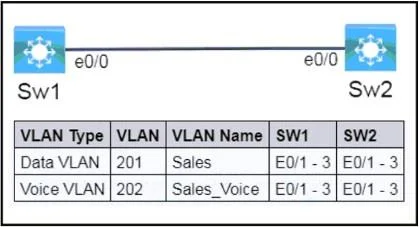
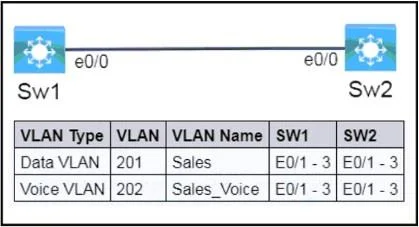
The lab simulation requires configuring two switches with specified VLANs, setting up switch access ports for combined data and voice traffic, and enabling vendor-neutral neighbor discovery (LLDP) on their inter-switch link.
Question
Exhibits
Explanation
The lab simulation requires configuring two switches with specified VLANs, setting up switch access ports for combined data and voice traffic, and enabling vendor-neutral neighbor discovery (LLDP) on their inter-switch link.
Approach. The correct interaction involves accessing the command-line interface (CLI) for both Sw1 and Sw2 (likely through a console tab or icon as per lab guidelines) and executing specific Cisco IOS commands. The steps must be performed on both switches:
Step 1: Create and Name VLANs (Task 1)
- Enter global configuration mode:
configure terminal - Create Data VLAN 201:
vlan 201 - Name it 'Sales':
name Sales - Exit VLAN configuration:
exit - Create Voice VLAN 202:
vlan 202 - Name it 'Sales_Voice':
name Sales_Voice - Exit VLAN configuration:
exit
Step 2: Configure Access Ports for Voice and Data (Task 2)
- Enter interface range configuration mode for E0/1-3:
interface range e0/1 - 3 - Set the port mode to access:
switchport mode access - Assign the data VLAN:
switchport access vlan 201 - Assign the voice VLAN:
switchport voice vlan 202 - Exit interface configuration:
exit
Step 3: Configure LLDP on e0/0 (Task 3)
- Enable LLDP globally:
lldp run - Enter interface configuration mode for E0/0:
interface e0/0 - Enable LLDP transmission on the interface:
lldp transmit - Enable LLDP reception on the interface:
lldp receive - Exit interface configuration:
exit
Step 4: Save Configuration
- Return to privileged EXEC mode:
end - Save the running configuration to startup configuration (NVRAM):
copy running-config startup-config(orwrite memory)
Common mistakes.
- common_mistake. Common mistakes include:
- Forgetting to create VLANs: The ports cannot be assigned to VLANs that do not exist yet. Always create VLANs first.
- Using
switchport mode trunkon E0/1-3: These ports connect to end devices (IP phones and PCs) and should be access ports, not trunk ports which are for switch-to-switch links or links to routers that carry multiple VLANs. - Missing
switchport access vlanorswitchport voice vlan: Simply settingswitchport mode accessis insufficient; the specific data and voice VLANs must be assigned. - Using CDP instead of LLDP: Task 3 explicitly states 'vendor-neutral protocol,' which refers to LLDP, not Cisco's proprietary CDP (Cisco Discovery Protocol). Failing to enable
lldp runglobally orlldp transmit/receiveon the interface would also be incorrect. - Not configuring all specified interfaces: The task requires E0/1, E0/2, AND E0/3, so using
interface range e0/1 - 3is critical. - Incorrect VLAN IDs or names: Mismatched IDs or names would lead to configuration errors or a failure to meet the requirements.
- Forgetting to save the configuration: Changes made in running-config will be lost upon reboot if not saved to startup-config (NVRAM) using
copy running-config startup-config.
Concept tested. This question tests the following core Cisco IOS networking concepts:
- VLAN Configuration: Creation, naming, and management of Virtual Local Area Networks.
- Voice VLAN (Auxiliary VLAN): Configuring switch ports to support both a data VLAN for connected PCs and a voice VLAN for connected IP phones, allowing separate traffic handling for each.
- Access Port Configuration: Correctly setting up switch ports to connect to end devices.
- Link Layer Discovery Protocol (LLDP): Understanding and configuring this vendor-neutral Layer 2 protocol for network device discovery, an alternative to CDP.
- Basic Cisco IOS CLI Navigation and Configuration Saving: Proficiency in entering commands in different modes and persisting configurations.
Topics
Community Discussion
No community discussion yet for this question.