
200-301 · Question #1532
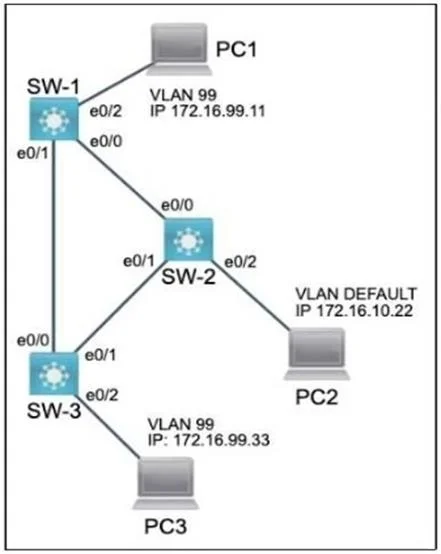
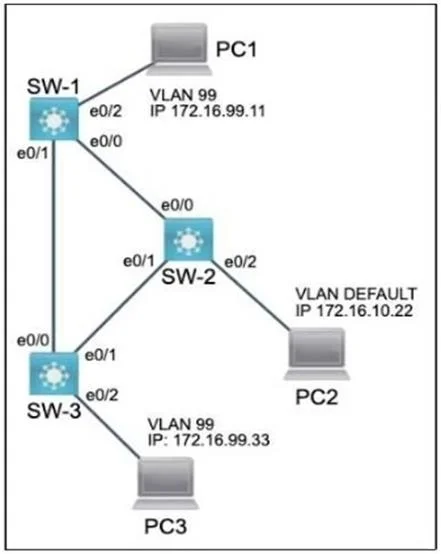
Lab Simulation 29 Guidelines This is a lab item in which tasks will be performed on virtual devices. - Refer to the Tasks tab to view the tasks for this lab item. - Refer to the Topology lab to…
Lab Simulation 29 Explanation Overall Goal This lab configures VLAN segmentation and Cisco Discovery Protocol (CDP) on a three-switch network. The goal is to: Isolate PC1, PC2, and PC3 into VLAN 99 (named FINANCIAL) Configure their switch ports as proper access ports Re-enable…
Question
Exhibits
Explanation
Lab Simulation 29 Explanation
Overall Goal
This lab configures VLAN segmentation and Cisco Discovery Protocol (CDP) on a three-switch network. The goal is to:
- Isolate PC1, PC2, and PC3 into VLAN 99 (named FINANCIAL)
- Configure their switch ports as proper access ports
- Re-enable CDP globally on SW-1 (so switches can discover each other)
- Disable CDP specifically on the port facing PC1 (security: end-user devices shouldn't discover network infrastructure)
Task 1: Create VLAN 99 on All Three Switches
SW-x(config)# vlan 99
SW-x(config-vlan)# name FINANCIAL
SW-x(config-vlan)# exit
Why: VLANs must be defined in each switch's VLAN database before any port can be assigned to them. Running vlan 99 enters VLAN configuration mode and creates the VLAN if it doesn't exist. The name FINANCIAL command labels it - the name must match exactly across all switches for consistency and to meet exam grading criteria.
If skipped: Assigning a port to VLAN 99 on a switch that doesn't have it defined may place the port into an "inactive" state (the VLAN shows as "allowed but inactive" on trunk ports). Connectivity fails.
If done out of order: Task 2 (port assignment) can technically create the VLAN implicitly on some IOS versions, but the name won't be set - you'd fail the grading check for "label it exactly as FINANCIAL."
Task 2: Configure Switch Ports for PCs as Access Ports in VLAN 99
SW-x(config)# interface e0/2
SW-x(config-if)# switchport mode access
SW-x(config-if)# switchport access vlan 99
SW-x(config-if)# exit
switchport mode access - Forces the port into permanent access mode, disabling Dynamic Trunking Protocol (DTP) negotiation. This is what "end-user port" means: it carries traffic for exactly one VLAN, with no 802.1Q tagging visible to the PC.
switchport access vlan 99 - Assigns the port to VLAN 99. Traffic from the PC enters and exits tagged as VLAN 99 internally, but the PC itself sees it as untagged Ethernet.
If switchport mode access is skipped: The port defaults to dynamic auto, which can negotiate trunking. A malicious device could attempt a VLAN hopping attack, or the port might trunk unexpectedly - violating the "only allow the designated VLAN" requirement.
If switchport access vlan 99 is skipped: The PC lands on VLAN 1 (the default), not VLAN 99, and won't communicate with other VLAN 99 devices.
Task 3: Re-enable CDP Globally on SW-1
SW-1(config)# cdp run
Why: cdp run is a global command that enables CDP on the entire switch. It was previously disabled (with no cdp run), which shut down all CDP advertisements and discovery on SW-1. Re-enabling it allows SW-1 to discover and be discovered by neighboring switches (SW-2, SW-3) via CDP - essential for network management and topology visibility.
If skipped: SW-1 remains invisible to neighboring switches and cannot discover them. Task 4 would also be partially pointless - you can't selectively disable an interface-level feature if the global feature is already off.
Task 4: Disable CDP on SW-1's Port Facing PC1 (e0/2)
SW-1(config)# interface e0/2
SW-1(config-if)# no cdp enable
Why: no cdp enable disables CDP on a specific interface only. Even though CDP is globally on (Task 3), this suppresses CDP packets on the port connected to PC1. End-user devices should never receive CDP frames because:
- CDP reveals switch model, IOS version, IP address, and platform - a security exposure
- It's unnecessary for PC connectivity
Interface-level vs. global distinction: cdp run (global) = master on/off switch. cdp enable (interface) = per-port override. Task 3 turns the master switch ON; Task 4 then mutes the specific port. These are independent controls.
If done out of order (Task 4 before Task 3): no cdp enable on the interface would have no effect if CDP is globally disabled - and after enabling CDP globally (Task 3), the interface would default to cdp enable, so you'd send CDP to PC1. You must do Task 3 first, then Task 4.
If skipped: PC1 receives CDP frames from SW-1. On a real network this is a minor security leak; on the exam, it fails the requirement.
Memory Tips
| Concept | Mnemonic |
|---|---|
| VLAN before port assignment | "Build the room before moving furniture" |
switchport mode access before switchport access vlan | "Set the mode, then set the membership" |
cdp run = global, cdp enable = per-interface | "Run the engine, then mute individual exhaust pipes" |
| Global ON + interface OFF = selective CDP | Task 3 opens the door; Task 4 closes one window |
Final reminder: Always save with copy running-config startup-config (or write memory) on each switch before exiting. Losing configs on reload is a common lab failure point.
Topics
Community Discussion
No community discussion yet for this question.