
200-301 · Question #1528
Lab Simulation 26 Guidelines This is a lab item in which tasks will be performed on virtual devices. - Refer to the Tasks tab to view the tasks for this lab item. - Refer to the Topology lab to…
Lab Simulation 26 - 802.1Q Trunking + LACP EtherChannel --- Overall Goal You're building a redundant, multi-VLAN trunk between SW-1 and SW-2 using: 802.1Q trunking to carry multiple VLANs over a single link while restricting which VLANs are allowed LACP EtherChannel (IEEE…
Question
Exhibits
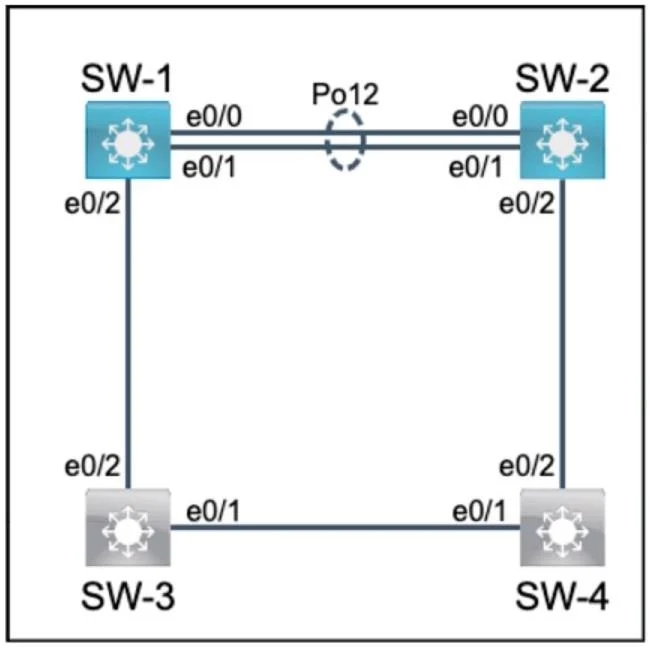
Explanation
Lab Simulation 26 - 802.1Q Trunking + LACP EtherChannel
Overall Goal
You're building a redundant, multi-VLAN trunk between SW-1 and SW-2 using:
- 802.1Q trunking to carry multiple VLANs over a single link while restricting which VLANs are allowed
- LACP EtherChannel (IEEE 802.3ad) to bundle two physical links into one logical high-bandwidth, fault-tolerant channel
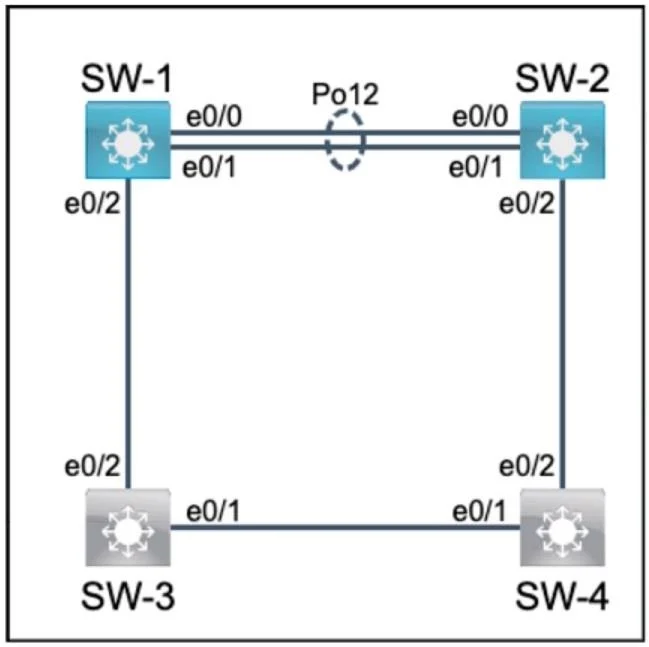
The topology likely has SW-1 and SW-2 interconnected via e0/0 and e0/1, with SW-1's e0/2 connecting to another device (SW-3 or SW-4) that only needs VLANs 12 and 22.
Task 1 - Trunk Ports on SW-1 and SW-2 (e0/0, e0/1)
Steps 1-16
interface e0/0 / interface e0/1
Enters interface config mode for the target port. All subsequent commands apply only to this interface.
switchport trunk encapsulation dot1q
Specifies 802.1Q as the trunking encapsulation method. On older Cisco IOS, switches may default to ISL (Cisco proprietary). This command is required before you can set the mode to trunk. If skipped, the switchport mode trunk command may fail or the switch will negotiate ISL, which is incompatible with non-Cisco equipment and violates the lab requirement.
switchport mode trunk
Hardcodes the port as a trunk - it stops sending DTP (Dynamic Trunking Protocol) negotiation and permanently operates as a trunk. If skipped, the port stays in access mode and carries only one VLAN, breaking multi-VLAN communication entirely.
switchport trunk allowed vlan 1,12,22
Restricts which VLANs are permitted to traverse this trunk. By default, a trunk allows all VLANs. Pruning to only 1, 12, and 22 improves security (limits broadcast domains) and reduces unnecessary traffic. If skipped, all VLANs flood through, which may expose traffic to unintended segments and fails the lab requirement.
Order matters:
encapsulationmust come beforemode trunkon platforms that support both ISL and 802.1Q. Setting mode first on some IOS versions will throw an error.
Task 2 - SW-1 e0/2 Trunk (VLANs 12 and 22 only)
Steps 17-20
Same trunk configuration, but VLAN 1 is excluded. This is intentional - VLAN 1 is the default/native VLAN and often carries management traffic. The downstream device (SW-3 or SW-4) only participates in VLANs 12 and 22, so VLAN 1 is withheld for security/design reasons.
If VLAN 1 were included here, management traffic or unwanted broadcasts could leak to devices that shouldn't see them.
Task 3 - LACP EtherChannel (e0/0 + e0/1)
Steps 21-24
interface range e0/0 - e0/1
Applies the next command to both interfaces simultaneously - a shorthand that avoids repeating commands.
channel-group 1 mode active
This is the critical step. Breaking it down:
| Component | Meaning |
|---|---|
channel-group 1 | Assigns the port to EtherChannel bundle #1 |
mode active | Uses LACP (IEEE 802.3ad - the "industry standard protocol") and actively initiates negotiation |
Why active specifically?
The question states ports must "immediately negotiate the link." LACP has two modes:
active- sends LACP PDUs immediately, initiates negotiationpassive- waits for the other side to initiate
If both sides were set to passive, neither would send LACP PDUs and the channel would never form. Setting both to active ensures immediate, automatic negotiation.
Using
mode onwould also bundle the ports, but that's a static/manual EtherChannel with no negotiation protocol - it's not LACP and doesn't meet the "industry standard protocol" requirement. Cisco's proprietary protocol is PAgP; LACP/802.3ad is the industry standard.
If EtherChannel were configured before trunking, the logical port-channel interface inherits settings from members, but mismatched configurations (e.g., one port trunk, one access) will cause the channel to fail or flap. Always configure trunking first, then aggregate.
What Would Break If Steps Were Out of Order or Skipped
| Skipped Step | Consequence |
|---|---|
encapsulation dot1q | mode trunk may fail; ISL negotiated instead |
mode trunk | Port stays in access mode, only carries native VLAN |
allowed vlan | All VLANs traverse the trunk (security/policy violation) |
channel-group mode active | e0/0 and e0/1 remain separate physical links; no redundancy or aggregation |
Using passive on both sides | LACP never negotiates; channel never forms |
Memory Tips
- Trunk order: "Encap before Mode, Mode before VLAN" - think E -> M -> V
- LACP vs PAgP: "LACP = Law (industry standard/IEEE)"; PAgP = Proprietary (Cisco)
- active/active: At least one side must be
active. If unsure, make bothactive- it always works. - allowed vlan: Think of it as a whitelist - default is "all allowed," you're narrowing it down intentionally.
Topics
Community Discussion
No community discussion yet for this question.