
200-301 · Question #1529
Lab Simulation 27 Guidelines This is a lab item in which tasks will be performed on virtual devices. - Refer to the Tasks tab to view the tasks for this lab item. - Refer to the Topology lab to…
Lab Simulation 27 - Explanation Overall Goal This lab tests three distinct but related network security concepts: local authentication, traffic filtering via ACLs, and Layer 2 port security. Together they form a defense-in-depth approach - controlling who can log in, what…
Question
Exhibits
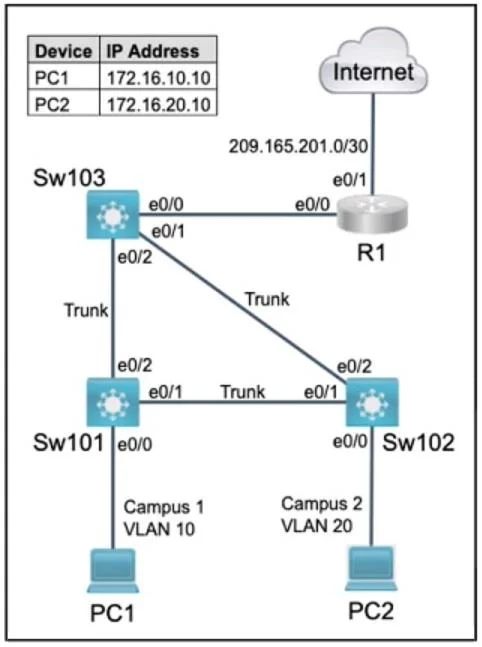
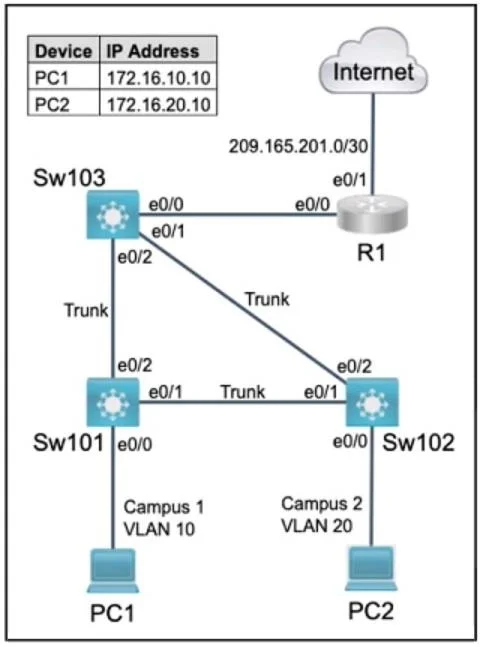
Explanation
Lab Simulation 27 - Explanation
Overall Goal
This lab tests three distinct but related network security concepts: local authentication, traffic filtering via ACLs, and Layer 2 port security. Together they form a defense-in-depth approach - controlling who can log in, what traffic is allowed, and how many devices can attach to a port.
Task 1 - Local User Account on Sw101 (VTY Telnet Access)
Commands
Sw101(config)# username netops privilege 1 password ipsec4all
Sw101(config)# service password-encryption
Sw101(config)# line vty 0 4
Sw101(config-line)# login local
Sw101(config-line)# transport input telnet
Sw101(config-line)# end
Sw101# copy running-config startup-config
Why Each Part Matters
| Element | Explanation |
|---|---|
username netops privilege 1 password ipsec4all | Creates the local account. privilege 1 = user exec mode (not privileged/enable). |
password (not secret) | Vigenere = Cisco Type 7 encryption, which uses the Vigenere cipher. secret uses MD5 (Type 5). You must use password here. |
service password-encryption | Triggers Type 7 encryption on all password-type entries in the config. Without this, the password is stored in plaintext. |
login local | Tells the VTY lines to authenticate against the local user database (the account you just created). |
transport input telnet | Restricts VTY access to Telnet only. Without this, SSH may also be permitted depending on IOS defaults. |
line vty 0 4 | Covers virtual terminal lines 0 through 4 (5 simultaneous sessions). |
What Goes Wrong If Skipped
- Omitting
login local-> the local account exists but isn't used for authentication; lines may use no auth or a line password instead. - Using
secretinstead ofpassword-> wrong encryption algorithm (MD5, not Vigenere/Type 7) - question specifically asks for Vigenere. - Forgetting
transport input telnet-> SSH may remain allowed, violating "telnet access only."
Task 2 - Named ACL on Sw103 (ENT_ACL)
Assumed Topology
- PC1 has a specific IP on VLAN 10 (e.g., 172.16.10.10)
- PC2 has an IP reachable from VLAN 10 (e.g., 172.16.10.20)
- R1's interface toward VLAN 10 is 172.16.30.2
Commands
Sw103(config)# ip access-list extended ENT_ACL
Sw103(config-ext-nacl)# deny icmp host 172.16.10.10 host 172.16.10.20
Sw103(config-ext-nacl)# permit tcp host 172.16.10.10 host 172.16.30.2 eq 23
Sw103(config-ext-nacl)# deny tcp any host 172.16.30.2 eq 23
Sw103(config-ext-nacl)# permit ip any any
Sw103(config-ext-nacl)# exit
Sw103(config)# interface vlan 10
Sw103(config-if)# ip access-group ENT_ACL in
Sw103(config-if)# end
Sw103# copy running-config startup-config
Why the Order of ACEs Is Critical
ACLs are processed top-down, first match wins.
| Line | Purpose | Why this position |
|---|---|---|
deny icmp PC1 -> PC2 | Blocks PC1's pings to PC2 only | Must come before the permit ip any any catch-all |
permit tcp PC1 -> R1:23 | Allows PC1 to Telnet to R1 | Must come before the deny-telnet line below |
deny tcp any -> R1:23 | Blocks everyone else in VLAN 10 from telnetting to R1 | Placed after PC1's permit so PC1 isn't caught by this deny |
permit ip any any | Allows all other traffic | ACLs have an implicit deny all at the end; this explicit permit preserves normal traffic |
Apply inbound on VLAN 10 SVI - filtering at ingress means traffic is checked as it enters the switch from that VLAN, which is the most efficient and correct placement.
What Goes Wrong If Skipped or Misordered
- Placing
deny tcp any -> R1:23before PC1's permit -> PC1 gets denied Telnet too (first-match catches it). - Forgetting
permit ip any any-> the implicit deny drops all other VLAN 10 traffic, breaking normal connectivity. - Applying
outinstead ofin-> traffic from other VLANs toward VLAN 10 gets filtered instead of traffic originating from VLAN 10.
Task 3 - Port Security on Sw102 Ethernet 0/0
Commands
Sw102(config)# interface ethernet 0/0
Sw102(config-if)# switchport mode access
Sw102(config-if)# switchport port-security
Sw102(config-if)# switchport port-security maximum 2
Sw102(config-if)# switchport port-security violation restrict
Sw102(config-if)# end
Sw102# copy running-config startup-config
Why Each Part Matters
| Command | Purpose |
|---|---|
switchport mode access | Port security only works on access ports, not trunk ports |
switchport port-security | Enables port security - required before any other port-security commands work |
maximum 2 | Only 2 unique source MAC addresses are allowed; the 3rd triggers the violation action |
violation restrict | Restrict mode: drops the offending packet, increments the violation counter, and sends a syslog message - exactly what the question describes |
Violation Mode Comparison
| Mode | Drops packet | Increments counter | Syslog | Shuts port |
|---|---|---|---|---|
protect | Yes | No | No | No |
restrict | Yes | Yes | Yes | No |
shutdown (default) | Yes | Yes | Yes | Yes |
The question says "discards + counts + syslog but does NOT shut down the port" -> restrict.
Dynamic vs. Sticky MAC Learning
- Dynamic (default, no extra command): learned MACs are stored in RAM only; lost on reboot.
- Sticky (
switchport port-security mac-address sticky): learned MACs are written to running config and can be saved.
The question asks for dynamic - so no sticky command is needed. This is the default behavior when you enable port security without specifying sticky.
What Goes Wrong If Skipped
- Skipping
switchport mode access-> port-security command may be rejected. - Using
violation shutdown-> port goes err-disabled on violation instead of just logging, which is too aggressive for this requirement. - Adding
mac-address sticky-> MACs persist across reboots, which contradicts "dynamically learned."
Memory Tips
- Vigenere = Type 7 =
passwordkeyword (notsecret). Think: "Vigenere is vintage - old, weak encryption." - ACL order = most specific first. Exceptions (PC1 allow/deny) go before general rules.
- Port security violation modes: Protect = silent drop, Restrict = drop + log, Shutdown = drop + err-disable. Remember: Restrict = Responsible reporting.
- Always
copy run startbefore moving on - NVRAM saves survive reboots; the lab grader checks saved config.
Topics
Community Discussion
No community discussion yet for this question.