nerdexam
CiscoCisco

200-301 · Question #1254

200-301 Question #1254: Real Exam Question with Answer & Explanation

Sign in or unlock 200-301 to reveal the answer and full explanation for question #1254. The question stem and answer options stay visible for context.

Submitted by yuriko_h· Mar 5, 2026Infrastructure Security - Configuring device access controls, extended named ACLs for traffic filtering, and switchport port security to protect the network from unauthorized access and traffic, aligning with Cisco CCNA/CCNP Security and Infrastructure domains.

Question

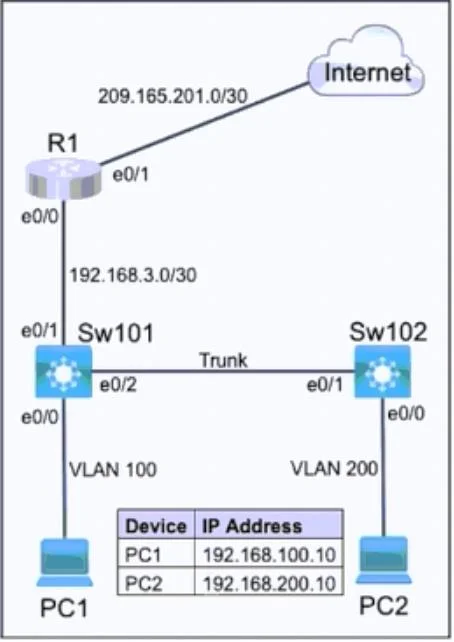
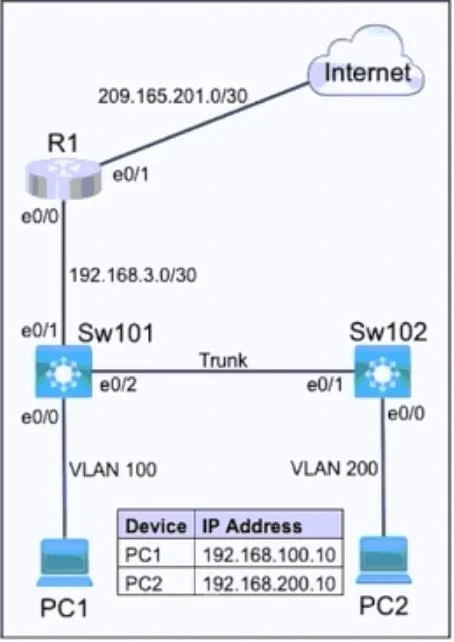
Lab Simulation 10 Guidelines This is a lab item in which tasks will be performed on virtual devices - Refer to the Tasks tab to view the tasks for this lab item. - Refer to the Topology tab to access the device console(s) and perform the tasks. - Console access is available for all required devices by clicking the device icon or using the tab(s) above the console window. - All necessary preconfigurations have been applied. - Do not change the enable password or hostname for any device. - Save your configurations to NVRAM before moving to the next item. - Click Next at the bottom of the screen to submit this lab and move to the next question. - When Next is clicked the lab closes and cannot be reopened. Topology Tasks Refer to the topology. All physical cabling is in place. Configure a local user account, a Named ACL (NACL), and security. Task 1 Configure a local account on Sw101 with telnet access only on virtual ports 0-4. Use the following information: - Username: support - Password: max2learn - Privilege level: Exec mode Task 2 Configure and apply a single NACL on Sw101 using the following: - Name: ENT_ACL - Restrict only PC2 on VLAN 200 from pinging PC1 - Allow only PC2 on VLAN 200 to telnet to Sw101 - Prevent all other devices from telnetting from VLAN 200 - Allow all other network traffic from VLAN 200 Task 3 Configure security on interface Ethernet 0/0 of Sw102: - Set the maximum number of secure MAC addresses to four. - Drop packets with unknown source addresses until the number of secure MAC addresses drops below the configured maximum value. No notification action is required. - Allow secure MAC addresses to be learned dynamically. Answer: Task 1# SW101: username support privilege 15 password max2learn line vty 0 4 login local transport input telnet Task 2# SW101: ip access-list extended ENT_ACL deny icmp host 192.168.200.10 192.168.100.10 permit tcp host 192.168.200.10 any eq 23 deny tcp any any eq 23 permit ip any any int vlan 200 ip access-group ENT_ACL in Task 3# SW102: int e0/0 switchport port-security switchport port-security maximum 4 switchport port-security voilation protect Final: copy running-config startup-config

Options

  • taskPerform the following configurations on Sw101 and Sw102: 1. On Sw101, configure a local user account ('support' / 'max2learn', privilege 15) with telnet access on VTY lines 0-4. 2. On Sw101, create an extended Named ACL 'ENT_ACL' that denies specific ICMP and TCP port 23 traffic, permits telnet from 192.168.200.10, and applies it inbound to Vlan 200. 3. On Sw102, configure port security on interface Ethernet 0/0 to allow a maximum of 4 dynamically learned secure MAC addresses and set the violation mode to 'protect'. Finally, save the running configurations to startup configurations.
  • prerequisitesConsole access for all required devices is available. All necessary preconfigurations have been applied.

Unlock 200-301 to see the answer

You've previewed enough free 200-301 questions. Unlock 200-301 for full answers, explanations, the timed quiz mode, progress tracking, and the master PDF. Question stem and options stay visible so you can still see what's on the exam.

Topics

#Named ACL Configuration#VTY Line Security#Port Security#Local Authentication
Full 200-301 PracticeBrowse All 200-301 Questions