200-301 · Question #1255
200-301 Question #1255: Real Exam Question with Answer & Explanation
The correct configuration sequence addresses all three tasks systematically: Task 1 creates a local user with privilege 15 using strong scrypt hashing on Gw1, then restricts VTY lines to telnet-only with local authentication. Task 2 modifies the Named ACL (CORP_ACL) by appending
Question
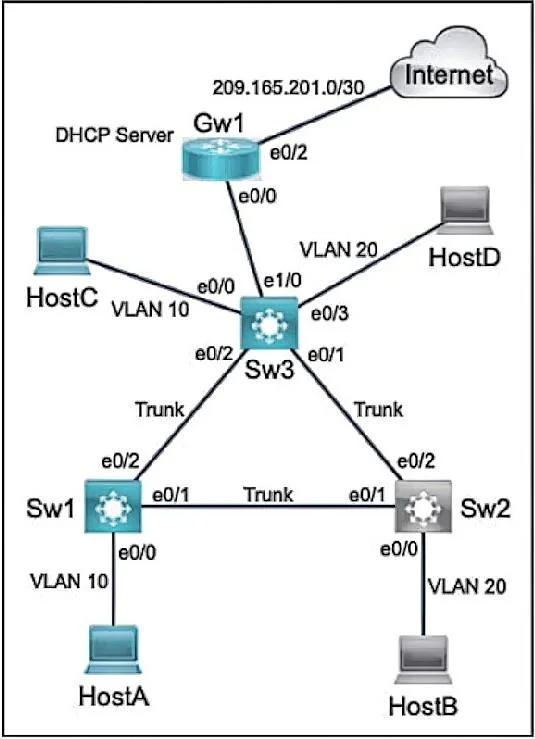
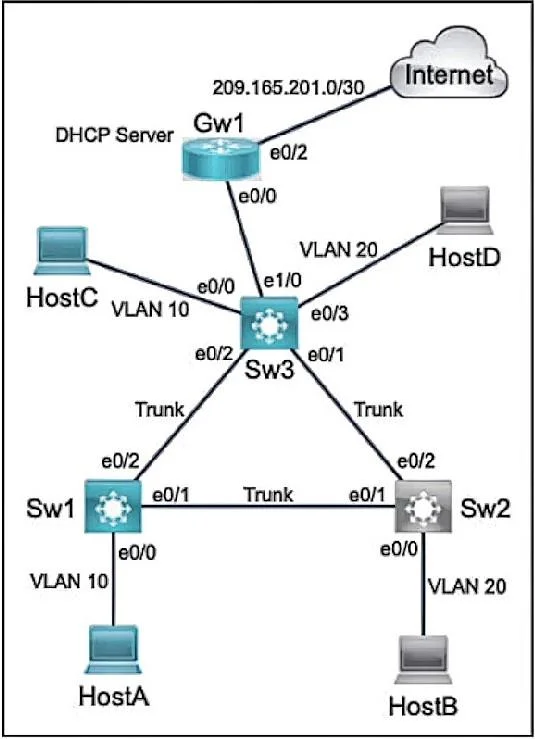
Lab Simulation 11 Guidelines This is a lab item in which tasks will be performed on virtual devices: - Refer to the Tasks tab to view the tasks for this lab item. - Refer to the Topology tab to access the device console(s) and perform the tasks. - Console access is available for all required devices by clicking the device icon or using the tab(s) above the console window. - All necessary preconfigurations have been applied. - Do not change the enable password or hostname for any device. - Save your configurations to NVRAM before moving to the next item. - Click Next at the bottom of the screen to submit this lab and move to the next question. - When Next is clicked the lab closes and cannot be reopened. Topology Tasks Refer to the topology. All physical cabling is in place. Configure local users accounts, modify the Named ACL (NACL), and configure DHCP Snooping. The current contents of the NACL must remain intact. Task 1 Configure a local account on Gw1 with telnet access only on virtual ports 0-4. Use the following information: - Username: wheel - Password: lock3path - Algorithm type: Scrypt - Privilege level: Exec mode Task 2 Configure and apply a NACL on Gw1 to control network traffic from VLAN 10: - Name: CORP_ACL - Allow BOOTP and HTTPS - Restrict all other traffic and log the ingress interface, source MAC address, the packet's source and destination IP addresses, and ports Task 3 Configure Sw1: - Enable DNCP Snooping for VLAN 10 - Disable DHCP Option-82 data insertion - Enable DHCP Snooping MAC address verification - Enable trusted interfaces Answer: Task 1# Gw1: R1(config)#username wheel privilege 15 algorithm-type scrypt secret lock3path line vty 0 4 login local transport input telnet Task 2# Gw1: ip access-list extended CORP_ACL permit udp any any eq bootpc permit udp any any eq bootps permit tcp 10.10.10.0 0.0.0.255 any eq 443 //there is no "https" keyword so we have to use the port number deny ip 10.10.10.0 0.0.0.255 any log-input interface e0/0 ip access-group CORP_ACL in //confirm the interface Task 3# Sw1: Sw1(config)#ip dhcp snooping Sw1(config)#ip dhcp snooping vlan 10 Sw1(config)#ip dhcp snooping verify mac-address Sw1(config)#no ip dhcp snooping information option Sw1(config)interface e0/2 Sw1(config-if)#ip dhcp snooping trust Final: copy running-config startup-config
Options
- taskRefer to the topology. All physical cabling is in place. Configure local users accounts, modify the Named ACL (NACL), and configure DHCP Snooping. The current contents of the NACL must remain intact.
- prerequisitesConsole access to virtual devices (Gw1, Sw1) is available. All necessary preconfigurations have been applied. Login credentials for Gw1: Username 'wheel', Password 'lock3path'.
Explanation
The correct configuration sequence addresses all three tasks systematically: Task 1 creates a local user with privilege 15 using strong scrypt hashing on Gw1, then restricts VTY lines to telnet-only with local authentication. Task 2 modifies the Named ACL (CORP_ACL) by appending DHCP-related UDP permit statements (bootpc port 68 and bootps port 67) while preserving existing ACL entries, which is achieved by entering the named ACL and adding new lines without overwriting. Task 3 configures DHCP Snooping by enabling it globally and on the appropriate VLANs, then designating trusted ports (uplinks/router-facing interfaces) while leaving client-facing ports as untrusted - this prevents rogue DHCP servers from responding to client requests.
Topics
Community Discussion
No community discussion yet for this question.