
200-301 · Question #1145
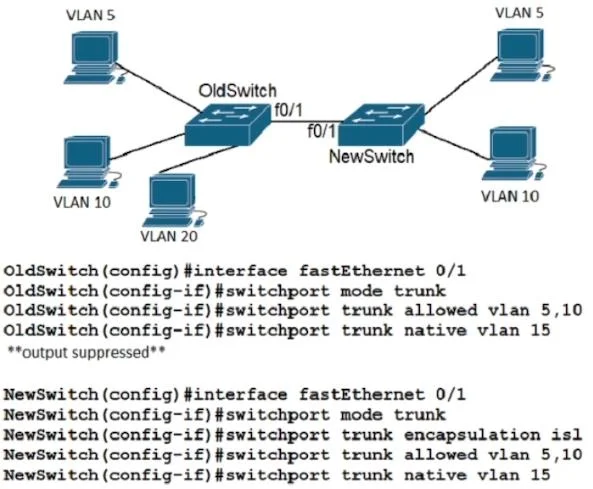
Refer to the exhibit A new VLAN and switch are added to the network. A remote engineer configures OldSwitch and must ensure that the configuration meets these requirements: - accommodates current…
The correct answer is D. no switchport trunk encapsulation isl. To support IEEE standard virtual LANs (802.1Q) and ensure compatibility, proprietary ISL encapsulation should be explicitly disabled on a trunk link.
Question
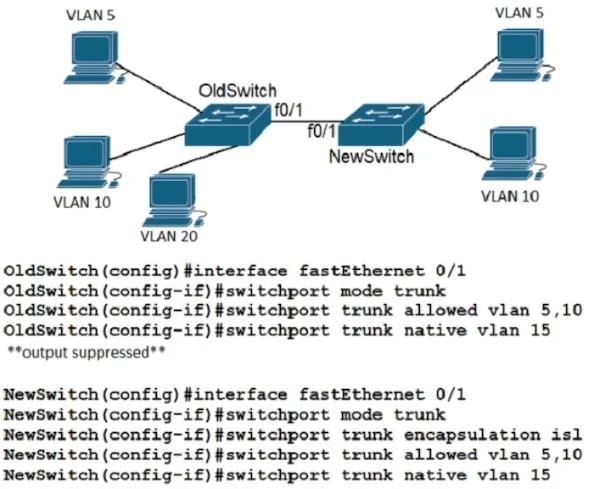
Refer to the exhibit A new VLAN and switch are added to the network. A remote engineer configures OldSwitch and must ensure that the configuration meets these requirements:
- accommodates current configured VLANs
- expands the range to include VLAN 20
- allows for IEEE standard support for virtual LANs
Which configuration on the NewSwitch side of the link meets these requirements?
Exhibits
Options
- Aswitch port mode dynamic
- Bno switchport mode trunk
- Cswitchport nonegotiate
- Dno switchport trunk encapsulation isl
How the community answered
(33 responses)- A6% (2)
- B9% (3)
- C3% (1)
- D82% (27)
Why each option
To support IEEE standard virtual LANs (802.1Q) and ensure compatibility, proprietary ISL encapsulation should be explicitly disabled on a trunk link.
The `switchport mode dynamic` command uses DTP to negotiate trunking, but it does not guarantee 802.1Q encapsulation or prevent the negotiation of ISL if both sides support it.
The `no switchport mode trunk` command would disable trunking altogether, preventing the accommodation of multiple VLANs, including VLAN 20.
The `switchport nonegotiate` command disables DTP, but it doesn't explicitly enforce 802.1Q encapsulation; it requires `switchport trunk encapsulation dot1q` to be manually set in conjunction if ISL is a possibility.
The command `no switchport trunk encapsulation isl` explicitly disables Cisco's proprietary ISL trunking encapsulation, forcing the interface to use the IEEE 802.1Q standard for VLAN tagging, which meets the requirement for IEEE standard support.
Concept tested: IEEE 802.1Q trunk encapsulation
Source: https://www.cisco.com/c/en/us/td/docs/switches/lan/catalyst3750/software/release/12-2_55_se/configuration/guide/scg/swtrunks.html
Topics
Community Discussion
No community discussion yet for this question.