
200-301 · Question #1093
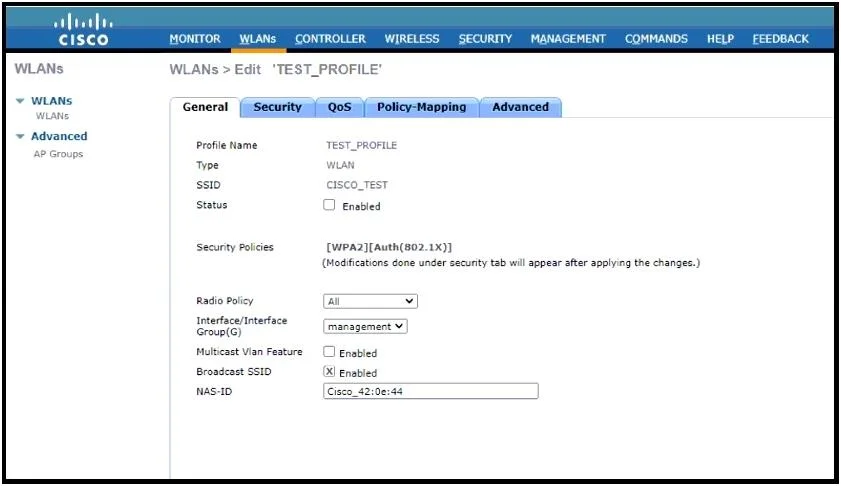
Refer to the exhibit. A Cisco WLC administrator is creating a new wireless network with enhanced SSID security. The new network must operate at 2.4 Ghz with 54 Mbps of throughput. Which set of tasks…
The correct answer is C. Uncheck the Broadcast SSID check box and set the Radio Policy to 802.11g only. To configure a new secure 2.4 GHz wireless network with 54 Mbps throughput on a Cisco WLC, the SSID should be hidden, and the radio policy set to 802.11g only.
Question
Exhibits
Options
- AUncheck the Broadcast SSID check box and set the Radio Policy to 802.11a/g only.
- BCheck the Broadcast SSID check box and set the Radio Policy to 802.11g only.
- CUncheck the Broadcast SSID check box and set the Radio Policy to 802.11g only.
- DCheck the Broadcast SSID check box and set the Radio Policy to 802.11a only.
How the community answered
(28 responses)- A11% (3)
- B4% (1)
- C82% (23)
- D4% (1)
Why each option
To configure a new secure 2.4 GHz wireless network with 54 Mbps throughput on a Cisco WLC, the SSID should be hidden, and the radio policy set to 802.11g only.
Setting the Radio Policy to `802.11a/g only` would include 802.11a, which operates in the 5 GHz band, not solely 2.4 GHz as specified for 54 Mbps throughput.
Checking the `Broadcast SSID` check box would make the SSID visible, contradicting the requirement for enhanced SSID security.
To meet the 2.4 GHz requirement with 54 Mbps throughput, the radio policy must be set to `802.11g only` as 802.11g operates in the 2.4 GHz band and supports speeds up to 54 Mbps. For enhanced SSID security, the `Broadcast SSID` check box should be unchecked to hide the SSID from public view.
Setting the Radio Policy to `802.11a only` would restrict the network to the 5 GHz band, which does not meet the 2.4 GHz requirement.
Concept tested: WLAN SSID and radio policy configuration
Source: https://www.cisco.com/c/en/us/td/docs/wireless/controller/8-10/config-guide/b_cg810/b_cg810_chapter_01100.html
Topics
Community Discussion
No community discussion yet for this question.