
200-301 · Question #1094
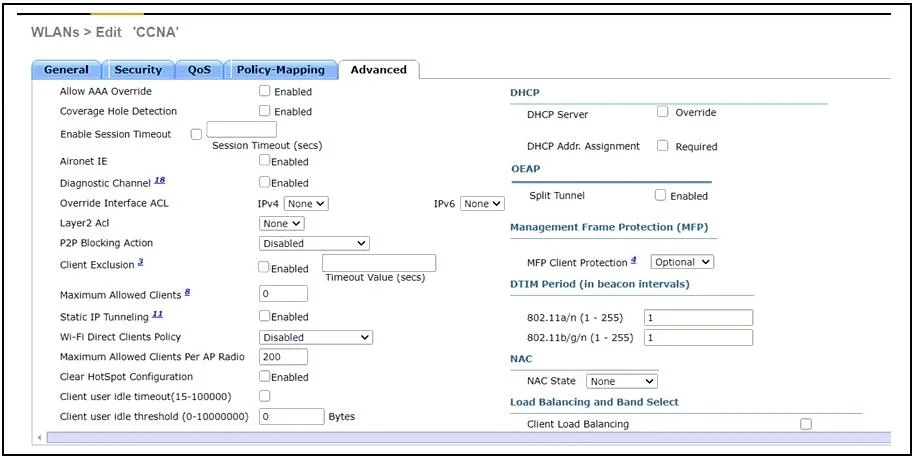
Refer to the exhibit. A network engineer configures the CCNA WLAN so that clients must reauthenticate hourly and to limit the number of simultaneous connections to the WLAN to 10. Which two actions…
The correct answer is B. Enable the Enable Session Timeout option and set the value to 3600. D. Set the Maximum Allowed Clients value to 10. To configure a WLAN for hourly client reauthentication and limit simultaneous connections, enable session timeout for 3600 seconds and set the maximum allowed clients to 10.
Question
Refer to the exhibit. A network engineer configures the CCNA WLAN so that clients must reauthenticate hourly and to limit the number of simultaneous connections to the WLAN to 10. Which two actions complete this configuration? (Choose two.)
Exhibits
Options
- AEnable the Wi-Fi Direct Clients Policy option.
- BEnable the Enable Session Timeout option and set the value to 3600.
- CEnable the Client Exclusion option and set the value to 3600.
- DSet the Maximum Allowed Clients value to 10.
- ESet the Maximum Allowed Clients Per AP Radio value to 10.
How the community answered
(37 responses)- A8% (3)
- B78% (29)
- C11% (4)
- E3% (1)
Why each option
To configure a WLAN for hourly client reauthentication and limit simultaneous connections, enable session timeout for 3600 seconds and set the maximum allowed clients to 10.
The `Wi-Fi Direct Clients Policy` option controls peer-to-peer Wi-Fi Direct connections and is not related to general client reauthentication or connection limits on a WLAN.
Enabling the `Enable Session Timeout` option and setting its value to `3600` seconds (1 hour) will ensure clients reauthenticate hourly, as required.
The `Client Exclusion` option is used to prevent specific problematic clients from connecting to the WLAN, not to set a session timeout for all clients.
Setting the `Maximum Allowed Clients` value to `10` directly limits the total number of simultaneous connections to the WLAN to 10, fulfilling the second requirement.
The `Maximum Allowed Clients Per AP Radio` value limits clients per individual AP radio, not the total number of simultaneous connections allowed on the entire WLAN, which is the scope of the question.
Concept tested: WLAN client session and connection limits
Source: https://www.cisco.com/c/en/us/td/docs/wireless/controller/8-10/config-guide/b_cg810/b_cg810_chapter_01100.html
Topics
Community Discussion
No community discussion yet for this question.