
200-150 · Question #203
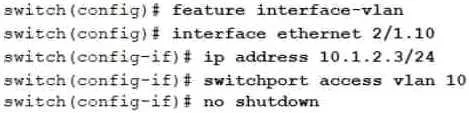
A network engineer needs to configure an SVI on a Cisco Nexus Series switch After configuring VLAN 10, which set of commands must the engineer enter, to complete the SVI configuration? A) B) C) D)
The correct answer is D. Option D. Completing an SVI on a Cisco Nexus switch requires entering the VLAN interface, assigning an IP address, and issuing 'no shutdown' to activate it.
Question
A network engineer needs to configure an SVI on a Cisco Nexus Series switch After configuring VLAN 10, which set of commands must the engineer enter, to complete the SVI configuration? A) B) C) D)
Exhibit
Options
- AOption A
- BOption B
- COption C
- DOption D
How the community answered
(31 responses)- A3% (1)
- B6% (2)
- C13% (4)
- D77% (24)
Why each option
Completing an SVI on a Cisco Nexus switch requires entering the VLAN interface, assigning an IP address, and issuing 'no shutdown' to activate it.
Option A is missing a required step - either the IP address assignment or 'no shutdown' - which prevents the SVI from becoming fully operational.
Option B uses incorrect command syntax or omits a necessary configuration element such as the IP address or the 'no shutdown' command.
Option C does not include all mandatory steps needed to both address and activate the SVI interface on the Nexus switch.
Option D provides the full required sequence: 'interface vlan 10' to create the logical SVI, an 'ip address' command with a valid subnet mask, and 'no shutdown' to bring the interface out of its default administratively down state. Omitting any of these three steps leaves the SVI either unconfigured or non-operational.
Concept tested: SVI configuration on Cisco Nexus switches
Source: https://www.cisco.com/c/en/us/td/docs/switches/datacenter/nexus7000/sw/interfaces/config/cisco_nexus7000_interfaces_config_guide_8x/cisco_nexus7000_interfaces_config_guide_8x_chapter_0101.html
Topics
Community Discussion
No community discussion yet for this question.