
200-150 · Question #100
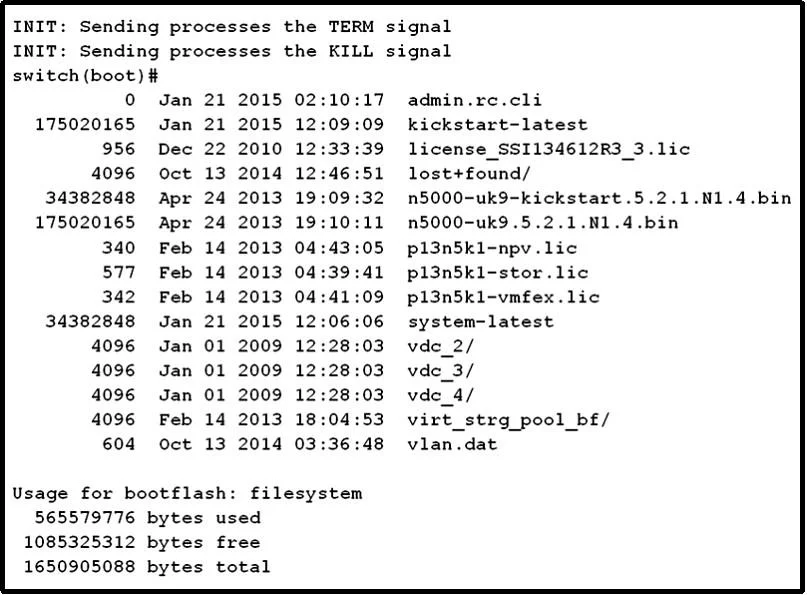
Refer to the exhibit. Which command allows the Cisco Nexus 5000 switch to continue to start up?
The correct answer is A. switch(boot)# load n5000-uk9.5.2.1.N1.4.bin. At the Nexus 5000 boot prompt after kickstart has already loaded, the 'load' command with the system image filename is required to load the full NX-OS system software and continue startup.
Question
Refer to the exhibit. Which command allows the Cisco Nexus 5000 switch to continue to start up?
Exhibit
Options
- Aswitch(boot)# load n5000-uk9.5.2.1.N1.4.bin
- Bswitch(boot)# configure terminalswitch(boot-config)# admin-password Cisco123
- Cswitch(boot)# load n5000-uk9-kickstart.5.2.1.N1.4.bin
- Dswitch(boot)# load system-latest
How the community answered
(34 responses)- A74% (25)
- B9% (3)
- C15% (5)
- D3% (1)
Why each option
At the Nexus 5000 boot prompt after kickstart has already loaded, the 'load' command with the system image filename is required to load the full NX-OS system software and continue startup.
'switch(boot)# load n5000-uk9.5.2.1.N1.4.bin' is the correct command issued from the kickstart environment to load the NX-OS system image, which contains the full feature set and completes the two-stage boot process. The 'uk9' system image (as opposed to the kickstart image) provides the complete NX-OS operating environment. Without this step, the switch remains in the limited kickstart shell and cannot function normally.
Using 'configure terminal' to set an admin password at the boot prompt does not load the system image and will not allow the switch to complete its normal startup sequence.
The kickstart image ('n5000-uk9-kickstart') has already been loaded to reach the boot prompt - issuing 'load' with the kickstart filename again is redundant and does not load the required system image.
'load system-latest' is not valid syntax at the Nexus 5000 boot prompt - the system image must be referenced by its explicit filename rather than a generic alias.
Concept tested: Nexus 5000 boot prompt system image load command
Source: https://www.cisco.com/c/en/us/td/docs/switches/datacenter/nexus5000/sw/troubleshooting/guide/N5K_Troubleshooting_Guide/N5K_Troubleshooting_Guide_chapter_01010.html
Topics
Community Discussion
No community discussion yet for this question.