
Oracle
1Z0-450 · Question #14
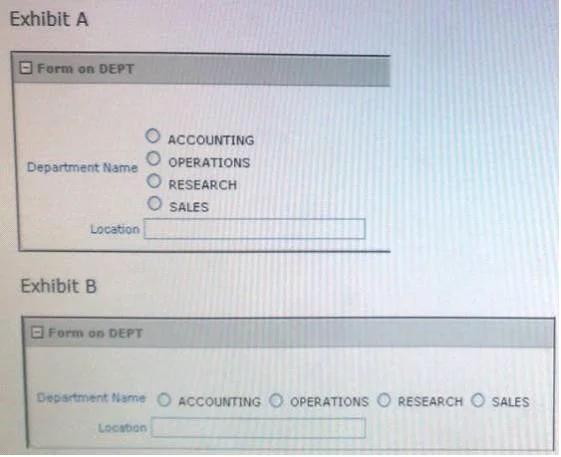
There are four departments listed as radio group, appearing one below the other in a form (View Exhibit A). You want to edit the item attributes so that they appear as shown in Exhibit B…
Sign in or unlock 1Z0-450 to reveal the answer and full explanation for question #14. The question stem and answer options stay visible for context.
Question
There are four departments listed as radio group, appearing one below the other in a form (View Exhibit A). You want to edit the item attributes so that they appear as shown in Exhibit B (horizontally, next to each other). Which action would you take to satisfy this requirement?
Exhibit
Options
- AChange "Begin on new Line" attribute of radio group to No and set "Begin on New Field" attribute to
- BChange "Begin on new Line" attribute of radio group to Yes and set "Begin on New field" attribute to
- CChange "Begin on new Line" attribute of radio group to No and set "Begin on New field" attribute to
- DEdit the List of Values section for the item.
- EEdit the List of Values In Shared Components.
Unlock 1Z0-450 to see the answer
You've previewed enough free 1Z0-450 questions. Unlock 1Z0-450 for full answers, explanations, the timed quiz mode, progress tracking, and the master PDF. Question stem and options stay visible so you can still see what's on the exam.