
1Y0-201 · Question #82
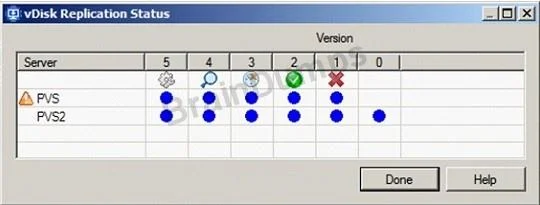
Scenario: A Citrix Administrator needs to replicate a vDisk between two production Provisioning Services servers named PVS and PVS2. The Replication Status dialog box shows an orange warning signal…
The correct answer is C. The Provisioning Services server does NOT have access to one of the vDisk locations. An orange warning in the Citrix PVS Replication Status dialog indicates that a Provisioning Services server cannot access one of the configured vDisk store locations, which prevents successful replication.
Question
Scenario: A Citrix Administrator needs to replicate a vDisk between two production Provisioning Services servers named PVS and PVS2. The Replication Status dialog box shows an orange warning signal with a message. Click on the Exhibit button to view the dialog box. What could be the cause of this issue?
Exhibit
Options
- AThe SOAP service is NOT running on the PVS server.
- BThe server time is NOT configured correctly on the PVS and PVS2 servers.
- CThe Provisioning Services server does NOT have access to one of the vDisk locations.
- DThe network card configurations on the PVS server do NOT match the configurations on the
How the community answered
(44 responses)- A7% (3)
- B16% (7)
- C73% (32)
- D5% (2)
Why each option
An orange warning in the Citrix PVS Replication Status dialog indicates that a Provisioning Services server cannot access one of the configured vDisk store locations, which prevents successful replication.
If the SOAP service were not running on PVS, the Provisioning Services console would be unable to communicate with that server entirely, producing a connectivity error rather than a replication-specific orange warning.
Incorrect server time can affect Kerberos authentication and certificate validation but does not directly cause the orange replication warning, which is specifically tied to vDisk store accessibility.
The orange warning signal in the Replication Status dialog specifically indicates that a Provisioning Services server does not have read or write access to a vDisk store path, blocking replication from completing. This access issue can be caused by missing share permissions, an incorrect store path configured on one of the servers, or a network connectivity problem to the shared storage location. Verifying that both PVS and PVS2 have the correct permissions and valid network paths to the shared vDisk store resolves the warning condition.
Mismatched network card configurations would cause broader network connectivity problems affecting all traffic rather than the specific vDisk store access failure indicated by the orange replication warning.
Concept tested: Citrix PVS vDisk replication store access requirements
Source: https://docs.citrix.com/en-us/provisioning/current-release/manage/managing-vdisks/vdisks-replication.html
Topics
Community Discussion
No community discussion yet for this question.