
000-221 · Question #95
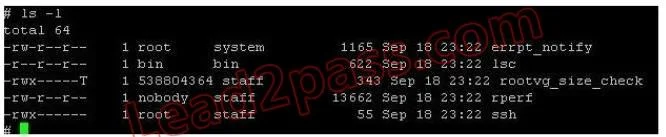
An administrator has logged in as root but is unable to run the ksh script named rperf. Given the following information, how could this be fixed?
The correct answer is D. Change the permissions to 700. A root user unable to execute a script is caused by the execute permission bit not being set on the file, which is resolved by setting permissions to 700.
Question
An administrator has logged in as root but is unable to run the ksh script named rperf. Given the following information, how could this be fixed?
Exhibit
Options
- AChange the parent directory to be executable
- BChange the owner of the script to root
- CChange the file to be of extension ksh
- DChange the permissions to 700
How the community answered
(63 responses)- A3% (2)
- B10% (6)
- C6% (4)
- D81% (51)
Why each option
A root user unable to execute a script is caused by the execute permission bit not being set on the file, which is resolved by setting permissions to 700.
Parent directory execute permission controls the ability to traverse or search the directory, not to execute files within it; the script file itself must have the execute bit set.
Changing ownership to root is irrelevant when already running as root and does not address missing execute permissions on the file.
AIX and Linux do not use file extensions to determine executability; only the execute permission bit in the inode controls whether a file can be run.
Setting permissions to 700 (rwx------) grants the file owner read, write, and execute permissions, which is the minimum required for the owner to run the script directly. In AIX and Linux, the execute bit must be explicitly set on a file - even root cannot invoke a script by name without it, though root can bypass read/write restrictions.
Concept tested: AIX file execute permissions and chmod
Source: https://www.ibm.com/docs/en/aix/7.3?topic=c-chmod-command
Topics
Community Discussion
No community discussion yet for this question.