nerdexam
IBM

000-221 · Question #42

The AIX hosts node1 and node2 have Ethernet adapters, both named ent0, configured on the same network. Both are dedicated physical 1GB adapter ports in a Host Ethernet Adapter. Based on this…

The correct answer is D. The media speed is set differently on the adapters than the endpoints on the switch. A speed or duplex mismatch between the physical adapter ports and the connected switch endpoints causes intermittent errors and degraded throughput.

Troubleshooting and Problem Determination

Question

The AIX hosts node1 and node2 have Ethernet adapters, both named ent0, configured on the same network. Both are dedicated physical 1GB adapter ports in a Host Ethernet Adapter. Based on this information and the output shown for each node, what is the most likely cause of intermittent failures and slow communication between these adapters?

Exhibit
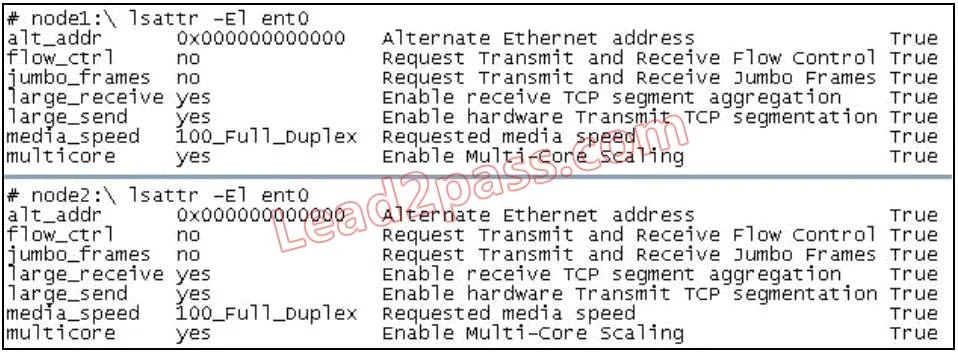
000-221 question #42 exhibit

Options

  • AThe jumbo_frarnes setting is 'no' and should be set to 'yes'.
  • BThe Multi-Core Scaling mode is enabled. Multi-Core Scaling is interfering with communications because
  • CThe Shared Ethernet Adapter does not have enough bandwidth to accommodate the network traffic.
  • DThe media speed is set differently on the adapters than the endpoints on the switch.

How the community answered

(45 responses)
  • A
    2% (1)
  • B
    4% (2)
  • C
    11% (5)
  • D
    82% (37)

Why each option

A speed or duplex mismatch between the physical adapter ports and the connected switch endpoints causes intermittent errors and degraded throughput.

AThe jumbo_frarnes setting is 'no' and should be set to 'yes'.

Jumbo frames being disabled would restrict maximum frame size consistently but would not produce intermittent failures or errors between two adapters on the same network.

BThe Multi-Core Scaling mode is enabled. Multi-Core Scaling is interfering with communications because

Multi-Core Scaling is a receive-side scaling performance feature; it distributes interrupt processing across cores and does not cause link-level communication failures.

CThe Shared Ethernet Adapter does not have enough bandwidth to accommodate the network traffic.

The question explicitly states these are dedicated physical 1GB adapter ports, not a Shared Ethernet Adapter, so SEA bandwidth contention is not applicable.

DThe media speed is set differently on the adapters than the endpoints on the switch.Correct

When one side of a link is hard-coded to a specific speed or duplex mode while the other auto-negotiates, the resulting mismatch produces late collisions, CRC errors, and packet loss that manifest as intermittent failures and slow communication. Because both adapters are dedicated 1GB physical ports on a Host Ethernet Adapter, the most common cause of this symptom profile is inconsistent media speed or duplex configuration between the adapters and their respective switch ports.

Concept tested: Ethernet speed and duplex mismatch diagnosis

Source: https://www.ibm.com/docs/en/aix/7.3?topic=adapters-ethernet-adapter-configuration

Topics

#Ethernet adapter#media speed mismatch#network troubleshooting#Host Ethernet Adapter

Community Discussion

No community discussion yet for this question.

Full 000-221 Practice