
000-221 · Question #179
Assuming the pdumplv device is in a volume group with a 64 MB pp size, how can the following error report entry be resolved?
The correct answer is A. extendlv pdumplv 1. When a dump logical volume is too small to hold a system dump, it must be extended using extendlv to add physical partitions, each adding 64 MB given the volume group's PP size.
Question
Assuming the pdumplv device is in a volume group with a 64 MB pp size, how can the following error report entry be resolved?
Exhibit
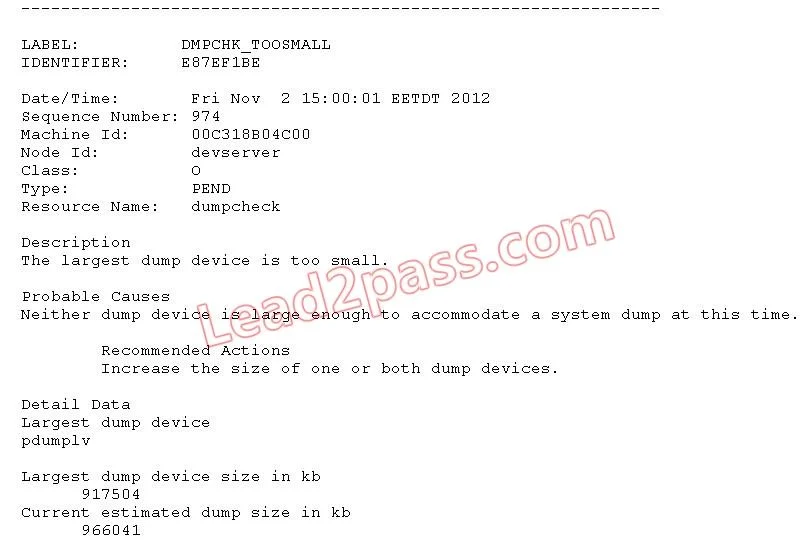
Options
- Aextendlv pdumplv 1
- Bchfs -a size=+1 pdumplv
- Cchiv -a size=+1 pdumplv
- Dsysdumpdev -i pdumplv 1
How the community answered
(23 responses)- A83% (19)
- B4% (1)
- C9% (2)
- D4% (1)
Why each option
When a dump logical volume is too small to hold a system dump, it must be extended using extendlv to add physical partitions, each adding 64 MB given the volume group's PP size.
The extendlv pdumplv 1 command increases pdumplv by 1 physical partition, which equals 64 MB given the volume group's configured PP size, directly resolving an insufficient dump space error. extendlv is the correct AIX command for growing a raw logical volume that has no associated filesystem. This gives the system dump device enough capacity to write a complete dump on the next system failure.
chfs modifies attributes of a JFS or JFS2 filesystem, but pdumplv is a raw logical volume used as a dump device with no filesystem, so chfs cannot operate on it.
chiv is not a valid AIX command and has no function for extending a logical volume or adjusting dump device capacity.
sysdumpdev manages dump device configuration such as designating primary and secondary devices, but it does not resize the underlying logical volume to add storage capacity.
Concept tested: Extending AIX dump logical volume with extendlv
Source: https://www.ibm.com/docs/en/aix/7.2?topic=e-extendlv-command
Topics
Community Discussion
No community discussion yet for this question.