
IBM
000-221 · Question #160
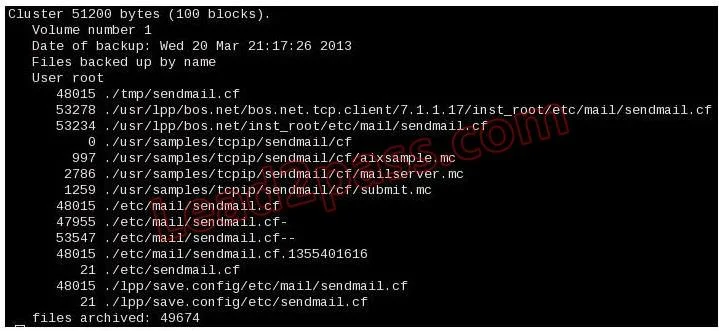
An administrator is attempting to recover the sendmail.cf file from the weekly mksysb backup. The following output confirms that the file does exist within the mksysb backup: Why would the following…
Sign in or unlock 000-221 to reveal the answer and full explanation for question #160. The question stem and answer options stay visible for context.
Troubleshooting and Problem Determination
Question
An administrator is attempting to recover the sendmail.cf file from the weekly mksysb backup. The following output confirms that the file does exist within the mksysb backup:
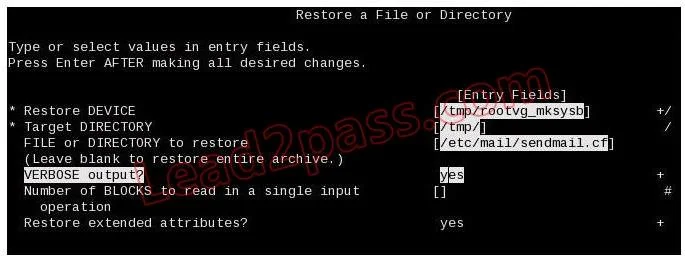
Why would the following smitty panel fail to find and restore the required file?
Exhibits
Options
- AThe target directory must match the source directory
- B/etc/mail/sendmail.cf is a symbolic link to /etc/sendmail.cf
- CExtended attributes should not be restored for a symbolic link
- DThe file to restore must be correctly delimited relative to the backup
Unlock 000-221 to see the answer
You've previewed enough free 000-221 questions. Unlock 000-221 for full answers, explanations, the timed quiz mode, progress tracking, and the master PDF. Question stem and options stay visible so you can still see what's on the exam.
Topics
#mksysb restore#file path delimiter#smit restore#backup recovery