
XK0-005 · Question #1790
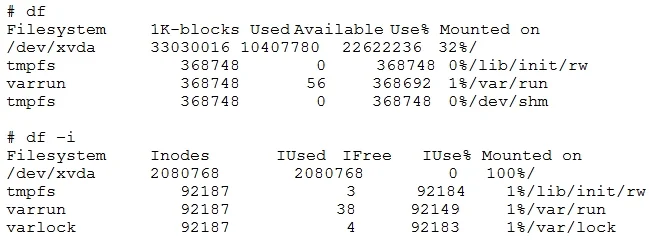
An administrator has received multiple tickets relating to a lack of a disk space on a few servers, but the percentage of disk space usage is below the threshold. The following shows further…
The correct answer is A. find . -xdev -type f | cut -d "/" -f 2 | sort | uniq -c | sort -n. A lack of disk space despite low percentage usage usually indicates inode exhaustion, often caused by an excessive number of small files.
Question
Exhibit
Options
- Afind . -xdev -type f | cut -d "/" -f 2 | sort | uniq -c | sort -n
- Bfind . -xdev -type p | cut -d "/" -f 2 | sort | uniq -c | sort -n
- Cfind . -xdev -type s | cut -d "/" -f 2 | sort | uniq -c | sort -n
- Dfind . -xdev -type d | cut -d "/" -f 2 | sort | uniq -c | sort -n
How the community answered
(44 responses)- A73% (32)
- B5% (2)
- C7% (3)
- D16% (7)
Why each option
A lack of disk space despite low percentage usage usually indicates inode exhaustion, often caused by an excessive number of small files.
The issue described, 'lack of disk space' despite low percentage usage, often points to an exhaustion of inodes rather than disk blocks, which occurs when there are an excessive number of small files. The `find . -xdev -type f` command specifically searches for regular files (`-type f`) within the current filesystem (`-xdev`), and the subsequent piping to `cut`, `sort`, `uniq -c`, and `sort -n` counts and displays the number of files per top-level directory, helping identify where these numerous files reside.
`find . -xdev -type p` searches for named pipes, which are special files and not the common cause of inode exhaustion issues related to general disk space.
`find . -xdev -type s` searches for sockets, another type of special file not commonly responsible for filling up inodes in the scenario described.
`find . -xdev -type d` searches for directories; while directories consume inodes, the problem typically lies with an abundance of regular files within them, not the directories themselves.
Concept tested: Linux file system troubleshooting, inode exhaustion
Source: https://man7.org/linux/man-pages/man1/find.1.html
Topics
Community Discussion
No community discussion yet for this question.