
VCP510 · Question #3
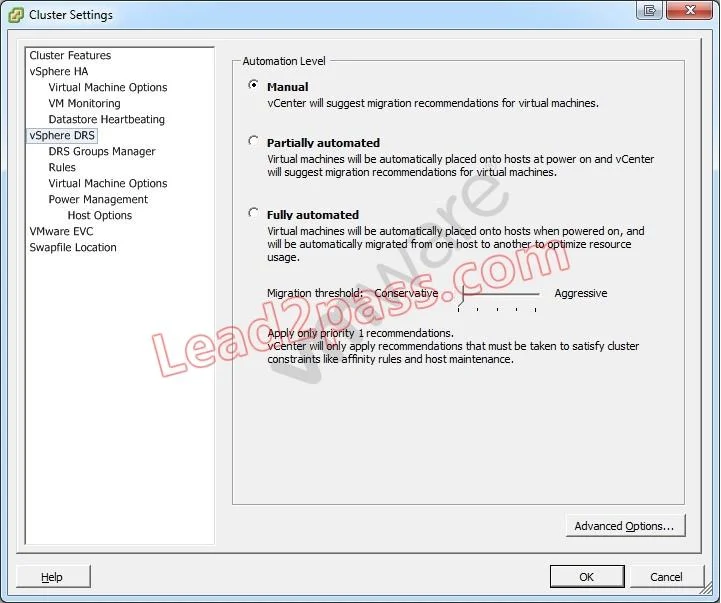
Click the Exhibit button. An administrator is applying patches to a batch of ESXi 5.x hosts in an under-allocated HA/DRS cluster. An attempt is made to place the host into maintenance mode, but the…
The correct answer is B. Set the virtual machines on the host to Fully Automated. C. Shut down the virtual machines on the host. Set the virtual machines on the host to fully automated. This way they will be automatically placed onto hosts at power on and vCenter will suggest migration recommendations. Next, shut down the virtual machines on the host to resolve the progress that has stalled at 2%.
Question
Click the Exhibit button. An administrator is applying patches to a batch of ESXi 5.x hosts in an under-allocated HA/DRS cluster. An attempt is made to place the host into maintenance mode, but the progress has stalled at 2%. DRS is configured as shown in the exhibit. Of the four choices below, two would effectively resolve this issue. Which two steps could be taken to correct the problem? (Choose two.)
Exhibit
Options
- AEnable VMware EVC.
- BSet the virtual machines on the host to Fully Automated.
- CShut down the virtual machines on the host.
- DMove the virtual machine swap file off the local datastore.
How the community answered
(42 responses)- A14% (6)
- B81% (34)
- D5% (2)
Explanation
Set the virtual machines on the host to fully automated. This way they will be automatically placed onto hosts at power on and vCenter will suggest migration recommendations. Next, shut down the virtual machines on the host to resolve the progress that has stalled at 2%.
Topics
Community Discussion
No community discussion yet for this question.