
Broadcom-VMware
VCP510 · Question #287
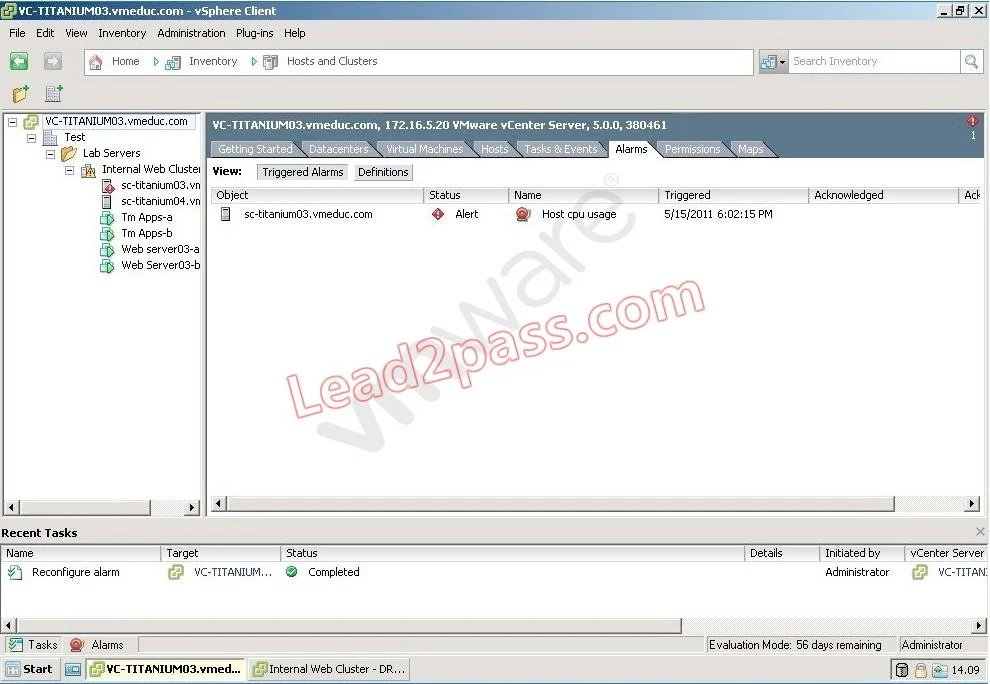
Click the Exhibit button. Users are having difficulty accessing a Web server since a new Web application was configured in a virtual machine running on sc-titanium03.vmeduc.com. The web server has…
The correct answer is A. Set a CPU reservation for the web server VM. 50/index.jsp?topic=%2Fcom.vmware.vsphere.vm_admin.doc_50%2FGUID-6C9023B2-3A8F- 48EB-8A36-44E3D14958F6.html
Perform Basic Troubleshooting
Question
Click the Exhibit button. Users are having difficulty accessing a Web server since a new Web application was configured in a virtual machine running on sc-titanium03.vmeduc.com. The web server has been assigned 1 vCPU. The vSphere Client reports the error shown in the exhibit. DRS is set to fully automated mode, but the problem has not resolved. Which action can resolve the issue?
Exhibit
Options
- ASet a CPU reservation for the web server VM.
- BManually move the Virtual Machine using high priority vMotion.
- CConfigure the DRS Migration Threshold to Aggressive.
- DSet CPU affinity for the virtual machine.
How the community answered
(43 responses)- A74% (32)
- B2% (1)
- C16% (7)
- D7% (3)
Explanation
50/index.jsp?topic=%2Fcom.vmware.vsphere.vm_admin.doc_50%2FGUID-6C9023B2-3A8F- 48EB-8A36-44E3D14958F6.html
Topics
#DRS#CPU reservation#resource contention#fully automated mode
Community Discussion
No community discussion yet for this question.