
SY0-501 · Question #21
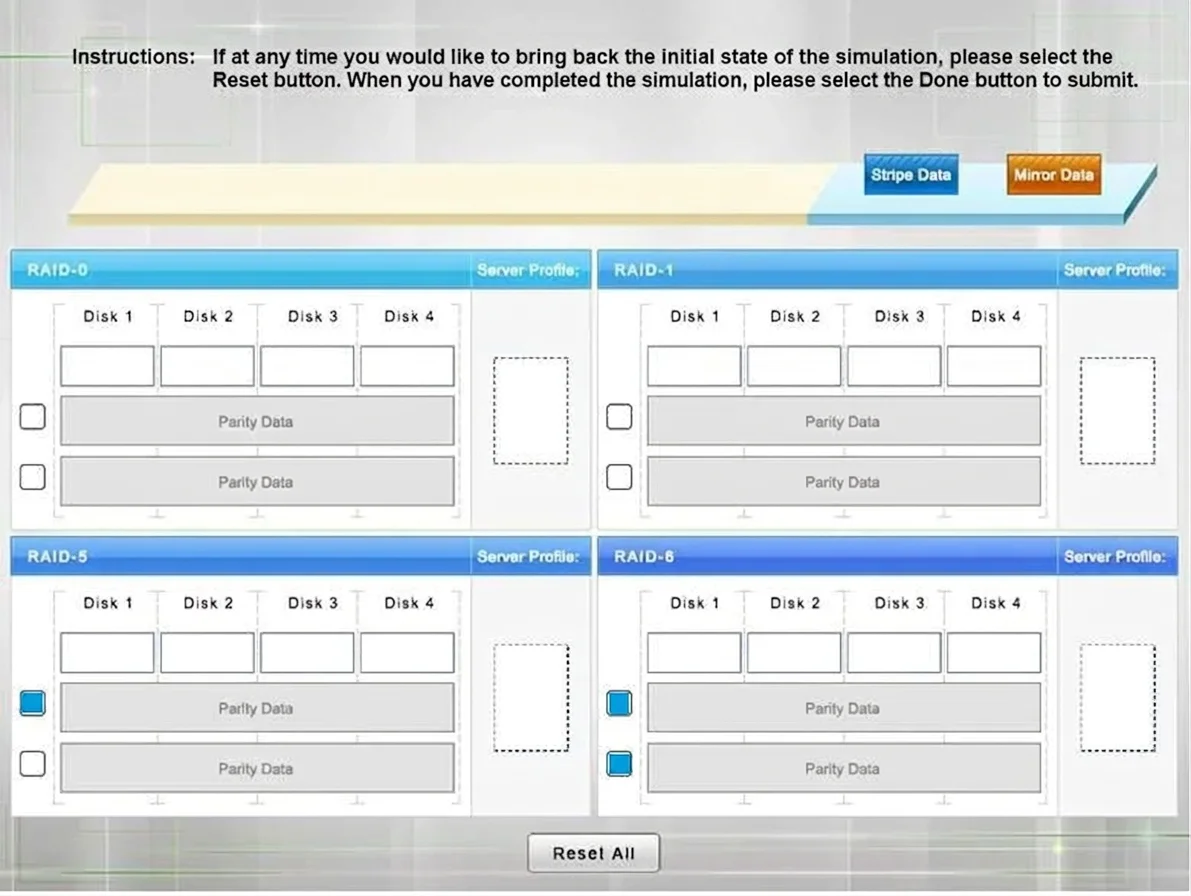
Drag and Drop Question A security administrator is given the security and availability profiles for servers that are being deployed. 1) Match each RAID type with the correct configuration and…
RAID Configuration Exam Question - Full Explanation Overall Goal This question tests whether you understand how RAID (Redundant Array of Independent Disks) types differ in fault tolerance, performance, storage efficiency, and minimum hardware requirements - and whether you can…
Question
Exhibits
Explanation
RAID Configuration Exam Question - Full Explanation
Overall Goal
This question tests whether you understand how RAID (Redundant Array of Independent Disks) types differ in fault tolerance, performance, storage efficiency, and minimum hardware requirements - and whether you can match real-world server roles to the RAID type that best fits their operational demands.
Part 1: RAID Type Configurations
RAID-0 - Striping
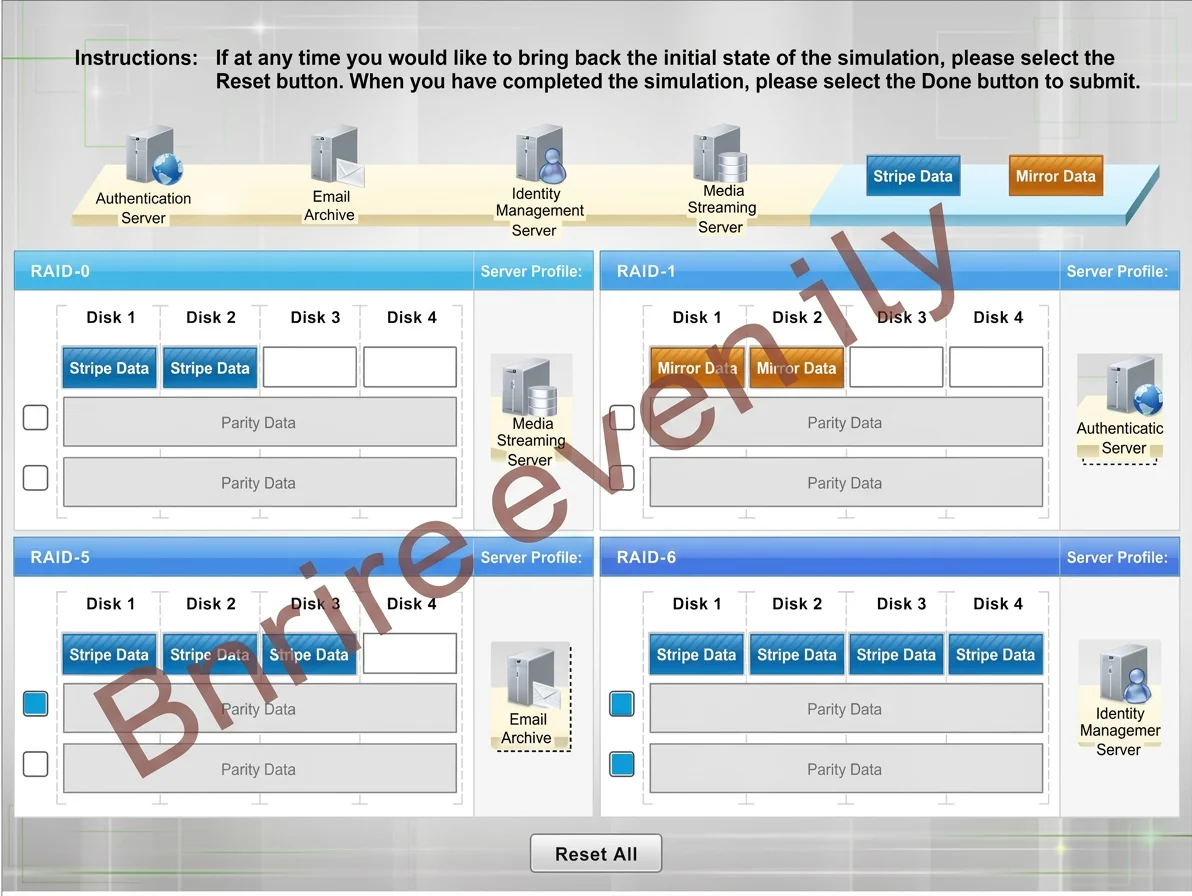
- Drive definitions: Striping Data (on every drive)
- Minimum drives: 2
- Parity: None
- How it works: Data is split ("striped") across all drives simultaneously. No redundancy exists.
- Trade-offs: Fastest read/write speeds, but zero fault tolerance - losing one drive destroys all data.
RAID-1 - Mirroring
- Drive definitions: Mirror Data (identical copy on each drive)
- Minimum drives: 2
- Parity: None
- How it works: Every write goes to both drives simultaneously. One drive is an exact duplicate.
- Trade-offs: Excellent availability and integrity. Storage efficiency is 50% (you pay for 2 drives, get 1 usable). Read speeds can be doubled; write speeds are the same as a single drive.
RAID-5 - Striping with Single Parity
- Drive definitions: Striping Data + 1 Parity block (distributed)
- Minimum drives: 3
- Parity: 1 checkbox selected
- How it works: Data is striped across drives, and a calculated parity block is distributed across all drives. If one drive fails, the parity allows full data reconstruction.
- Trade-offs: Good balance of performance, capacity, and fault tolerance. Can survive 1 drive failure. Usable capacity = (n-1) drives.
RAID-6 - Striping with Double Parity
- Drive definitions: Striping Data + 2 Parity blocks (distributed)
- Minimum drives: 4
- Parity: 2 checkboxes selected
- How it works: Like RAID-5 but with two independent parity calculations. Can reconstruct data even if 2 drives fail simultaneously.
- Trade-offs: Highest fault tolerance of the four types. Usable capacity = (n-2) drives. Slower writes than RAID-5 due to double parity overhead.
Part 2: Server Profile Matching
| Server Profile | Best RAID | Reasoning |
|---|---|---|
| Media Streaming Server | RAID-0 | Requires maximum I/O throughput (streaming video/audio). Availability is not mission-critical; content can be re-fetched or re-encoded. Striping maximizes sequential read/write speed. |
| Authentication Server | RAID-1 | Availability and integrity are paramount - users cannot log in if this server is down. RAID-1's mirroring provides instant failover with zero data loss. Storage needs are modest (auth data is small). |
| Email Archive | RAID-5 | Requires large storage capacity (archiving years of email) and reasonable fault tolerance. RAID-5 gives the best balance: good capacity efficiency with protection against a single drive failure. |
| Identity Management Server | RAID-6 | The most availability- and integrity-critical server. Identity stores (directory services, certificates, credentials) cannot be offline or corrupted. RAID-6 survives 2 simultaneous drive failures, making it the highest-resilience option. |
Step-by-Step Reasoning
Step 1 - Assign drive definitions to each RAID type
Why necessary: Each RAID type has a fundamentally different data layout. Assigning the wrong definition (e.g., putting "Mirror" on RAID-5) demonstrates a conceptual misunderstanding. Striping, mirroring, and parity are mutually exclusive mechanisms.
If skipped: You cannot correctly evaluate how each RAID handles failure, which makes server matching guesswork.
Step 2 - Set the minimum drive count
Why necessary: Minimum drive counts are architectural constraints, not preferences. RAID-5 cannot function with 2 drives (no room to distribute parity). RAID-6 cannot function with 3 drives.
If done wrong: The RAID array is physically impossible to construct, or you may confuse RAID-5 and RAID-6 in the server matching phase.
Step 3 - Select parity checkboxes for RAID-5 and RAID-6
Why necessary: Parity is what enables fault tolerance in RAID-5/6. Selecting 1 vs. 2 parity blocks directly maps to surviving 1 vs. 2 drive failures - a critical distinction for availability requirements.
If skipped: You conflate RAID-5 and RAID-6, making it impossible to correctly justify why the Identity Management Server needs RAID-6 over RAID-5.
Step 4 - Review each server profile's requirements
Why necessary: Server profiles encode four dimensions - integrity (no data corruption), availability (uptime), I/O (throughput/IOPS), and storage (capacity needs). You must weigh all four, not just one.
If skipped: You might assign RAID-0 to the authentication server just because it's "fast," ignoring that a single drive failure would lock out every user in the organization.
Step 5 - Drag server profiles to matching RAID types
Why necessary: This is the synthesis step. It validates that you can apply theoretical knowledge to practical scenarios - the core skill of a security administrator evaluating infrastructure.
Order matters: You must complete Part 1 first. If you don't know what RAID-6 is, you cannot recognize that the Identity Management Server needs it.
Memory Tips
RAID-0: "Zero redundancy, zero mercy" - fast but fragile.
RAID-1: "One mirror, one backup" - safety first, storage halved.
RAID-5: "Five feels alive" - the workhorse, survives 1 failure, needs 3+ drives.
RAID-6: "Six survives six feet under" - survives 2 failures, needs 4+ drives, for critical systems.
Server matching shortcut:
- Streaming -> Speed -> RAID-0
- Auth -> Always up -> RAID-1
- Archive -> Big + safe -> RAID-5
- Identity -> Never fail -> RAID-6
Topics
Community Discussion
No community discussion yet for this question.