
SC-900 · Question #185
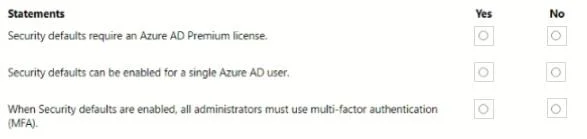
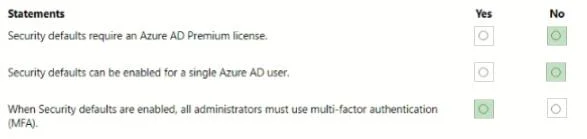
Hotspot Question For each of the following statements, select Yes if the statement is true. Otherwise, select No. NOTE: Each correct selection is worth one point. Answer: Which three forms of…
The correct answer is B. the Microsoft Authenticator app C. SMS messages E. Windows Hello for Business. Microsoft Entra MFA Verification Methods Correct Answers: B, C, E --- A - Security Questions → NO Security questions are not a supported MFA method in Microsoft Entra. They are exclusively a Self-Service Password Reset (SSPR) mechanism. Microsoft explicitly excludes them from…
Question
Hotspot Question For each of the following statements, select Yes if the statement is true. Otherwise, select No. NOTE: Each correct selection is worth one point. Answer:
Which three forms of verification can be used with Microsoft Entra Multi-Factor Authentication (MFA)? Each correct answer presents a complete solution. NOTE: Each correct answer is worth one point.
Exhibits
Options
- Asecurity questions
- Bthe Microsoft Authenticator app
- CSMS messages
- Da smart card
- EWindows Hello for Business
How the community answered
(29 responses)- A3% (1)
- B86% (25)
- D10% (3)
Explanation
Microsoft Entra MFA Verification Methods
Correct Answers: B, C, E
A - Security Questions → NO
Security questions are not a supported MFA method in Microsoft Entra. They are exclusively a Self-Service Password Reset (SSPR) mechanism. Microsoft explicitly excludes them from MFA because they are considered too weak (answers can be guessed or socially engineered).
B - Microsoft Authenticator App → YES
This is the primary recommended MFA method. It supports:
- Push notifications (approve/deny)
- Passwordless phone sign-in
- OATH time-based one-time passwords (TOTP)
C - SMS Messages → YES
SMS-based one-time codes are a supported Entra MFA factor. The user receives a 6-digit code via text. It's considered weaker than the Authenticator app (SIM-swapping risk) but is still an officially supported method.
D - Smart Card → NO
Smart cards use certificate-based authentication (CBA), which functions as a primary authentication method, not a standard MFA second factor in the Entra MFA framework. While CBA can satisfy MFA requirements in advanced configurations, it is not listed as one of the core MFA verification options.
E - Windows Hello for Business → YES
Windows Hello for Business uses biometrics or a device-bound PIN and is a fully supported Entra MFA method. It satisfies MFA because it combines something you have (the registered device) with something you are/know (biometric/PIN).
Memory Tip
"MFA = something you HAVE or ARE - not something you KNOW from memory"
- Security questions = pure knowledge = SSPR only, not MFA
- Smart card = primary auth, not a second factor
- Authenticator app, SMS, Windows Hello = all involve a device or biometric you physically possess or embody → valid MFA
Topics
Community Discussion
No community discussion yet for this question.