
SC-401 · Question #88
You have a Microsoft 365 alert named Alert2 as shown in the following exhibit. You need to manage the status of Alert2. To which status can you change Alert2?
The correct answer is E. Investigating, Active, or Dismissed. Despite status showing resolved it still can be changed. Select alert > Under Alert status > Actions > select "Edit comments" > choose new status: Active, Investigating, Dismissed or Resolved. Alert status will change Note: Alert status When an alert is created, its status is…
Question
You have a Microsoft 365 alert named Alert2 as shown in the following exhibit. You need to manage the status of Alert2. To which status can you change Alert2?
Exhibit
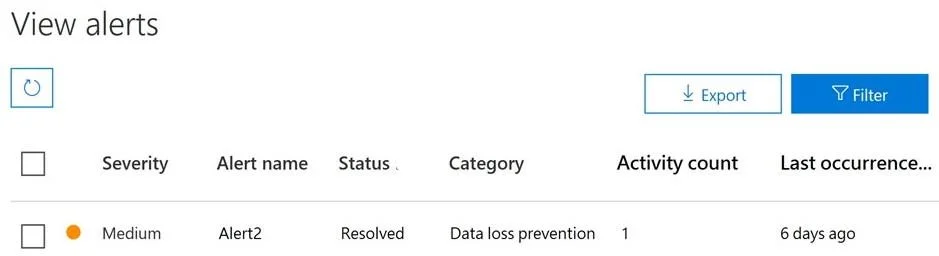
Options
- AThe status cannot be changed.
- BDismissed only
- CInvestigating only
- DActive or Investigating only
- EInvestigating, Active, or Dismissed
How the community answered
(31 responses)- B6% (2)
- C3% (1)
- E90% (28)
Explanation
Despite status showing resolved it still can be changed. Select alert > Under Alert status > Actions > select "Edit comments" > choose new status: Active, Investigating, Dismissed or Resolved. Alert status will change Note: Alert status When an alert is created, its status is Active. As you review the details of each alert, you can update its status to any of the states listed below: Active: default state of the alert until its status is changed Investigating: alert is under investigation Resolved: the alert doesn't require further investigation or follow-up Dismissed: the alert isn't relevant or doesn't need investigation https://learn.microsoft.com/en-us/purview/compliance-manager-alert-policies https://docs.microsoft.com/en-us/microsoft-365/compliance/dlp-configure-view-alerts-policies
Topics
Community Discussion
No community discussion yet for this question.