
SC-401 · Question #189
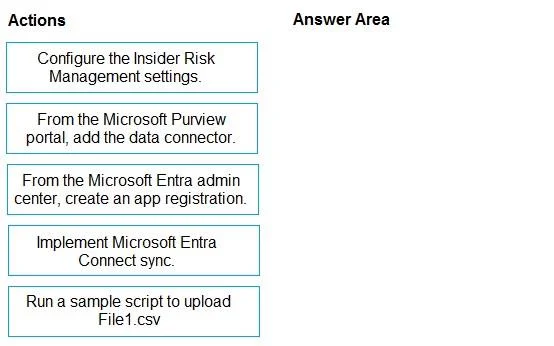
Drag and Drop Question You have a Microsoft 365 E5 subscription. You plan to implement Microsoft Purview Insider Risk Management. You obtain a file named File1.csv that contains employee resignation…
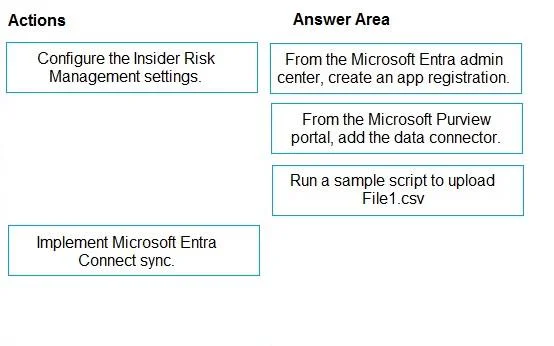
The correct answer is From the Microsoft Entra admin center, create an app registration.; From the Microsoft Purview portal, add the data connector.; Run a sample script to upload File1.csv. To implement an HR data connector and upload data for Microsoft Purview Insider Risk Management, the correct sequence involves creating an app registration, adding the data connector in Purview, and then running a script to upload the data.
Question
Exhibits
Answer Area
Drag items
Correct arrangement
- From the Microsoft Entra admin center, create an app registration.
- From the Microsoft Purview portal, add the data connector.
- Run a sample script to upload File1.csv
Explanation
To implement an HR data connector and upload data for Microsoft Purview Insider Risk Management, the correct sequence involves creating an app registration, adding the data connector in Purview, and then running a script to upload the data.
Approach. The correct sequence of actions to implement the HR data connector and upload File1.csv is as follows:
-
From the Microsoft Entra admin center, create an app registration. Many Microsoft Purview data connectors, including the HR data connector, require an Azure AD (now Microsoft Entra ID) app registration. This app registration provides the necessary authentication and authorization for the connector to securely interact with Microsoft 365 services and upload data programmatically.
-
From the Microsoft Purview portal, add the data connector. After creating the prerequisite app registration, the next step is to navigate to the Microsoft Purview compliance portal. Here, you will add and configure the specific HR data connector, linking it to the app registration created in the previous step. This establishes the connection point for ingesting HR data.
-
Run a sample script to upload File1.csv. With the HR data connector properly configured and active in the Microsoft Purview portal, the final step for data ingestion is to use the provided tools, typically a PowerShell script or a sample script, to upload the actual HR data (File1.csv) to the connector. This script will leverage the configured connector and app registration to securely transfer the data for processing by Insider Risk Management.
Common mistakes.
- common_mistake. The action 'Configure the Insider Risk Management settings.' is incorrect because while it is a crucial step for Insider Risk Management, it generally relates to setting up policies, indicators, and alerts, and comes after the data sources (like the HR data connector) are established or in parallel to define how the ingested data will be used. It is not part of the sequential process of implementing the connector and uploading data.
The action 'Implement Microsoft Entra Connect sync.' is incorrect because Microsoft Entra Connect sync is used for synchronizing on-premises Active Directory with Microsoft Entra ID (cloud directory). It has no relevance to the task of uploading HR resignation data from a CSV file to Microsoft Purview via a dedicated HR data connector. This option serves as a distractor by including 'Microsoft Entra' which might confuse test-takers who don't understand the specific purpose of Entra Connect sync versus app registrations for data connectors.
Concept tested. The core concept being tested is the understanding of the sequential steps required to set up and use a data connector in Microsoft Purview for Insider Risk Management, specifically the role of Microsoft Entra ID app registrations for authentication, the configuration of the connector in the Purview portal, and the final data ingestion process via scripting.
Reference. null
Topics
Community Discussion
No community discussion yet for this question.