
SC-300 · Question #86
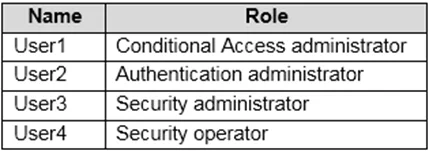
Hotspot Question You have an Azure Active Directory (Azure AD) tenant that contains the users shown in the following table. You plan to implement Azure AD Identity Protection. Which users can…
The correct answer is User1 can configure the user risk policy = Yes; User2 can configure the user risk policy = No; User3 can configure the user risk policy = Yes; User4 can configure the user risk policy = No; User1 can view the risky users report = No; User2 can view the risky users report = No; User3 can view the risky users report = Yes; User4 can view the risky users report = Yes. This question tests knowledge of Azure AD Identity Protection role-based access control, specifically which Azure AD roles have permissions to configure risk policies versus view risky users reports.
Question
Exhibits
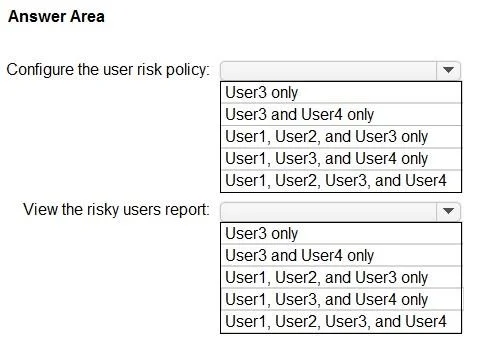
Answer Area
- User1 can configure the user risk policyYes
- User2 can configure the user risk policyNo
- User3 can configure the user risk policyYes
- User4 can configure the user risk policyNo
- User1 can view the risky users reportNo
- User2 can view the risky users reportNo
- User3 can view the risky users reportYes
- User4 can view the risky users reportYes
Explanation
This question tests knowledge of Azure AD Identity Protection role-based access control, specifically which Azure AD roles have permissions to configure risk policies versus view risky users reports.
Approach. Azure AD Identity Protection requires specific roles for different tasks. To CONFIGURE the user risk policy, a user needs the Security Administrator or Global Administrator role - standard Security Reader or other limited roles are insufficient for policy configuration. To VIEW the risky users report, roles including Security Administrator, Security Reader, Global Administrator, and Global Reader all have read access to Identity Protection reports. In a typical exam scenario with users assigned roles like Global Administrator, Security Administrator, and Security Reader: Global Admin and Security Admin can configure the user risk policy, while Global Admin, Security Admin, and Security Reader (plus Global Reader) can view the risky users report. The key distinction is that read-only roles (Security Reader, Global Reader) can VIEW reports but cannot CONFIGURE policies.
Concept tested. Azure AD Identity Protection role-based access control - understanding which roles (Global Administrator, Security Administrator, Security Reader, Global Reader) have permissions to configure risk policies versus viewing risky users/sign-in risk reports within Azure AD Identity Protection.
Topics
Community Discussion
No community discussion yet for this question.