
SC-300 · Question #366
SIMULATION Use the following login credentials as needed: To enter your username, place your cursor in the Sign in box and click on the username below. To enter your password, place your cursor in…
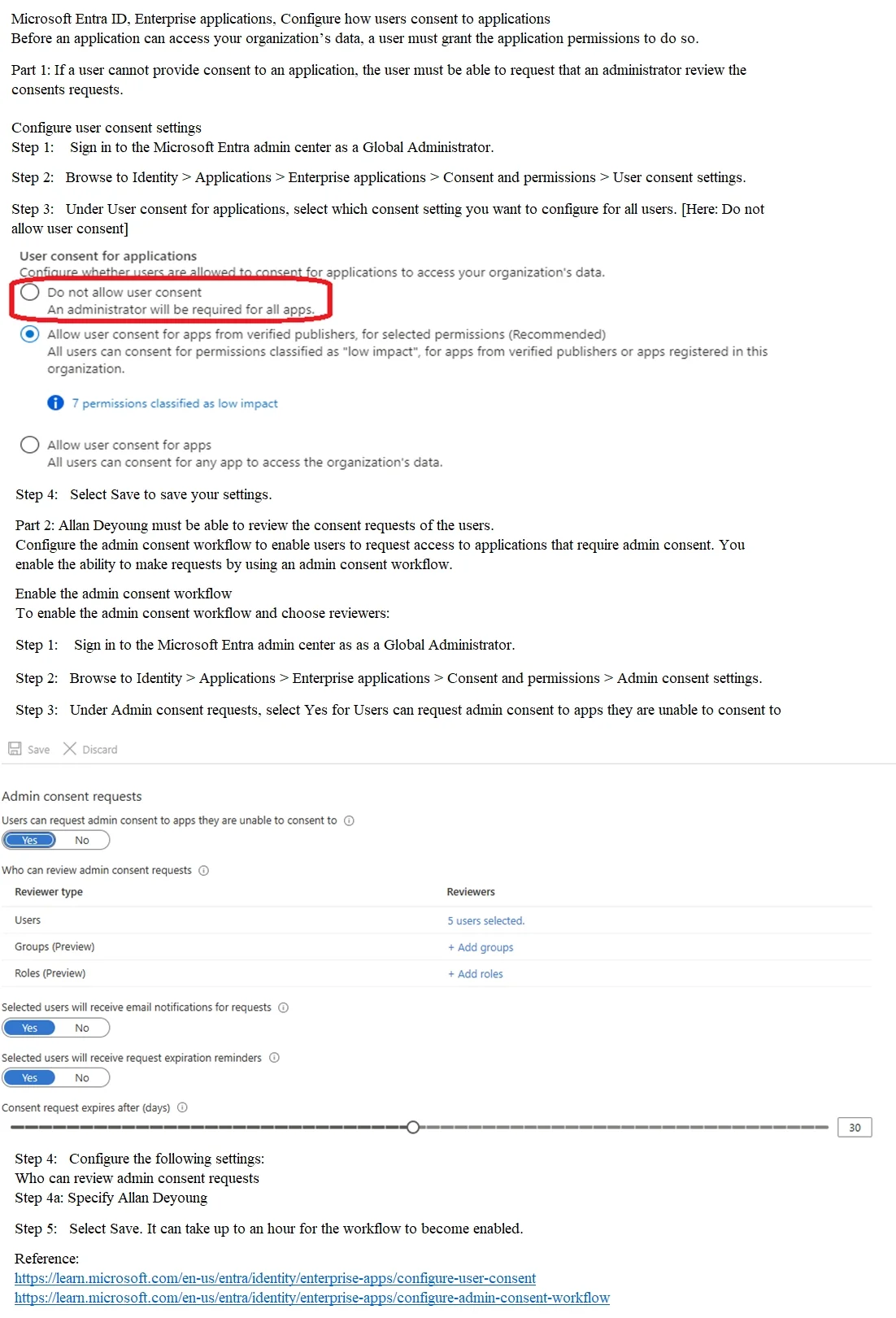
The correct solution requires navigating to the Microsoft Entra admin center (formerly Azure AD) under Identity > Applications > Enterprise Applications > Consent and Permissions > Admin Consent Settings. Here, you enable the 'Users can request admin consent to apps they are…
Question
SIMULATION Use the following login credentials as needed:
To enter your username, place your cursor in the Sign in box and click on the username below. To enter your password, place your cursor in the Enter password box and click on the password below. Microsoft 365 Username:[email protected] Microsoft 365 Password: =1122334455667788 If the Microsoft 365 portal does not load successfully in the browser, press CTRL-K to reload the portal in a new browser tab. The following information is for technical support purposes only:
Lab Instance: 99999999 You need to configure consent for applications that require access to data in the Microsoft 365 subscription. The solution must meet the following requirements:
If a user cannot provide consent to an application, the user must be able to request that an administrator review the consents requests. Allan Deyoung must be able to review the consent requests of the users. To complete this task, sign in to the appropriate admin center. Answer:
Exhibit
Explanation
The correct solution requires navigating to the Microsoft Entra admin center (formerly Azure AD) under Identity > Applications > Enterprise Applications > Consent and Permissions > Admin Consent Settings. Here, you enable the 'Users can request admin consent to apps they are unable to consent to' toggle to Yes, which satisfies the first requirement. Then you add Allan Deyoung as a designated reviewer in the 'Who can review admin consent requests' section, satisfying the second requirement - this ensures Allan receives notifications and can approve or deny user-submitted consent requests.
Topics
Community Discussion
No community discussion yet for this question.