
SC-300 · Question #342
SIMULATION Use the following login credentials as needed: To enter your username, place your cursor in the Sign in box and click on the username below. To enter your password, place your cursor in…
The correct approach is to create a Conditional Access policy in the Microsoft Entra admin center that blocks legacy authentication protocols for all users. By navigating to Protection > Conditional Access, creating a new policy, targeting all users, and setting the condition…
Question
SIMULATION Use the following login credentials as needed:
To enter your username, place your cursor in the Sign in box and click on the username below. To enter your password, place your cursor in the Enter password box and click on the password below. Microsoft 365 Username:[email protected] Microsoft 365 Password: =1122334455667788 If the Microsoft 365 portal does not load successfully in the browser, press CTRL-K to reload the portal in a new browser tab. The following information is for technical support purposes only:
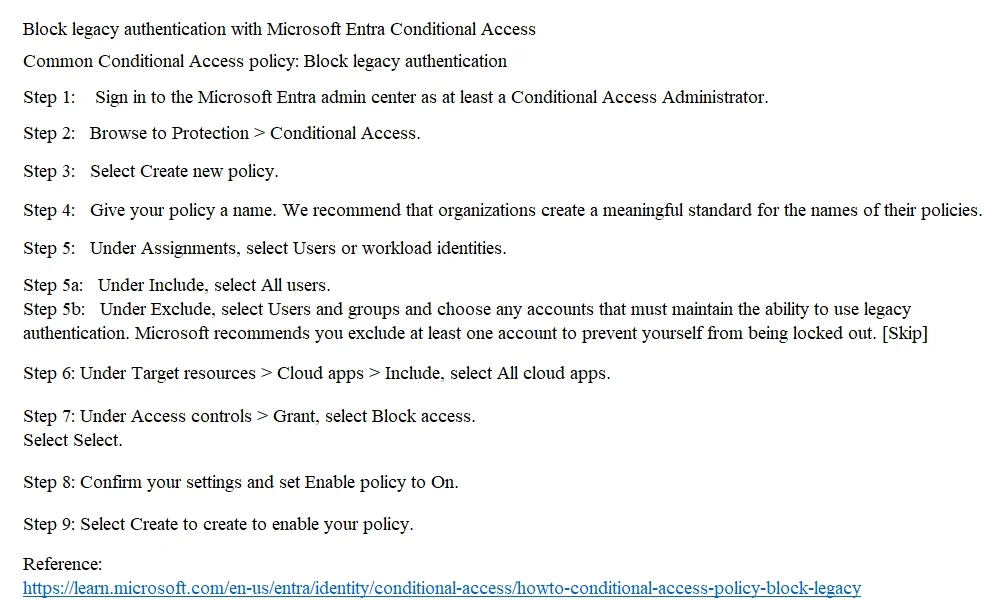
Lab Instance: 99999999 You need to prevent all users from using legacy authentication protocols when authenticating to Microsoft Entra ID. To complete this task, sign in to the appropriate admin center. Answer:
Exhibit
Explanation
The correct approach is to create a Conditional Access policy in the Microsoft Entra admin center that blocks legacy authentication protocols for all users. By navigating to Protection > Conditional Access, creating a new policy, targeting all users, and setting the condition to filter for legacy authentication clients (under 'Cloud apps or actions' > 'Conditions' > 'Client apps' selecting legacy authentication clients), then setting the Grant control to 'Block access', administrators can effectively prevent legacy protocols like POP, IMAP, SMTP, and basic authentication from being used. This method is the Microsoft-recommended approach as legacy authentication protocols do not support modern security features like Multi-Factor Authentication (MFA), making them a significant security vulnerability. Security Defaults can also block legacy authentication, but Conditional Access policies provide more granular control and are preferred in environments with Microsoft Entra ID P1 or P2 licensing.
Topics
Community Discussion
No community discussion yet for this question.