
SC-300 · Question #271
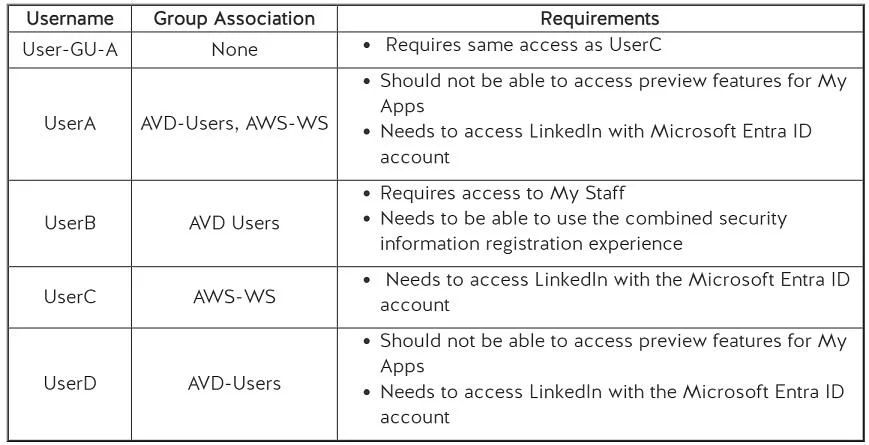
Hotspot Question Your company uses Microsoft Entra ID to manage user and guest access to its Microsoft 365 services. You have recently enabled Guest access to enable your users to collaborate with…
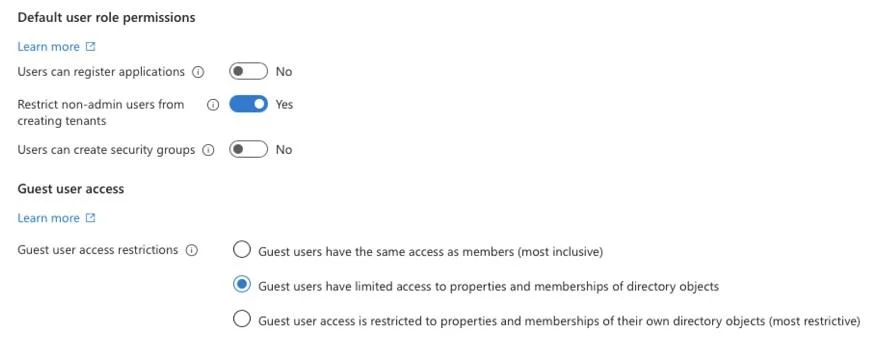
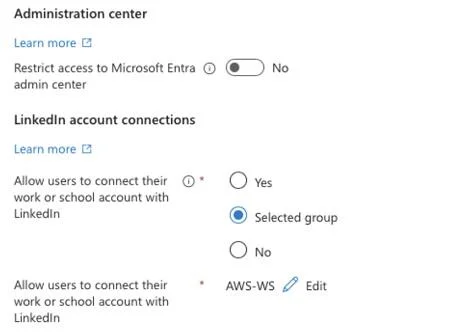
The correct answer is You should change Guest User access to be more inclusive to allow User-GU-A to have the same access as UserC. = Yes; You need to add UserB to the AWS-WS group to allow them access to My Staff. = No; Only UserA and UserD can access the Combined Security Information Registration Experience. = No. 1. You should change Guest User access to be more inclusive to allow User-GU-A to have the same access as UserC. (Yes) The current guest user access setting is configured to "Guest users have limited access to properties and memberships of directory objects" (Exhibit 1), which…
Question
Exhibits
Answer Area
- You should change Guest User access to be more inclusive to allow User-GU-A to have the same access as UserC.Yes
- You need to add UserB to the AWS-WS group to allow them access to My Staff.No
- Only UserA and UserD can access the Combined Security Information Registration Experience.No
How the community answered
(1 responses)- Yes|Yes|Yes100% (1)
Explanation
-
You should change Guest User access to be more inclusive to allow User-GU-A to have the same access as UserC. (Yes)
- The current guest user access setting is configured to "Guest users have limited access to properties and memberships of directory objects" (Exhibit 1), which is the most restrictive option. User-GU-A is a guest user and needs the same access as UserC. To achieve this, the guest user access setting must be changed to the most inclusive option: "Guest users have the same access as members."
-
You need to add UserB to the AWS-WS group to allow them access to My Staff. (No)
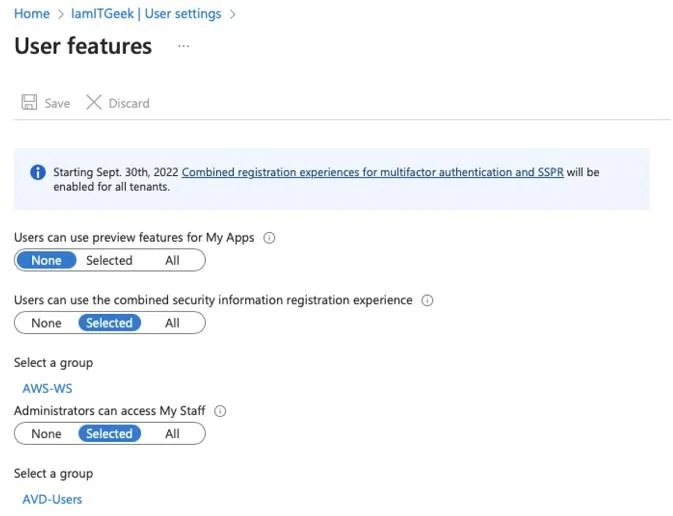
- UserB requires access to My Staff. According to Exhibit 2, the setting "Administrators can access My Staff" is configured for "Selected" users within the "AVD-Users" group. UserB is already a member of the "AVD-Users" group (Exhibit 2). Therefore, UserB already has the necessary access to My Staff and does not need to be added to the AWS-WS group.
-
Only UserA and UserD can access the Combined Security Information Registration Experience. (No)
- The setting "Users can use the combined security information registration experience" (Exhibit 2) is configured for "Selected" users within the "AVD-Users" group. UserA, UserB, and UserD are all members of the "AVD-Users" group (Exhibit 2). Consequently, all three users (UserA, UserB, and UserD) can access this experience, making the statement that only UserA and UserD can access it incorrect.
Topics
Community Discussion
No community discussion yet for this question.